









🎨 Seedream 5.0 Pro — ByteDance's flagship image model: up to 2K, best-in-class typography & multi-reference editing!


LTX-2.3 AI Video Generator
Lightricks LTX-2.3 is a 22B parameter DiT-based audio-video foundation model with a rebuilt VAE for sharper textures, faces, hair, and text rendering. Features a 4x larger text connector for superior prompt adherence, native 9:16 portrait mode up to 1080x1920, LoRA support with up to 3 custom adapters, and cleaner audio via HiFi-GAN vocoder. Generates 480p to 1080p videos from 5 to 20 seconds with synchronized audio.
LTX-2.3 Text-to-Video Examples
Experience the next generation of AI video creation with LTX-2.3. Generate cinematic, high-fidelity videos from detailed text prompts with stunning visual quality and natural motion.
Rainforest at Golden Hour
An aerial shot drifts over a dense rainforest at golden hour, with mist rising from the canopy and a waterfall cascading into a dark green pool.
“A wide aerial shot slowly drifts over a dense rainforest at golden hour. Thick mist rises from the canopy as shafts of warm orange light pierce through the trees. A winding river reflects the fading sky below. The camera tilts down gradually, revealing a waterfall cascading into a dark green pool. Ambient sounds of water and distant birds fill the scene.”

LTX-2.3 Image-to-Video Examples
Transform static images into dynamic, high-quality videos with LTX-2.3. See how still photographs come alive with realistic motion, expressive characters, and cinematic camera work.
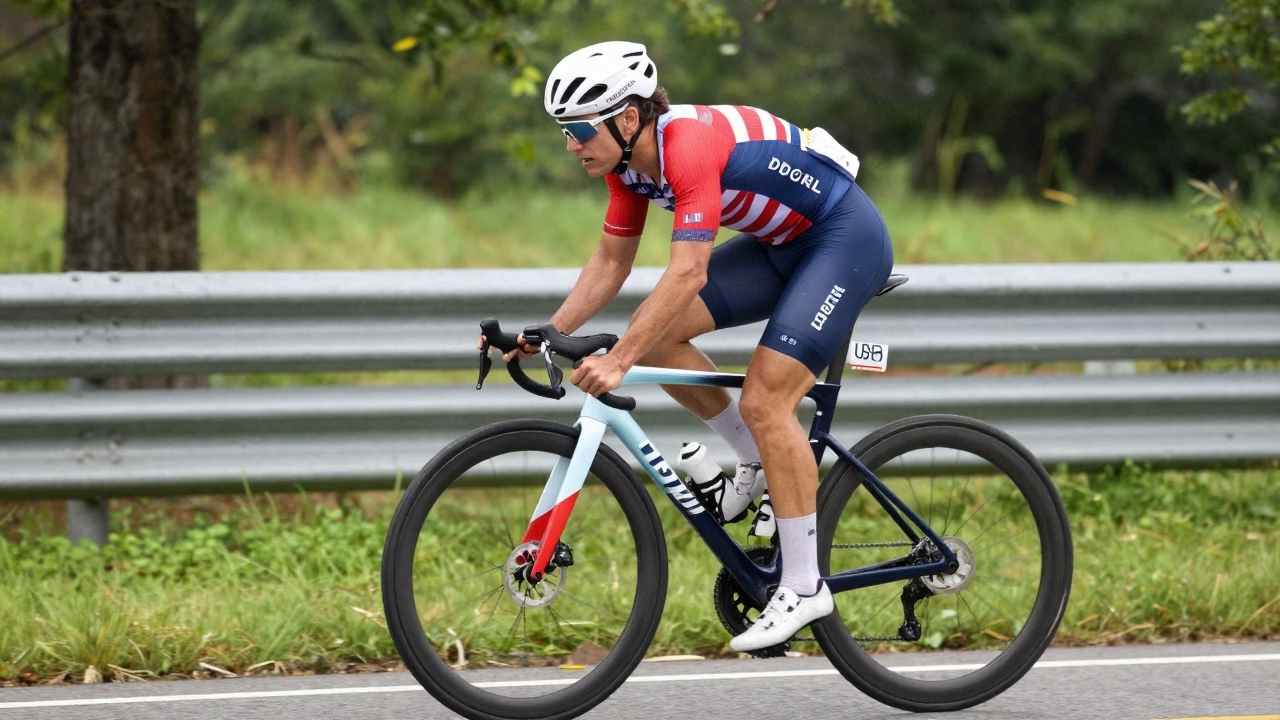
Competitive Cyclist
A side-tracking shot follows a competitive cyclist in a red, white and blue racing kit powering along a wet road at full speed. He is crouched low over the handlebars in an aggressive aero position, legs driving the pedals in a fast, powerful cadence. The camera tracks him at pace from the left, keeping him centered in frame. Trees and guardrails blur into streaks of green and grey behind him. Rain mist rises off the road surface. His jersey ripples in the wind. The sound of spinning wheels, fast breathing, and wet road noise fill the audio. The camera slowly pushes in toward his focused expression as he accelerates.
What is LTX-2.3?
Lightricks' 22B parameter DiT-based audio-video foundation model with rebuilt VAE and open-source weights
- 22BParameters
- Up to 4KResolution
- 5-20sDuration
- Apache 2.0License
A next-generation open-source model delivering sharper details, better prompt adherence, native portrait video, and cleaner synchronized audio under Apache 2.0 license.
LTX-2.3 Features
Discover the powerful capabilities of Lightricks LTX-2.3 for next-generation video production
- 01
Rebuilt VAE Engine
Completely rebuilt Variational Autoencoder delivers dramatically sharper fine details including textures, faces, hair strands, text overlays, and crisp edges. A fundamental upgrade over LTX-2 for professional-quality output.
- 02
Enhanced Prompt Adherence
A 4x larger text connector ensures LTX-2.3 follows your prompts with significantly greater accuracy. Complex scene descriptions, specific actions, and detailed visual instructions are faithfully rendered in the generated video.
- 03
Native Portrait Video
First-class 9:16 vertical video support at up to 1080x1920 resolution, purpose-built for TikTok, Instagram Reels, and YouTube Shorts. No more cropping or letterboxing from landscape-only models.
- 04
Synchronized Audio-Video
Cleaner, higher-fidelity audio generation powered by a new HiFi-GAN vocoder. Produces contextually appropriate sound effects, ambient audio, and dialogue that naturally syncs with the visual content.
- 05
Custom LoRA Adapters
Apply up to 3 simultaneous LoRA adapters to customize style, character consistency, or motion patterns. Fine-tune outputs for brand-specific aesthetics or specialized creative workflows.
- 06
Multi-Resolution Output
Flexible resolution from 480p for rapid drafts up to 1080p for production-ready output, with upscaling support to 4K. Choose 24 or 48 FPS frame rates to match your project requirements.
- 07
Improved Image-to-Video
Significantly reduced Ken Burns effect and static freezing artifacts. Images are animated with genuine motion and dynamic camera work, producing natural movement that brings still images to life.
- 08
Open-Source Foundation
Released under Apache 2.0 license with full model weights and training code available. Build custom applications, fine-tune for specific use cases, or integrate directly into your production pipeline.


How to Use LTX-2.3 for Text-to-Video
Create stunning AI videos with synchronized audio in three simple steps
- 01
Select LTX-2.3 Text-to-Video Model
Navigate to the video generation page and select the LTX-2.3 text-to-video model. Choose your preferred resolution (480p to 1080p), aspect ratio (16:9 landscape or 9:16 portrait), frame rate (24 or 48 FPS), and video duration (5-20 seconds). Optionally attach up to 3 LoRA adapters for custom styles.
- 02
Write Your Prompt and Configure Settings
Craft a detailed text description of the video you want to create. LTX-2.3's 4x larger text connector ensures superior prompt adherence, so be specific about scene composition, camera movements, lighting, and actions. Enable prompt optimization for better results, toggle synchronized audio generation, and adjust any additional parameters.
- 03
Generate and Download Your Video
Click generate and wait for LTX-2.3 to render your video with the rebuilt VAE for sharper textures, faces, and text. Preview the result with synchronized HiFi-GAN audio. Download your finished video in MP4 format for immediate use in your projects, social media, or production workflows.
How to Use LTX-2.3 for Image-to-Video
Transform still images into dynamic videos with improved motion in three simple steps
- 01
Select LTX-2.3 Image-to-Video Model and Upload Image
Navigate to the video generation page and select the LTX-2.3 image-to-video model. Upload a high-quality still image (JPG, PNG, or WEBP format). Choose your resolution (480p to 1080p), aspect ratio (16:9 or 9:16 portrait), frame rate (24 or 48 FPS), and duration (5-20 seconds). Optionally attach LoRA adapters for custom styles.
- 02
Add Motion Prompt and Configure Settings
Write a detailed prompt describing how you want your image to come to life. LTX-2.3's improved image-to-video produces genuine motion with less Ken Burns effect and less freezing. Specify camera movements, subject actions, and environmental effects. Enable audio generation for synchronized HiFi-GAN sound, and use prompt optimization for best results.
- 03
Generate and Download Your Video
Click generate and wait for LTX-2.3 to animate your image with the rebuilt VAE for sharper details and natural movement. The model preserves your image's composition while adding dynamic motion and depth. Preview the result with synchronized audio, then download your finished video in MP4 format.
LTX-2.3 YouTube Videos
Watch demonstrations and tutorials of LTX-2.3, the 22B parameter open-source audio-video foundation model
- Run LTX 2.3 Video Generation AI Model Locally with ComfyUI - Easy Guide - Fahd Mirza
- LTX 2.3 in Comfy UI — Text to Video & Image to Video - AI Ninja
- LTX-2.3 In ComfyUI = AI Video Generation At 0 Credits Per Run - Nerdy Rodent
- LTX-2.3 ComfyUI Workflow Tutorial | Text-to-Video, Image-to-Video, Talking Avatar & Audio Generation - Vantage with AI
- LTX 2.3 Released - ComfyUI Workflow & A New Tool I Built To Run AI😃😃😃 - Benji’s AI Playground
LTX-2.3 YouTube Videos
Watch demonstrations and tutorials of LTX-2.3, the 22B parameter open-source audio-video foundation model
LTX-2.3 Popular Reviews on X
See what the AI community is saying about LTX-2.3, the 22B parameter open-source audio-video foundation model
AI Pricing Plans
Flexible AI Pricing
Pay-as-you-go credits or subscription plans. No hidden fees, cancel anytime.
One Time supports crypto payment (BTC, USDT, ETH, 350+) · Monthly billing
Free-One Time
Try before you buy
- Up to 3 videos
- Up to 32 images
- Multi-Model Support
- Text to Video
- Image to Video
- Video to Video
Show more (+11)
- Consistent Character
- AI Animation Generator
- Templates & Effects
- AI Video Enhancers
- Interactive Community
- Faster Generation Speed
- No-watermark Outputs
- More Camera Movement
- Private Video Visibility
- Copy Protection
- Priority Support
Pro-1 Month
PopularElevate your AI experience
- Up to 80 videos
- Up to 800 images
- 3 tasks(Parallel Tasks)
- Multi-Model Support
- Text to Video
- Image to Video
Show more (+12)
- Video to Video
- Consistent Character
- AI Animation Generator
- Templates & Effects
- AI Video Enhancers
- Interactive Community
- Faster Generation Speed
- No-watermark Outputs
- More Camera Movement
- Private Video Visibility
- Copy Protection
- Priority Support
Lite-1 Month
Start your AI journey
- Up to 30 videos
- Up to 300 images
- 3 tasks(Parallel Tasks)
- Multi-Model Support
- Text to Video
- Image to Video
Show more (+12)
- Video to Video
- Consistent Character
- AI Animation Generator
- Templates & Effects
- AI Video Enhancers
- Interactive Community
- Faster Generation Speed
- No-watermark Outputs
- More Camera Movement
- Private Video Visibility
- Copy Protection
- Priority Support
- Card
- Crypto accepted (BTC, USDT, ETH, 350+)

Frequently Asked Questions
Still have questions?