









🎨 Seedream 5.0 Pro — ByteDance's flagship image model: up to 2K, best-in-class typography & multi-reference editing!


MiniMax H3 Text / Image / Reference to 2K Video Generator
Generate 2K video with MiniMax H3, MiniMax's video model family on Dreamega AI. Write a prompt for text-to-video, animate a first frame (with an optional last frame) for image-to-video, or combine up to 9 reference images, 3 reference videos and 3 reference audio tracks for reference-to-video. Pick any duration from 5 to 15 seconds and any of six aspect ratios from 21:9 to 9:16.
MiniMax H3 Video Gallery
Browse clips generated with MiniMax H3 from text prompts and from reference images. Every example is 2K output, 5 to 15 seconds long.
Cliff City Speeder Chase
A single continuous shot follows a speeder racing along the ledge-roads of a cliffside city, generated from text.
“Speeder chase across a cliff city (single continuous shot) From a monumental cliffside city carved into stone, the camera dives toward a tiny streak of light ripping along a narrow ledge-road. Lock-on: a speeder hugging the wall at insane speed. The camera slingshots ahead, whips back, then drops tight to the rear thrusters: heat haze, grit snapping off the ledge, warning lights flashing. A collapsing balcony rains debris; the rider snaps a last-inch swerve under a falling arch, then threads through hanging laundry lines and open windows in one fluid line. The camera darts through the same openings, staying glued to the motion. One final bend and sudden calm: the camera blasts outward into a reveal of the city opening onto a boundless waterfall-fed valley, mist turning into rainbow.”
MiniMax H3 Image to Video Gallery
See how MiniMax H3 brings a still image to life. The clip below starts from a single input image and is rendered at 2K, 5 to 15 seconds long.
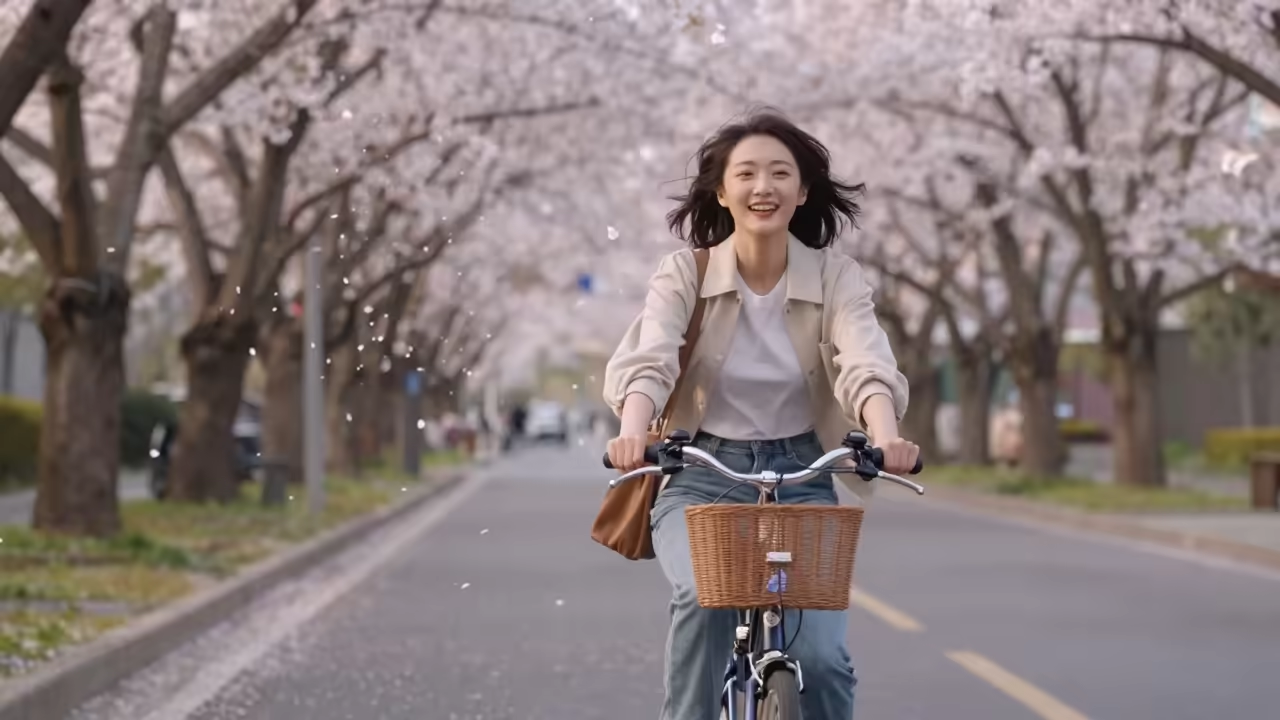
Cherry Blossom Bike Ride
What's MiniMax H3
MiniMax's video generation model family, served on Dreamega AI
- 2KOutput Resolution
- 5-15sAny Duration You Set
- 3 VariantsText / Image / Reference to Video
- 6 RatiosFrom 21:9 to 9:16
MiniMax H3 is MiniMax's video generation model family, available on Dreamega AI in three variants: Text-to-Video for building a 2K clip from a prompt of up to 4000 characters, Image-to-Video for animating a first-frame image with an optional last frame and natural-language motion instructions, and Reference-to-Video for guiding subject consistency and motion with up to 9 reference images, 3 reference videos and 3 reference audio tracks. Every variant outputs 2K video with a duration you set anywhere from 5 to 15 seconds, priced at 26 credits per second.
MiniMax H3's Powerful Features
Discover what the MiniMax H3 video model family brings to text, image and reference driven generation
- 01
Three Generation Modes
MiniMax H3 ships as three variants: Text-to-Video, Image-to-Video and Reference-to-Video, so you can start from a written idea, a still frame, or a set of references.
- 02
Native 2K Output
Every clip renders at 2K, the model's single supported resolution tier, so you get the same crisp detail from text, image and reference workflows without picking a quality setting.
- 03
Flexible 5-15 Second Clips
Set any whole number of seconds between five and fifteen. Short loops for social posts or longer takes for product demos come out of the same model.
- 04
Six Aspect Ratios
Text-to-Video and Reference-to-Video accept 21:9, 16:9, 4:3, 1:1, 3:4 and 9:16, covering cinematic widescreen, standard landscape, square feeds and vertical mobile delivery from a single parameter.
- 05
First and Last Frame Control
Image-to-Video animates your first-frame image and optionally accepts a last-frame image, letting you pin exactly where a shot begins and where it should land on screen.
- 06
Multimodal Reference Inputs
Reference-to-Video takes up to nine reference images, three reference video clips and three audio tracks, guiding subject appearance, motion and sound from material you already have.
- 07
4000-Character Prompts
Text-to-Video prompts run up to 4000 characters, leaving room to describe subject, camera movement, lighting and mood in one pass instead of trimming your idea down.
- 08
Consistent Subjects
Feed the reference mode a character, product or location and H3 carries that subject through the generated shot, so a series of clips stays recognisably the same.






How to Use MiniMax H3 Text to Video
Generate 2K videos from a written description
- 01
Write Your Prompt
Describe the scene, subject, camera movement and mood. Text-to-Video accepts prompts of up to 4000 characters, so detail helps.
- 02
Choose Duration and Aspect Ratio
Pick any length from 5 to 15 seconds and one of six aspect ratios, from 21:9 widescreen to 9:16 vertical.
- 03
Generate and Download
Click generate and MiniMax H3 renders your clip in 2K. Preview the result, then download it or rerun with an adjusted prompt.
AI Pricing Plans
Flexible AI Pricing
Pay-as-you-go credits or subscription plans. No hidden fees, cancel anytime.
One Time supports crypto payment (BTC, USDT, ETH, 350+) · Monthly billing
Free-One Time
Try before you buy
- Up to 3 videos
- Up to 32 images
- Multi-Model Support
- Text to Video
- Image to Video
- Video to Video
Show more (+11)
- Consistent Character
- AI Animation Generator
- Templates & Effects
- AI Video Enhancers
- Interactive Community
- Faster Generation Speed
- No-watermark Outputs
- More Camera Movement
- Private Video Visibility
- Copy Protection
- Priority Support
Pro-1 Month
PopularElevate your AI experience
- Up to 80 videos
- Up to 800 images
- 3 tasks(Parallel Tasks)
- Multi-Model Support
- Text to Video
- Image to Video
Show more (+12)
- Video to Video
- Consistent Character
- AI Animation Generator
- Templates & Effects
- AI Video Enhancers
- Interactive Community
- Faster Generation Speed
- No-watermark Outputs
- More Camera Movement
- Private Video Visibility
- Copy Protection
- Priority Support
Lite-1 Month
Start your AI journey
- Up to 30 videos
- Up to 300 images
- 3 tasks(Parallel Tasks)
- Multi-Model Support
- Text to Video
- Image to Video
Show more (+12)
- Video to Video
- Consistent Character
- AI Animation Generator
- Templates & Effects
- AI Video Enhancers
- Interactive Community
- Faster Generation Speed
- No-watermark Outputs
- More Camera Movement
- Private Video Visibility
- Copy Protection
- Priority Support
- Card
- Crypto accepted (BTC, USDT, ETH, 350+)
Frequently Asked Questions
Common questions about MiniMax H3 video generation
Still have questions?