🎨 Seedream 5.0 Pro — ByteDance's flagship image model: up to 2K, best-in-class typography & multi-reference editing!

Try It!
Logo

AI Jewelry Try-On

Upload a jewelry design and see how it looks on you. Realistic virtual fitting for earrings, necklaces, rings, and bracelets. Preview before you buy.

AI Jewelry Try-On Gallery

See how AI applies jewelry designs onto real photos. Compare original photos with jewelry try-on results across different styles.

Gold Earrings Try-On

Portrait - Original
Original
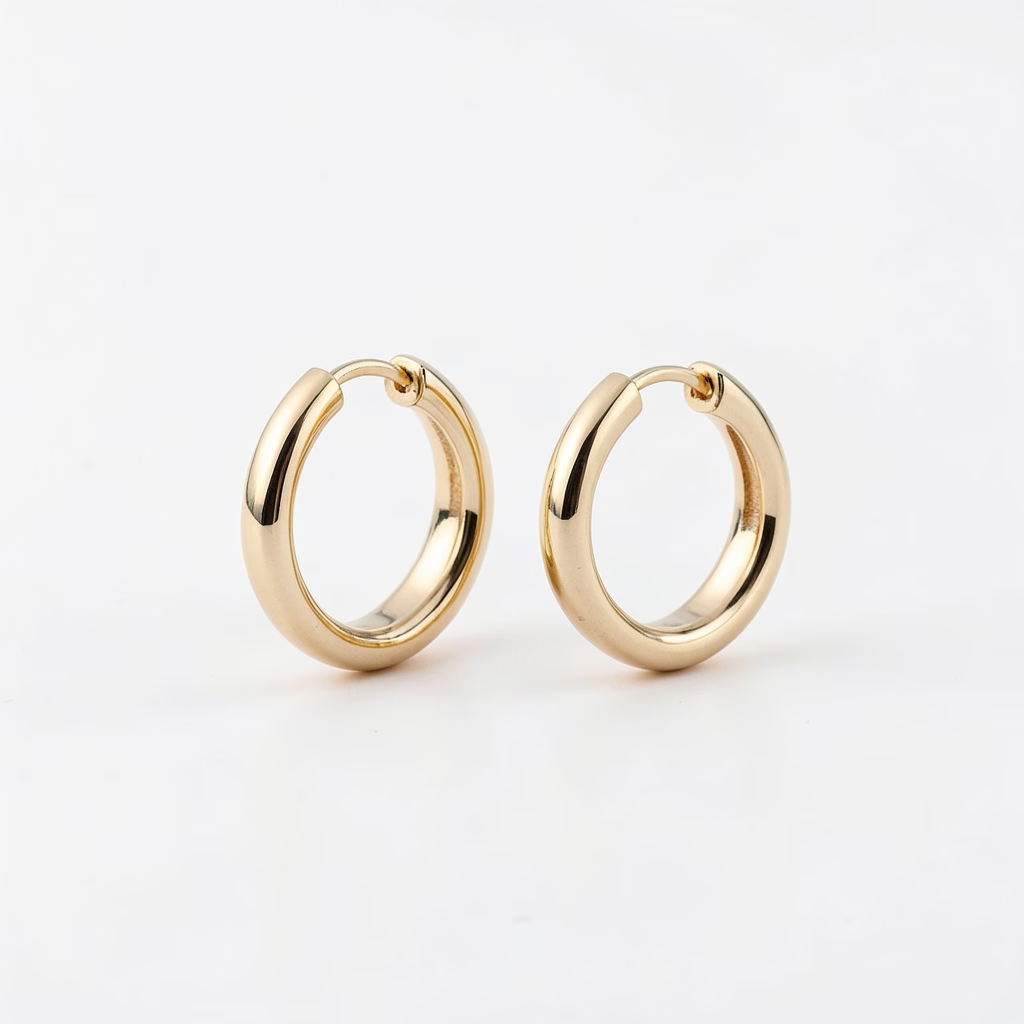
Gold Hoops Reference
Reference
Gold Earrings - Result
Result

Elegant gold hoop earrings virtually tried on a portrait photo

AI Jewelry Try-On Features

Try any jewelry on your photo with AI. Realistic virtual jewelry placement with natural shadows and reflections.

  1. 01

    All Jewelry Types

    Try earrings, necklaces, rings, bracelets, tiaras and all types of jewelry virtually on your photo

  2. 02

    Natural Placement

    AI accurately places jewelry with realistic scale and shadows that match your body and lighting

  3. 03

    Reference Matching

    Upload any jewelry photo to see it on you with accurate shape and detail reproduction

  4. 04

    Material Rendering

    Realistic gold, silver, diamond, pearl reflections and light interactions for lifelike results

How to Use AI Jewelry Try-On

Preview jewelry on your photo in four simple steps

  1. 01

    Upload Your Photo

    Upload a photo of yourself where you want to preview the jewelry. For earrings, use a photo showing your face and ears. For necklaces, ensure your neck is visible. For rings or bracelets, upload a hand photo. Supported formats include JPEG and PNG.

  2. 02

    Upload Jewelry Image (Optional)

    Optionally upload an image of the jewelry you want to try on. This can be a product photo, a custom design, or any jewelry image you like. If no jewelry image is provided, you can describe the style you want instead.

  3. 03

    Describe or Select Jewelry Style

    Describe the type, style, and material of the jewelry you want to preview — for example, gold hoop earrings, diamond pendant necklace, or silver bangle. You can also adjust settings and select the AI model for your try-on.

  4. 04

    Generate & Preview

    Click generate to see a realistic preview of the jewelry on your photo. The AI blends the accessory naturally with your skin tone, body contours, and lighting for a lifelike result. Save or share your favorites.

AI Jewelry Try-On FAQ

Upload a jewelry image and optionally a photo of yourself. The AI detects the appropriate body area — ears, neck, fingers, or wrists — and places the jewelry with realistic perspective, lighting, and shadows to show you how it would look when worn.
You can try on earrings, necklaces, pendants, rings, bracelets, and bangles. The AI supports various styles from minimalist studs to statement pieces, and adapts the placement and scale to match your photo naturally.
Clear, well-lit photos with the relevant body area visible work best. For earrings, use a photo showing your ears and face. For necklaces, ensure your neck and upper chest are visible. For rings and bracelets, a clear hand or wrist photo is ideal. Natural lighting produces the most realistic results.
Yes. The AI accounts for skin tone, body contours, lighting conditions, and natural shadows to create highly realistic previews. The jewelry is blended seamlessly onto your photo, showing accurate scale, reflection, and positioning as it would appear in real life.
Absolutely! You can upload any jewelry image — whether it's a product photo from an online store, a custom design you created, or a piece you photographed. The AI will adapt the jewelry to fit naturally on your photo regardless of the source.
We offer multiple AI models optimized for jewelry try-on, each with different strengths in realism, detail rendering, and processing speed. You can choose the model that best suits your needs, with credit costs varying by model.

AI Pricing Plans

Flexible AI Pricing

Pay-as-you-go credits or subscription plans. No hidden fees, cancel anytime.

One Time supports crypto payment (BTC, USDT, ETH, 350+) · Monthly billing

Free

Try before you buy

Free
32points
  • Up to 3 videos
  • Up to 32 images
  • Multi-Model Support
  • Text to Video
  • Image to Video
  • Video to Video
Show more (+11)
  • Consistent Character
  • AI Animation Generator
  • Templates & Effects
  • AI Video Enhancers
  • Interactive Community
  • Faster Generation Speed
  • No-watermark Outputs
  • More Camera Movement
  • Private Video Visibility
  • Copy Protection
  • Priority Support

Pro

Popular

Elevate your AI experience

29.99USD / 1 Month
800
800 credits/mo
  • Up to 80 videos
  • Up to 800 images
  • 3 tasks(Parallel Tasks)
  • Multi-Model Support
  • Text to Video
  • Image to Video
Show more (+12)
  • Video to Video
  • Consistent Character
  • AI Animation Generator
  • Templates & Effects
  • AI Video Enhancers
  • Interactive Community
  • Faster Generation Speed
  • No-watermark Outputs
  • More Camera Movement
  • Private Video Visibility
  • Copy Protection
  • Priority Support

Lite

Start your AI journey

19.99USD / 1 Month
300 credits/mo
  • Up to 30 videos
  • Up to 300 images
  • 3 tasks(Parallel Tasks)
  • Multi-Model Support
  • Text to Video
  • Image to Video
Show more (+12)
  • Video to Video
  • Consistent Character
  • AI Animation Generator
  • Templates & Effects
  • AI Video Enhancers
  • Interactive Community
  • Faster Generation Speed
  • No-watermark Outputs
  • More Camera Movement
  • Private Video Visibility
  • Copy Protection
  • Priority Support
  • Card
  • Crypto accepted (BTC, USDT, ETH, 350+)

Privacy preferences

We use essential storage to run the service. Optional analytics, advertising and convenience features stay off until you choose to enable them. Privacy policy