









🎨 Seedream 5.0 Pro — ByteDance's flagship image model: up to 2K, best-in-class typography & multi-reference editing!


FLUX 3 Text / Image / Start-End / Extend to Video Generator
Generate video with FLUX 3, Black Forest Labs' multimodal frontier model, on Dreamega AI. Write a prompt for text-to-video, animate a reference image for image-to-video, bridge a start frame and an end frame, or continue an existing MP4 clip with video extend. Every mode renders 5 to 20 seconds at 720p or 1080p with native synchronized audio and multilingual dialogue.
Flux Model Series
Flux 2 Max
Top-tier Flux 2 image generation with maximum quality and detail
Flux 2 Pro
Professional Flux 2 image generation with enhanced prompt adherence
Flux 2 Flex
Flexible Flux 2 model for versatile image creation and editing
Flux 2 Klein
Compact Flux 2 model optimized for fast generation
Flux Kontext
Context-aware Flux model for text-to-image and image editing
Flux Krea
Creative Flux model fine-tuned for artistic and stylized outputs
Flux Pro Ultra
Ultra-high-resolution Flux Pro image generation
Flux Dev
Open-weight Flux model ideal for development and experimentation
Flux Schnell
Fastest Flux model for rapid image generation
FLUX 3 Video Gallery
Browse clips generated with FLUX 3 from text prompts. Every example renders in a single pass with native synchronized audio.
Courier Fifty Years Late
A bicycle courier reaches an apartment door in a thunderstorm and meets an older version of himself, generated from text.
“A young bicycle courier arrives at an apartment door during a thunderstorm, but the digital display shows a date fifty years in the future. The scene opens with a fast tracking shot following him through wet neon streets, then becomes completely still as the door opens. An elderly man with the same face stands inside and looks at him in shock. The camera slowly rotates around both characters while lightning illuminates the corridor. The food bag begins glowing, and nearby objects float into the air. Emotional science-fiction mystery, realistic acting, controlled camera movement, cinematic neon lighting.”
FLUX 3 Image to Video Gallery
See how FLUX 3 brings still images to life. The first clip animates a single reference image; the second bridges a start frame and an end frame with a prompt-guided transition.
Robot on the Abandoned Platform
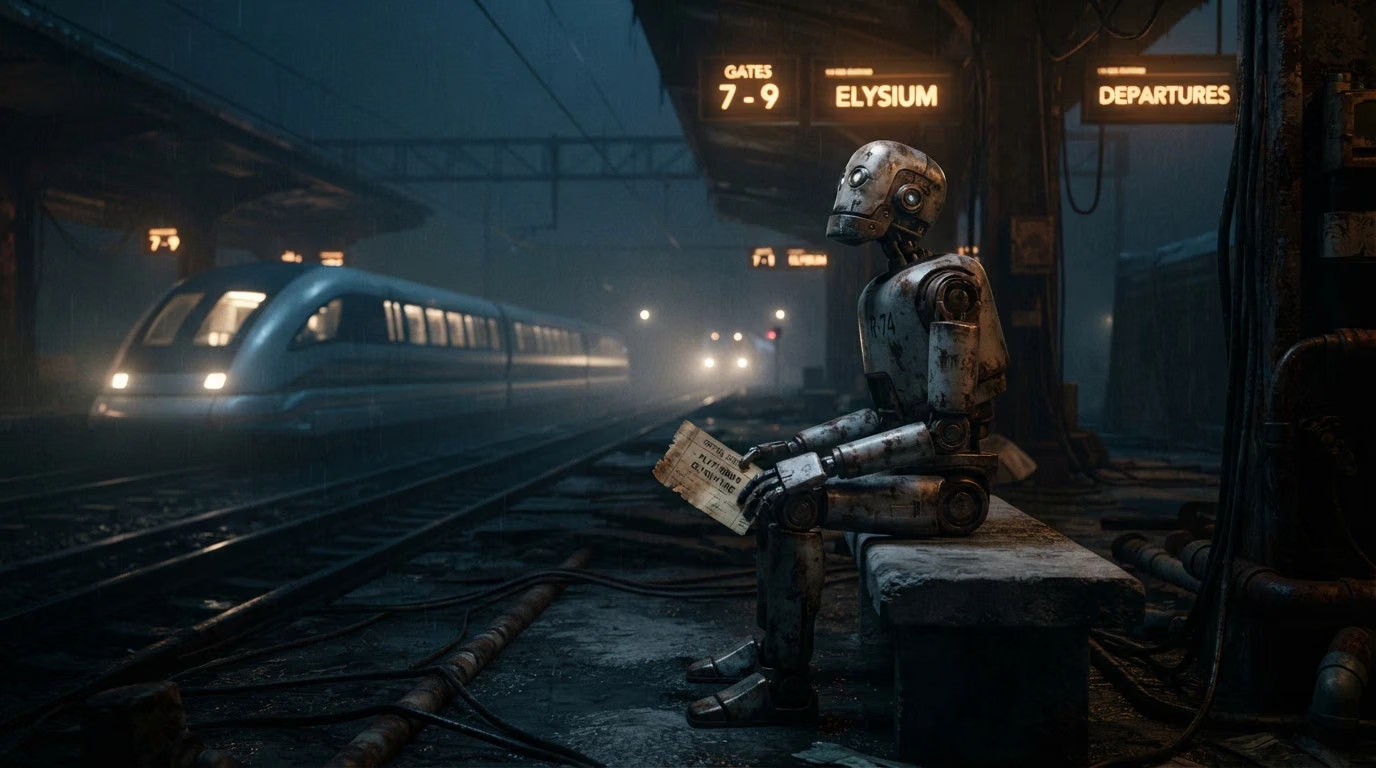
The old robot sits alone on an abandoned train platform, holding a faded ticket. Its head slowly rises as distant lights appear along the tracks. The station signs begin illuminating one by one, and a futuristic train silently enters the platform. The camera begins with a close-up of the ticket, tracks across the robot's weathered body, then cranes upward as the train arrives. Emotional science-fiction, quiet storytelling, atmospheric fog, warm and cold light contrast.
FLUX 3 Video Extend Gallery
Continue an existing clip into a new shot. FLUX 3 picks up where the source video ends and keeps characters, lighting and motion continuous.
Museum Skeleton Comes Alive
Continue directly as the dinosaur skeleton begins moving. It carefully steps down from the exhibition platform, sending small bones and dust across the floor. The paleontologist runs through the gallery while other fossil displays begin moving behind glass cases. The camera tracks beside her, then swings around as she reaches the museum entrance and finds a living prehistoric jungle outside instead of the city. Maintain the same character, clothing, museum layout, lighting, and movement continuity.
What's FLUX 3
Black Forest Labs' multimodal frontier model for video with native audio, served on Dreamega AI
- 5-20sClip Length
- 1080pMax Resolution
- 4Modes: Text / Image / Start-End / Extend
- 7Aspect Ratios
FLUX 3 is Black Forest Labs' first multimodal frontier model: instead of training separate image, video and audio systems, it learns all three jointly in one unified architecture, with the same backbone also used for robot action prediction. The video release generates clips of up to 20 seconds with native synchronized audio, multilingual dialogue with lip-sync, and cinematic camera control. On Dreamega AI it is available in four modes: Text-to-Video builds a clip from a written prompt, Image-to-Video animates a reference image, Start-End to Video bridges two keyframes, and Video Extend continues an existing MP4 clip. Every mode renders 5 to 20 seconds at 720p or 1080p.
FLUX 3's Powerful Features
What Black Forest Labs' multimodal model brings to text, image and clip driven video generation
- 01
One Multimodal Model
FLUX 3 learns images, video and audio together in a single unified architecture rather than bolting separate systems together, so motion, sound and picture come from the same understanding of the scene.
- 02
Native Synchronized Audio
Dialogue, sound effects and ambience are generated in the same pass as the video, tied to what happens on screen. Audio is on by default and adds nothing to the credit cost.
- 03
Multilingual Dialogue with Lip-Sync
Characters can speak in English, Chinese, Spanish, French, German, Japanese, Portuguese, Russian, Italian, Hindi and more, with lip movement matched to the spoken words.
- 04
Up to 20 Seconds per Clip
Pick any whole-second length from 5 to 20 seconds and the full clip renders in one generation, long enough for a multi-beat scene or a complete camera move.
- 05
Start-End Frame Control
Upload a start frame and an end frame and FLUX 3 generates the transition between them, following your prompt for the action, camera movement and mood in between.
- 06
Video Extend
Continue an existing MP4 clip of up to 15 seconds into a new 5 to 20 second shot while keeping the same characters, clothing, lighting and movement continuity.
- 07
720p and 1080p Output
Choose 720p for drafts and social delivery or 1080p for final work. Billing is per second at each tier, so short tests stay cheap and only finals cost full price.
- 08
Seven Aspect Ratios
Render 21:9, 2:1, 16:9, 4:3, 1:1, 3:4 or 9:16 to cover ultrawide film, widescreen, square feeds and vertical shorts without reframing afterwards.








How to Use FLUX 3 Text to Video
Generate a 5 to 20 second clip with sound from a written description
- 01
Write Your Prompt
Describe the scene, subject, camera movement, lighting and mood. Include spoken lines in quotes if you want dialogue, and name the language.
- 02
Set Duration, Ratio and Resolution
Pick any length from 5 to 20 seconds, one of seven aspect ratios, and 720p or 1080p depending on whether this is a draft or a final.
- 03
Generate and Download
Click generate and FLUX 3 renders the clip in one pass with synchronized audio. Preview the result, then download it or extend it with Video Extend.
FLUX 3 YouTube Videos
Watch community demos, reviews and tutorials showcasing what FLUX 3 can do
- FLUX 3 Is Here — Everything You NEED to Know - ElevenLabs
- Introducing FLUX 3 - Black Forest Labs
- Black Forest Labs FLUX 3: First Look - Bryan Software
- 100+ FLUX 3 AI Videos Scarily Close to Real Life - Airt
- Flux 3 Review: Everything You Need to Know (2026) - Thrive Media
- FLUX 3 - Incredible AI Video Model - Demo Reel - Jerrod Lew
FLUX 3 YouTube Videos
Watch community demos, reviews and tutorials showcasing what FLUX 3 can do
FLUX 3 Popular Reviews on X
See what people are saying about FLUX 3 on X (Twitter)
AI Pricing Plans
Flexible AI Pricing
Pay-as-you-go credits or subscription plans. No hidden fees, cancel anytime.
One Time supports crypto payment (BTC, USDT, ETH, 350+) · Monthly billing
Free-One Time
Try before you buy
- Up to 3 videos
- Up to 32 images
- Multi-Model Support
- Text to Video
- Image to Video
- Video to Video
Show more (+11)
- Consistent Character
- AI Animation Generator
- Templates & Effects
- AI Video Enhancers
- Interactive Community
- Faster Generation Speed
- No-watermark Outputs
- More Camera Movement
- Private Video Visibility
- Copy Protection
- Priority Support
Pro-1 Month
PopularElevate your AI experience
- Up to 80 videos
- Up to 800 images
- 3 tasks(Parallel Tasks)
- Multi-Model Support
- Text to Video
- Image to Video
Show more (+12)
- Video to Video
- Consistent Character
- AI Animation Generator
- Templates & Effects
- AI Video Enhancers
- Interactive Community
- Faster Generation Speed
- No-watermark Outputs
- More Camera Movement
- Private Video Visibility
- Copy Protection
- Priority Support
Lite-1 Month
Start your AI journey
- Up to 30 videos
- Up to 300 images
- 3 tasks(Parallel Tasks)
- Multi-Model Support
- Text to Video
- Image to Video
Show more (+12)
- Video to Video
- Consistent Character
- AI Animation Generator
- Templates & Effects
- AI Video Enhancers
- Interactive Community
- Faster Generation Speed
- No-watermark Outputs
- More Camera Movement
- Private Video Visibility
- Copy Protection
- Priority Support
- Card
- Crypto accepted (BTC, USDT, ETH, 350+)
Frequently Asked Questions
Common questions about FLUX 3 video generation
Still have questions?