











AI Video Eraser
Remove unwanted objects, people, text, or any element from videos with AI-powered mask inpainting. Simply draw a mask over what you want to erase, and our AI will intelligently fill the area with natural-looking content. Supports HD/4K quality videos up to 10 minutes with frame-by-frame temporal consistency.
Video Eraser Before & After
See how AI Video Eraser removes unwanted objects, text, and elements from videos. Each example shows the original input and the cleaned output.
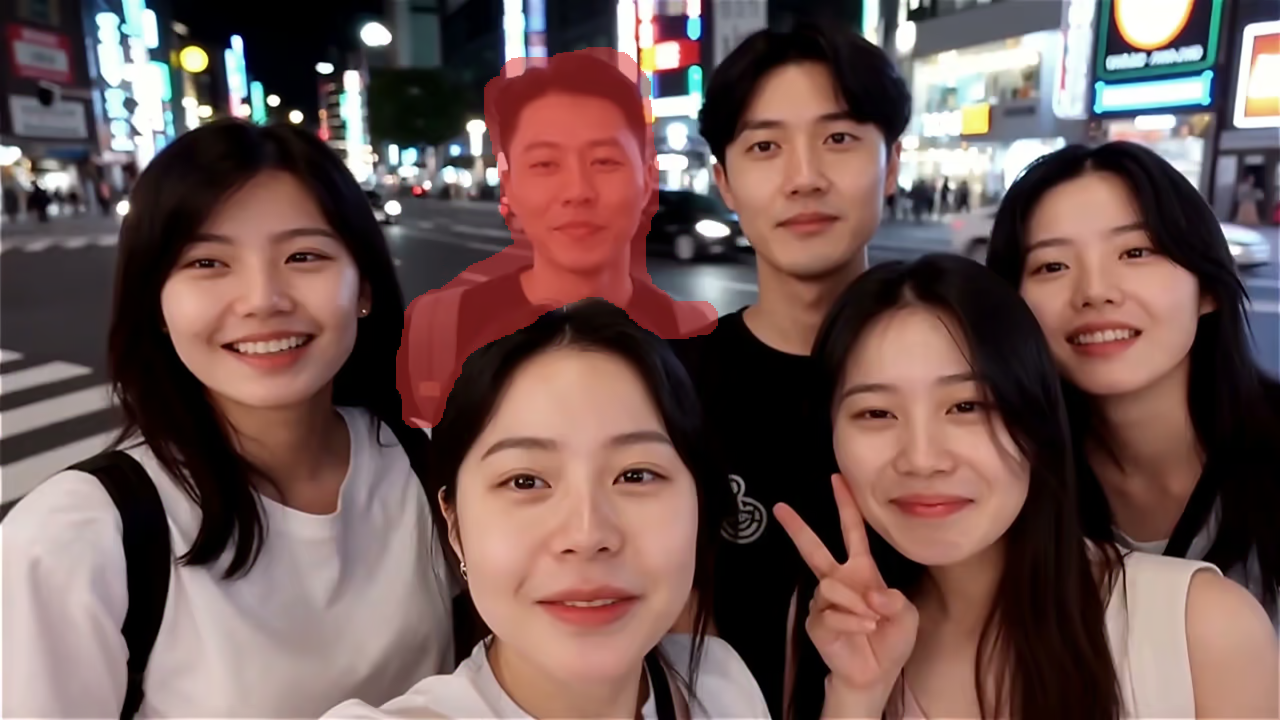
Object Removal
What's AI Video Eraser
Remove any unwanted object, person, or text from videos with AI mask-based inpainting - free, fast, and professional HD/4K quality
- · 01Mask-BasedPrecision Erasing
- · 02HD/4KQuality Output
- · 03TemporalConsistency
- · 04No SkillsRequired
AI Video Eraser uses advanced deep learning and temporal inpainting technology to intelligently remove unwanted elements from videos. Simply draw a mask over the area you want to erase, and the AI fills it with natural-looking content that blends seamlessly across frames.
AI Video Eraser Features
Professional video object removal powered by AI mask-based inpainting technology
- Feature 01 / 09
Draw-to-Erase Mask
Simply paint a mask over the unwanted object, person, or text in your video. The intuitive brush tool makes it easy to select exactly what you want to remove with pixel-level precision.
- Feature 02 / 09
Smart AI Inpainting
Advanced deep learning fills erased areas with natural-looking content that matches the surrounding scene. The AI understands context and generates seamless replacements across all frames.
- Feature 03 / 09
Frame-by-Frame Consistency
Temporal-aware processing ensures the inpainted region looks consistent across every frame. No flickering, no artifacts - just smooth, natural-looking video throughout.
- Feature 04 / 09
Prompt-Guided Fill
Optionally describe what should fill the erased area. Guide the AI to generate specific content like grass, sky, or pavement for more controlled and accurate results.
- Feature 05 / 09
Multiple Format Support
Works with all popular video formats including MP4, MOV, and WebM. Upload videos up to 500MB and 10 minutes in duration for comprehensive object removal.
- Feature 06 / 09
Natural-Looking Output
The AI fills the masked area to match the surrounding footage, giving you clean clips ready for social media, content creation, or presentations.
- Feature 07 / 09
Remove Any Element
Erase people, objects, logos, watermarks, timestamps, subtitles, or any visual element from your videos. Works on both static and moving elements with equal precision.
- Feature 08 / 09
Privacy Protected
Uploads travel over encrypted HTTPS. On free accounts, results are public by default; paid plans let you keep your videos private.
- Feature 09 / 09
Instant Download
Download your processed video as soon as it's ready. No subscription needed — pay with credits, starting at 20 credits for clips up to 5 seconds.
How to Use AI Video Eraser
Remove unwanted objects from videos in three simple steps with AI-powered mask inpainting
Upload Your Video & Draw Mask
Upload the video containing unwanted objects, people, or text you want to remove. Supports MP4, MOV, and WebM up to 500MB and 10 minutes. After uploading, use the mask editor to paint over the area you want to erase on the first frame. The brush tool makes it easy to precisely select objects of any size or shape.
Video Eraser FAQ
Frequently asked questions about the AI Video Eraser
Still have questions?
Flexible AI Pricing
Pay-as-you-go credits or subscription plans. No hidden fees, cancel anytime.
One Time supports crypto payment (BTC, USDT, ETH, 350+)
Monthly billing