









🎨 Seedream 5.0 Pro — ByteDance's flagship image model: up to 2K, best-in-class typography & multi-reference editing!


Plush Pillow Generator: See Your Photo as a Soft, Cuddly Cushion
Upload a photo of a pet, a child or anyone you love, choose a shape (square, round, heart or star) and a fabric (velvet, cotton or fluffy). The AI turns the subject into a decorative plush pillow you can preview, share or use as a gift idea.
Example Gallery
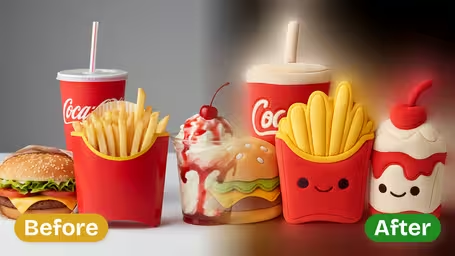
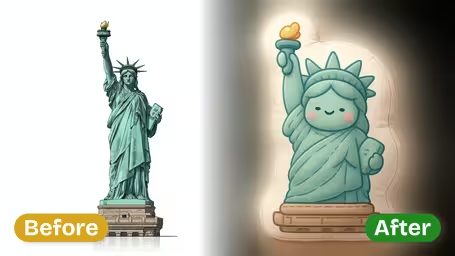
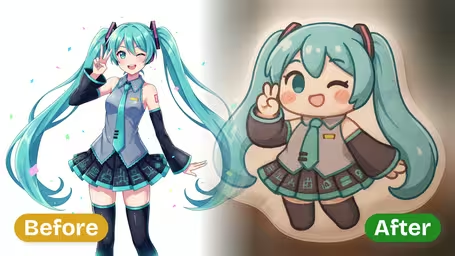
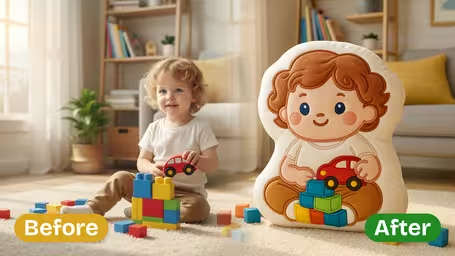
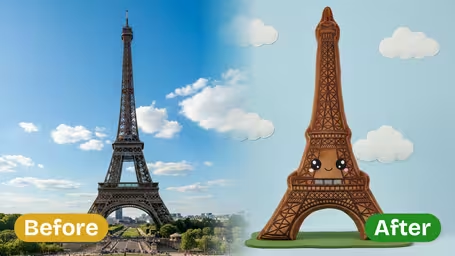
What the plush pillow generator does
The template takes the subject of your photo and rebuilds it as a soft decorative cushion. You choose the outline and the fabric; the AI handles the stuffed shape, the seams and the way light falls on velvet, cotton or fluffy pile. The result is one square image that shows the pillow as if it had been photographed for a shop.
- 01
Four pillow shapes
Square with crisp corners, Round with soft curves, Heart for romantic gifts, or Star with playful points. Square is the default.
- 02
Three fabric textures
Velvet with a soft sheen, Cotton with a matte woven finish, or Fluffy with a thick, cloud-like pile. Velvet is the default.
- 03
Your subject becomes the cushion
Pets, kids and people are turned into plush versions of themselves, with colors and markings carried over into the fabric.
- 04
One model, one price
Runs on GPT Image 2.5 for 8 credits per image, one square image per run. Free credits for new accounts and a daily check-in bonus.

How to turn a photo into a plush pillow
Upload, pick a shape and fabric, and download. It takes under a minute.
- 01
Upload a clear photo
Add one JPG or PNG with a single pet or person. Simple backgrounds work best.
Center the subject and leave some space around it; the output is square, so tails and ears near the edge may get cropped.
- 02
Choose a shape and fabric
Pick Square, Round, Heart or Star, then Velvet, Cotton or Fluffy. GPT Image 2.5 is the only model, and every combination costs 8 credits.
Fluffy plus Round is the cuddliest combo for pets; Heart plus Velvet works well for couple and anniversary photos.
- 03
Generate and download
Click generate and download your pillow image. Run it again for another take on the same shape and fabric.
If you plan to order a real pillow, send the print shop your original photo and use this image only to show the look you want.


When people use the plush pillow generator
Most people use it to preview a gift: a cushion of the family dog for a parent, a heart pillow for an anniversary, a star pillow for a kid's room. Pet owners share the results for fun, and small custom-pillow shops use them to show buyers an idea before production.
Gift previews
See what a custom pillow of a pet, child or couple would look like before ordering one from a print shop.
Pet lovers
Turn your dog, cat or rabbit into a Fluffy plush cushion and share it as a cute post.
Kids' room ideas
Try Star or Round shapes with Cotton fabric to plan decor around a child's favorite photo.
Custom pillow sellers
Show customers a concept mockup quickly, then produce the real cushion from their original photo.
Plush Pillow Generator FAQ
What the pillow image is (and isn't), how shapes and fabrics differ, what to upload and what it costs.
AI Pricing Plans
Flexible AI Pricing
Pay-as-you-go credits or subscription plans. No hidden fees, cancel anytime.
One Time supports crypto payment (BTC, USDT, ETH, 350+) · Monthly billing
Free-One Time
Try before you buy
- Up to 3 videos
- Up to 32 images
- Multi-Model Support
- Text to Video
- Image to Video
- Video to Video
Show more (+11)
- Consistent Character
- AI Animation Generator
- Templates & Effects
- AI Video Enhancers
- Interactive Community
- Faster Generation Speed
- No-watermark Outputs
- More Camera Movement
- Private Video Visibility
- Copy Protection
- Priority Support
Pro-1 Month
PopularElevate your AI experience
- Up to 80 videos
- Up to 800 images
- 3 tasks(Parallel Tasks)
- Multi-Model Support
- Text to Video
- Image to Video
Show more (+12)
- Video to Video
- Consistent Character
- AI Animation Generator
- Templates & Effects
- AI Video Enhancers
- Interactive Community
- Faster Generation Speed
- No-watermark Outputs
- More Camera Movement
- Private Video Visibility
- Copy Protection
- Priority Support
Lite-1 Month
Start your AI journey
- Up to 30 videos
- Up to 300 images
- 3 tasks(Parallel Tasks)
- Multi-Model Support
- Text to Video
- Image to Video
Show more (+12)
- Video to Video
- Consistent Character
- AI Animation Generator
- Templates & Effects
- AI Video Enhancers
- Interactive Community
- Faster Generation Speed
- No-watermark Outputs
- More Camera Movement
- Private Video Visibility
- Copy Protection
- Priority Support
- Card
- Crypto accepted (BTC, USDT, ETH, 350+)