


🎨 Seedream 5.0 Pro — ByteDance's flagship image model: up to 2K, best-in-class typography & multi-reference editing!


AI Album Cover Generator
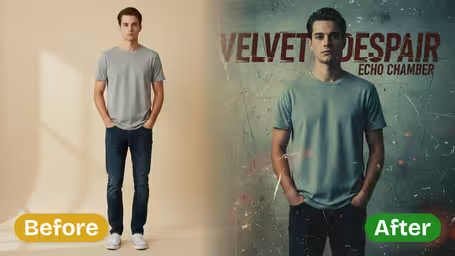
AI Album Cover Generator - Transform your photos into stylized album cover artwork with cinematic lighting, artistic textures, and professional music industry visual standards.
Example Gallery


AI Album Cover Generator Features
Discover how Dreamega's AI album cover generator transforms your music photos into professional, memorable cover art effortlessly and for free.
- 01
Transform Photos into Unique Album Covers
Quickly turn ordinary music photos into distinctive album cover art. Upload your favorite images and let the AI convert them into high-quality, ready-to-use song covers without extra cost or time-consuming edits.
- 02
High-Resolution Professional Designs
Generate crystal-clear, detailed, and vibrant album covers that meet industry standards. Personalize your art by adding your album name or other text to make each cover a unique reflection of your music.
- 03
Versatile Cover Art for Any Genre
Create bold and memorable covers whether you’re a solo performer, duo, or full band. Upload individual or group photos and transform them into art that perfectly matches your music style across genres.



How to Create Album Cover Art from Your Photo
Upload one photo, set the genre, style and text, and the AI turns it into a square cover with your title on it.
- 01
Upload the Photo for Your Cover
Add one JPG or PNG image: a portrait, a band photo, a landscape or an object that fits the record.
Photos with one clear subject and some empty sky or wall give the title more room.
- 02
Choose Genre, Style and Cover Text
Set the music genre, visual style, color palette and mood, then type the album title and artist name and pick a font style, position and size for each.
Leave a setting on Auto if you have no preference; changing one dropdown at a time makes it easier to see what each one does.
- 03
Generate and Download the Cover
Pick GPT Image 2.5 (8 credits) or Nano Banana 2.1 (4 credits), generate, and download the finished cover.
Zoom in and check the spelling of the title before you upload it to a distributor.



When musicians use the AI Album Cover Generator
Most people who use it are releasing music on their own: bedroom producers, small bands, rappers dropping a single every few weeks. They need a cover for every release but cannot pay a designer each time, so they turn a photo they already have into artwork in a style that matches the track.
Single and EP releases
Independent artists make a cover for each single from a photo shoot or a phone snapshot, and keep the same style across an EP.
SoundCloud and mixtape art
Producers and DJs post a new mix every week and use the vaporwave, cyberpunk or grunge styles to give each upload its own cover.
Playlist covers
Curators on streaming platforms make a custom cover for a playlist, with the playlist name typed in as the album title.
Mock-ups before hiring a designer
Bands try several directions in a few minutes and send the one they like to a designer as a reference.
AI Album Cover Generator FAQ
What you can control on the cover, how the text options work, and which model to use.
AI Pricing Plans
Flexible AI Pricing
Pay-as-you-go credits or subscription plans. No hidden fees, cancel anytime.
One Time supports crypto payment (BTC, USDT, ETH, 350+) · Monthly billing
Free-One Time
Try before you buy
- Up to 3 videos
- Up to 32 images
- Multi-Model Support
- Text to Video
- Image to Video
- Video to Video
Show more (+11)
- Consistent Character
- AI Animation Generator
- Templates & Effects
- AI Video Enhancers
- Interactive Community
- Faster Generation Speed
- No-watermark Outputs
- More Camera Movement
- Private Video Visibility
- Copy Protection
- Priority Support
Pro-1 Month
PopularElevate your AI experience
- Up to 80 videos
- Up to 800 images
- 3 tasks(Parallel Tasks)
- Multi-Model Support
- Text to Video
- Image to Video
Show more (+12)
- Video to Video
- Consistent Character
- AI Animation Generator
- Templates & Effects
- AI Video Enhancers
- Interactive Community
- Faster Generation Speed
- No-watermark Outputs
- More Camera Movement
- Private Video Visibility
- Copy Protection
- Priority Support
Lite-1 Month
Start your AI journey
- Up to 30 videos
- Up to 300 images
- 3 tasks(Parallel Tasks)
- Multi-Model Support
- Text to Video
- Image to Video
Show more (+12)
- Video to Video
- Consistent Character
- AI Animation Generator
- Templates & Effects
- AI Video Enhancers
- Interactive Community
- Faster Generation Speed
- No-watermark Outputs
- More Camera Movement
- Private Video Visibility
- Copy Protection
- Priority Support
- Card
- Crypto accepted (BTC, USDT, ETH, 350+)