


🎨 Seedream 5.0 Pro — ByteDance's flagship image model: up to 2K, best-in-class typography & multi-reference editing!


Magazine Cover Maker: Turn Your Photo into a Fashion Magazine Cover
Upload a waist-up photo and the AI restages it as an editorial cover shot: clean studio backdrop, soft even light, sharper colors and bold magazine typography across the top. Pick GPT Image 2.5 or Nano Banana 2.1 and download in seconds.
Example Gallery


Recommended Templates
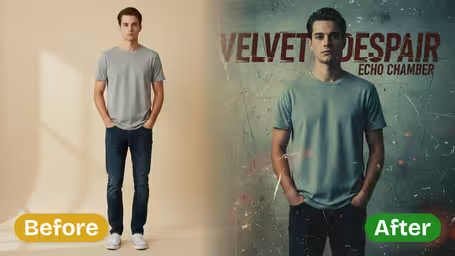

What the magazine cover maker does to your photo
The template treats your photo like raw material for a cover shoot. It swaps the background for a studio set, evens out the light, sharpens detail and boosts color, then lays bold typography across the top in a classic fashion-magazine layout. You don't adjust any settings besides the model. Your face, outfit and pose stay yours.
- 01
Studio backdrop and lighting
Messy rooms and street backgrounds are replaced with a clean, neutral studio backdrop and soft, even light, like a real cover shoot.
- 02
Masthead and cover lines
Bold magazine typography is added at the top, with smaller cover lines around you. The AI writes the text itself, so add your own wording afterward if you need exact words.
- 03
Editorial finish
Sharper detail and richer color give a phone photo the polished, commercial look of a print magazine, while your face, hair and outfit are kept.
- 04
Two models to choose from
GPT Image 2.5 (8 credits) for the cleanest lettering and detail, or Nano Banana 2.1 (4 credits) for quick, cheaper drafts. One cover per run.

How to make a magazine cover from your photo
Upload, pick a model, download. Add your own headline afterward if you want exact words.
- 01
Upload a waist-up photo
Add one JPG or PNG with a single person, face clearly visible. The background doesn't matter, because it gets replaced with a studio backdrop.
Look straight at the camera and stand tall. Cover-style poses with a confident expression give the most believable results.
- 02
Choose a model
GPT Image 2.5 (default, 8 credits) or Nano Banana 2.1 (4 credits). There are no other settings: the layout, lighting and typography come from the cover template.
Test a few different photos with Nano Banana 2.1 first, then make the final cover of your favorite with GPT Image 2.5.
- 03
Generate, download, add your text
Click generate and download the cover in seconds. The masthead and cover lines are written by the AI.
To put a real name, date or inside joke on the cover, open the image in Canva or a phone editor and type over the AI text.


When people use the magazine cover maker
Most covers are made as a surprise for someone else: a friend's birthday, a parent's retirement, a partner's anniversary. Others go on Instagram after a graduation or a new job, or get printed big for a party. Small creators also use them as playful self-promo images.
Birthday and anniversary surprises
Put the birthday person on a cover, add a funny headline in an editor and print it as a card or framed gift.
Graduation and milestone posts
Mark a graduation, promotion or marathon finish with a cover-style post that stands out in the feed.
Party decorations
Print an oversized cover for a retirement party, bachelorette or wedding welcome table and let guests pose next to it.
Creator and personal branding
Stylists, makeup artists and influencers use a cover look for a portfolio teaser or a profile banner.
Magazine Cover Maker FAQ
What the cover generator changes, what it can't do yet, and how to get a cover that looks like a real newsstand issue.
AI Pricing Plans
Flexible AI Pricing
Pay-as-you-go credits or subscription plans. No hidden fees, cancel anytime.
One Time supports crypto payment (BTC, USDT, ETH, 350+) · Monthly billing
Free-One Time
Try before you buy
- Up to 3 videos
- Up to 32 images
- Multi-Model Support
- Text to Video
- Image to Video
- Video to Video
Show more (+11)
- Consistent Character
- AI Animation Generator
- Templates & Effects
- AI Video Enhancers
- Interactive Community
- Faster Generation Speed
- No-watermark Outputs
- More Camera Movement
- Private Video Visibility
- Copy Protection
- Priority Support
Pro-1 Month
PopularElevate your AI experience
- Up to 80 videos
- Up to 800 images
- 3 tasks(Parallel Tasks)
- Multi-Model Support
- Text to Video
- Image to Video
Show more (+12)
- Video to Video
- Consistent Character
- AI Animation Generator
- Templates & Effects
- AI Video Enhancers
- Interactive Community
- Faster Generation Speed
- No-watermark Outputs
- More Camera Movement
- Private Video Visibility
- Copy Protection
- Priority Support
Lite-1 Month
Start your AI journey
- Up to 30 videos
- Up to 300 images
- 3 tasks(Parallel Tasks)
- Multi-Model Support
- Text to Video
- Image to Video
Show more (+12)
- Video to Video
- Consistent Character
- AI Animation Generator
- Templates & Effects
- AI Video Enhancers
- Interactive Community
- Faster Generation Speed
- No-watermark Outputs
- More Camera Movement
- Private Video Visibility
- Copy Protection
- Priority Support
- Card
- Crypto accepted (BTC, USDT, ETH, 350+)