









🎨 Seedream 5.0 Pro — ByteDance's flagship image model: up to 2K, best-in-class typography & multi-reference editing!


Mount Rushmore Generator: Put Your Face (and Your Friends') on a Granite Mountain
Upload a photo and the AI carves every person in it into a rock cliff under a blue sky. It keeps the same headcount and positions, so your group lands on the mountain in the right order.
Example Gallery
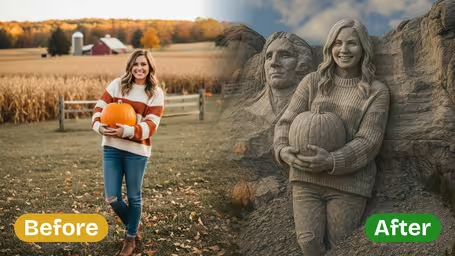
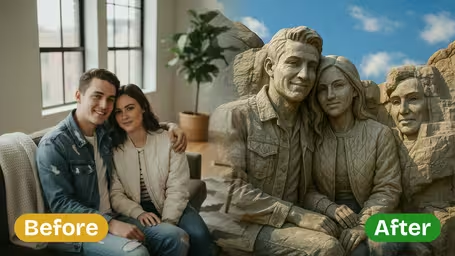
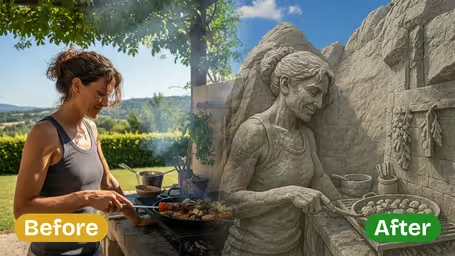
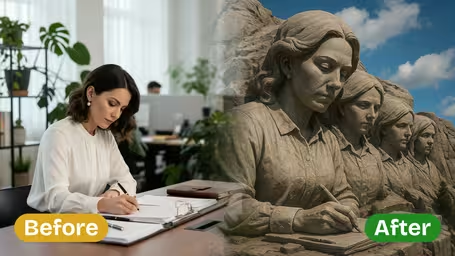
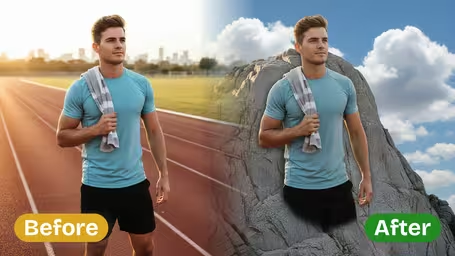
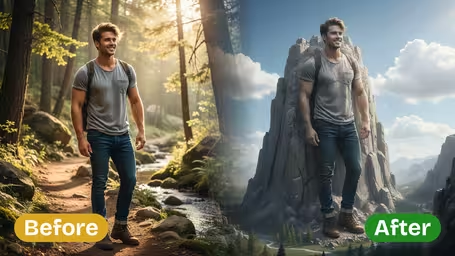
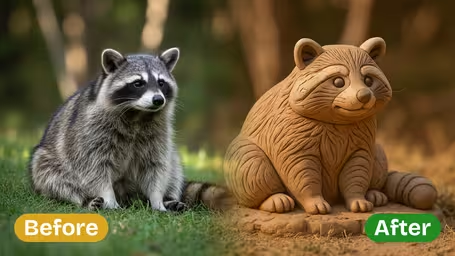
What the Mount Rushmore generator does with your photo
It turns the people in your photo into a granite carving on a natural cliff, the way the four presidents sit on the real monument. The headcount and left-to-right order stay as they are in your picture, and details like glasses, hats and collars are carved into the rock. There's nothing to configure: one photo in, one square image out.
- 01
Headcount and order kept
The AI is told to preserve the number of people and their relative positions, so whoever stood on the left in the photo is on the left of the mountain.
- 02
Real carved-granite look
Chiseled faces, stone hair and weathered rock texture, set into a mountain landscape with blue sky and clouds behind.
- 03
Clothes and accessories in stone
Glasses, hats, collars and jewelry are carved along with the faces, which is often what makes each person recognizable.
- 04
One model, one price
Runs on GPT Image 2.5 only. Every image costs 8 credits and comes out square.


How to put your face on Mount Rushmore
One photo, one click. There are no styles to pick, so the photo you choose does most of the work.
- 01
Upload a photo
Add one JPG or PNG with everyone you want on the mountain: a selfie, a couple shot or a group photo.
Have people stand shoulder to shoulder. Big gaps between them become empty rock between the heads.
- 02
Keep GPT Image 2.5 selected
It is the only model for this template and costs 8 credits per square image.
Front-facing photos carve best. Side profiles tend to flatten into a lumpy cliff.
- 03
Generate and download
You get one image of the carved faces in a mountain under a blue sky with clouds.
For a reunion or farewell card, add a caption like "The Smith Family, est. 1998" in any editor.


When people use the Mount Rushmore generator
It's mostly a group joke that happens to look grand. Friends carve their squad into the mountain for a group-chat banner, families make one for a reunion or a parent's retirement, and coworkers use it on a farewell card. Sports fans like the "Mount Rushmore of..." format too, as long as they have one photo with all four people in it.
Friend group banners
Carve your squad into granite and pin it as the group chat or Discord server image.
Family reunions and retirements
A family photo becomes a monument to print on a card or show on the screen at the party.
Team farewells
Put the whole team on the mountain for someone's last day at the office.
"Mount Rushmore of..." debates
Settle the argument about your top four by carving them into stone, from one combined photo.
Mount Rushmore Generator FAQ
How many faces fit, how close the likeness gets, and what to keep in mind before you post or print.
AI Pricing Plans
Flexible AI Pricing
Pay-as-you-go credits or subscription plans. No hidden fees, cancel anytime.
One Time supports crypto payment (BTC, USDT, ETH, 350+) · Monthly billing
Free-One Time
Try before you buy
- Up to 3 videos
- Up to 32 images
- Multi-Model Support
- Text to Video
- Image to Video
- Video to Video
Show more (+11)
- Consistent Character
- AI Animation Generator
- Templates & Effects
- AI Video Enhancers
- Interactive Community
- Faster Generation Speed
- No-watermark Outputs
- More Camera Movement
- Private Video Visibility
- Copy Protection
- Priority Support
Pro-1 Month
PopularElevate your AI experience
- Up to 80 videos
- Up to 800 images
- 3 tasks(Parallel Tasks)
- Multi-Model Support
- Text to Video
- Image to Video
Show more (+12)
- Video to Video
- Consistent Character
- AI Animation Generator
- Templates & Effects
- AI Video Enhancers
- Interactive Community
- Faster Generation Speed
- No-watermark Outputs
- More Camera Movement
- Private Video Visibility
- Copy Protection
- Priority Support
Lite-1 Month
Start your AI journey
- Up to 30 videos
- Up to 300 images
- 3 tasks(Parallel Tasks)
- Multi-Model Support
- Text to Video
- Image to Video
Show more (+12)
- Video to Video
- Consistent Character
- AI Animation Generator
- Templates & Effects
- AI Video Enhancers
- Interactive Community
- Faster Generation Speed
- No-watermark Outputs
- More Camera Movement
- Private Video Visibility
- Copy Protection
- Priority Support
- Card
- Crypto accepted (BTC, USDT, ETH, 350+)