


🎨 Seedream 5.0 Pro — ByteDance's flagship image model: up to 2K, best-in-class typography & multi-reference editing!


Clay Art Generator
Clay Art Generator - Transform your photos into highly detailed clay sculpture style with handcrafted polymer clay figurine textures and visible sculpted grooves.
Example Gallery


Recommended Templates


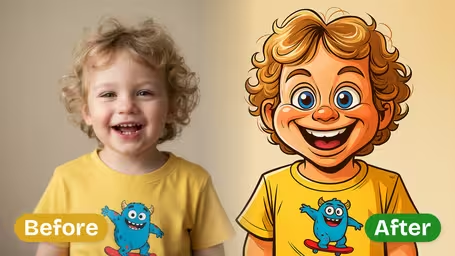

AI Clay Art Generator Features
Discover how Dreamega’s AI clay art generator transforms any photo into stunning claymation style artwork with lifelike detail and engaging character designs.
- 01
Transform Photos into Claymation Art
Upload any photo and instantly convert it into clay-style artwork with Dreamega’s AI technology, preserving facial features and unique details while giving it a charming claymation finish.
- 02
Personalized Claymation Character Creations
Create tailor-made clay cartoon characters from yourself, loved ones, or friends, capturing clothing, expressions, and style to deliver a one-of-a-kind piece of art within seconds.
- 03
Clay-Style Photos for Social Media Impact
Turn selfies, group shots, and pet photos into vivid claymation pictures that stand out, grab attention, and help boost engagement on your social media platforms.
How to Turn Any Photo into Claymation Style Art with Dreamega AI Clay Art Generator
Upload a photo and pick a clay finish to get the same scene back as a handmade claymation set.
- 01
Upload your photo
Use a JPG or PNG selfie, portrait, group shot, pet photo or even a dish or product. The whole scene will be turned into clay.
Sharp, well-lit photos keep more sculpted detail in faces and small objects.
- 02
Choose a Clay Finish
Pick Matte Finish, Glossy Finish or Ceramic Glaze, or type your own finish such as terracotta or plasticine.
If Glossy looks too subtle, Ceramic Glaze gives a more visible shine.
- 03
Generate and download
Each image costs 8 credits on GPT Image 2.5. Save the square clay image for a profile picture, a post or a print.
Run the same photo with two finishes and keep the one that suits the mood.



What people make with the Clay Art Generator
Most people use it to get a stop-motion look without sculpting anything: a selfie, a family photo or a pet turned into a little clay set. Because the background and pose stay the same, it also works for food, products and room shots, which is handy for small businesses wanting something warmer than a regular photo.
Claymation profile pictures
A selfie becomes a handmade clay portrait with soft studio light, a friendly avatar for social or work profiles.
Family and pet portraits
Group photos and pets turn into a whole clay scene, a nice print or card for grandparents and pet owners.
Stop-motion mood frames
Animators and students use it to preview how a real scene would look as a claymation set before building one.
Food and product shots
Cafés and makers turn a dish or product photo into clay for a menu, a post or a playful ad.
AI Clay Art Generator FAQ
Answers about the Clay Art Generator: what gets turned into clay, the three finishes, groups and pets, likeness and cost.
AI Pricing Plans
Flexible AI Pricing
Pay-as-you-go credits or subscription plans. No hidden fees, cancel anytime.
One Time supports crypto payment (BTC, USDT, ETH, 350+) · Monthly billing
Free-One Time
Try before you buy
- Up to 3 videos
- Up to 32 images
- Multi-Model Support
- Text to Video
- Image to Video
- Video to Video
Show more (+11)
- Consistent Character
- AI Animation Generator
- Templates & Effects
- AI Video Enhancers
- Interactive Community
- Faster Generation Speed
- No-watermark Outputs
- More Camera Movement
- Private Video Visibility
- Copy Protection
- Priority Support
Pro-1 Month
PopularElevate your AI experience
- Up to 80 videos
- Up to 800 images
- 3 tasks(Parallel Tasks)
- Multi-Model Support
- Text to Video
- Image to Video
Show more (+12)
- Video to Video
- Consistent Character
- AI Animation Generator
- Templates & Effects
- AI Video Enhancers
- Interactive Community
- Faster Generation Speed
- No-watermark Outputs
- More Camera Movement
- Private Video Visibility
- Copy Protection
- Priority Support
Lite-1 Month
Start your AI journey
- Up to 30 videos
- Up to 300 images
- 3 tasks(Parallel Tasks)
- Multi-Model Support
- Text to Video
- Image to Video
Show more (+12)
- Video to Video
- Consistent Character
- AI Animation Generator
- Templates & Effects
- AI Video Enhancers
- Interactive Community
- Faster Generation Speed
- No-watermark Outputs
- More Camera Movement
- Private Video Visibility
- Copy Protection
- Priority Support
- Card
- Crypto accepted (BTC, USDT, ETH, 350+)