









🎨 Seedream 5.0 Pro — ByteDance's flagship image model: up to 2K, best-in-class typography & multi-reference editing!


Buzz Cut Filter
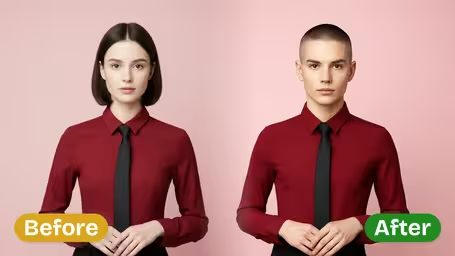
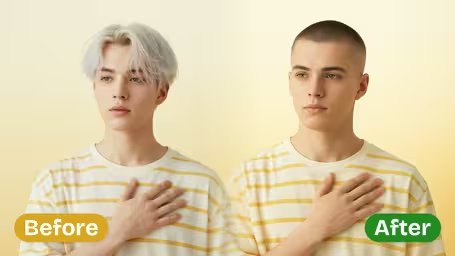
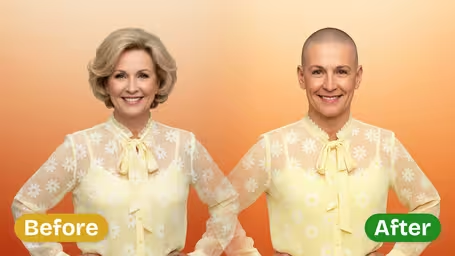
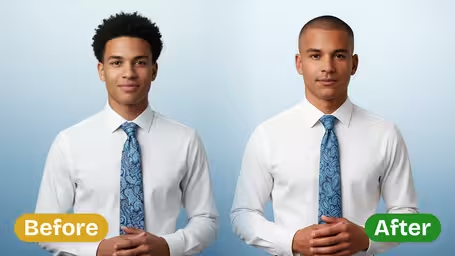
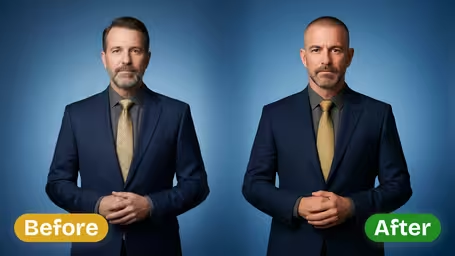
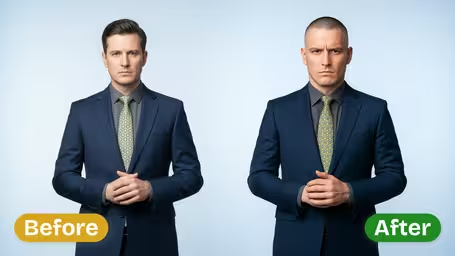
Buzz Cut Filter - Transform your hairstyle to an extremely short, neat trimming effect with clear head contour definition and military-style aesthetic.
Example Gallery
Recommended Templates
AI Buzz Cut Filter Features
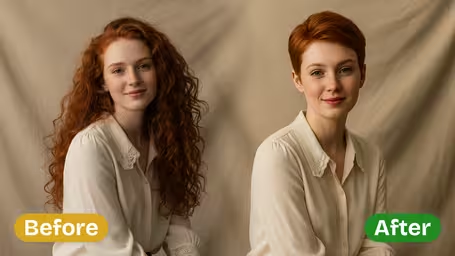
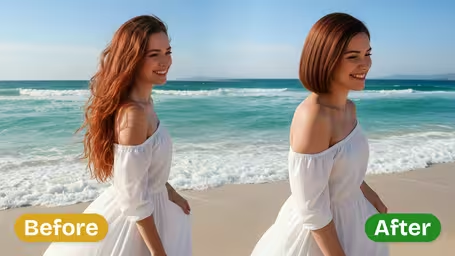
Discover how Dreamega’s AI Buzz Cut Filter transforms your photo into a sleek, bold buzz cut look with realistic detail—perfect for social media, style trials, or a confident new vibe.
- 01
Sport a Sleek Buzz Cut Style
Get a fresh buzz cut look with Dreamega’s AI Buzz Cut Filter. This tool applies a realistic hairstyle to your photo, giving you a bold, low-maintenance appearance ideal for testing styles or updating portraits with modern precision.
- 02
Eye-Catching Social Media Buzz Cut
Make your social media photos stand out by adding a striking buzz cut effect. Dreamega’s AI produces high-quality, shareable images that grab attention and convey confidence. Perfect for instantly elevating your Instagram or TikTok presence.
- 03
Bold Buzz Cut for Everyone
Try a bold buzz cut style regardless of your gender or age. Dreamega’s AI Buzz Cut Filter blends naturally with facial features while maintaining authentic texture, creating personalized portraits for free that look sharp and confident.

How to Use the AI Buzz Cut Filter on Your Photo
Upload one JPG or PNG portrait, pick a cut style and a length between 1 and 8 mm, and see the same photo with a buzz cut.
- 01
Upload a Clear Portrait
Choose one JPG or PNG photo where your face, forehead and ears are visible. A straight-on head-and-shoulders shot works best.
Take off hats and push long hair or fringe back so the AI can see your real hairline and the shape of your head.
- 02
Pick Cut Style, Length and Model
Set Cut Style (Military Style, Neat & Trimmed, Structured Cut or your own text) and Hair Length (1–2 mm, 3–5 mm or 6–8 mm), then choose GPT Image 2.5 (8 credits) or Nano Banana 2.1 (4 credits).
Change one setting at a time between runs so you can tell what made the difference. For a vertical photo, use Nano Banana 2.1, since GPT Image 2.5 outputs a square image.
- 03
Compare and Save
Check the hairline, the temples and the area around the ears, then download the version you like.
Save the length that looks best and tell your barber the millimetres, not just "short". If you are also considering a full shave, run the same photo through the bald filter to compare.



When People Use the Buzz Cut Filter
A buzz cut takes ten minutes at the barber and weeks to grow out, so most people want to see it first. The filter gets used before a big change of style, before joining the military or a sports team, by men whose hair is starting to thin, and by friends who want to see someone with a buzz just for fun.
Before the barber visit
Try 3 mm against 6 mm on your own face and bring the picture to show exactly what you want.
Enlistment or team rules
See yourself with a regulation cut before basic training, a police academy or a sports team that requires short hair.
Thinning hair
Check whether going short makes thinning less noticeable. Keep in mind the preview may draw a fuller hairline than you have.
Summer cuts and jokes
Show a friend with long hair what a summer buzz would look like, or send a buzz cut version to the group chat.
AI Buzz Cut Filter FAQ
Answers about the Buzz Cut Filter: what the cut styles and lengths mean, how it handles long or thinning hair, and what each run costs.
AI Pricing Plans
Flexible AI Pricing
Pay-as-you-go credits or subscription plans. No hidden fees, cancel anytime.
One Time supports crypto payment (BTC, USDT, ETH, 350+) · Monthly billing
Free-One Time
Try before you buy
- Up to 3 videos
- Up to 32 images
- Multi-Model Support
- Text to Video
- Image to Video
- Video to Video
Show more (+11)
- Consistent Character
- AI Animation Generator
- Templates & Effects
- AI Video Enhancers
- Interactive Community
- Faster Generation Speed
- No-watermark Outputs
- More Camera Movement
- Private Video Visibility
- Copy Protection
- Priority Support
Pro-1 Month
PopularElevate your AI experience
- Up to 80 videos
- Up to 800 images
- 3 tasks(Parallel Tasks)
- Multi-Model Support
- Text to Video
- Image to Video
Show more (+12)
- Video to Video
- Consistent Character
- AI Animation Generator
- Templates & Effects
- AI Video Enhancers
- Interactive Community
- Faster Generation Speed
- No-watermark Outputs
- More Camera Movement
- Private Video Visibility
- Copy Protection
- Priority Support
Lite-1 Month
Start your AI journey
- Up to 30 videos
- Up to 300 images
- 3 tasks(Parallel Tasks)
- Multi-Model Support
- Text to Video
- Image to Video
Show more (+12)
- Video to Video
- Consistent Character
- AI Animation Generator
- Templates & Effects
- AI Video Enhancers
- Interactive Community
- Faster Generation Speed
- No-watermark Outputs
- More Camera Movement
- Private Video Visibility
- Copy Protection
- Priority Support
- Card
- Crypto accepted (BTC, USDT, ETH, 350+)