









🎨 Seedream 5.0 Pro — ByteDance's flagship image model: up to 2K, best-in-class typography & multi-reference editing!


AI Frosted Glass Silhouette Effect
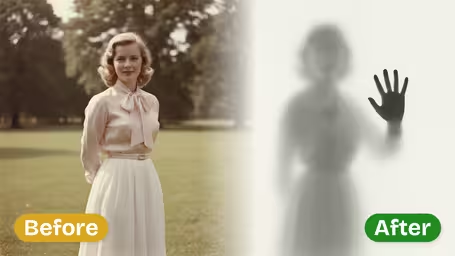
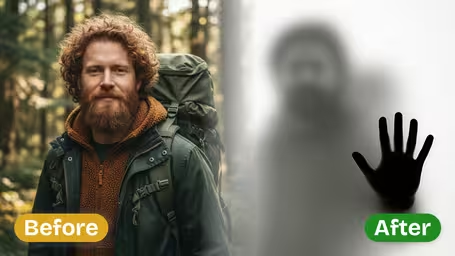
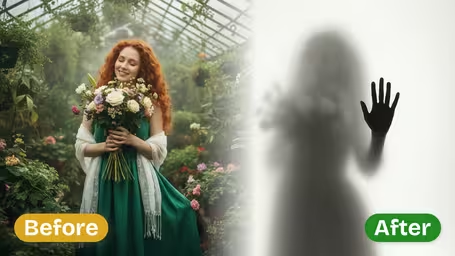
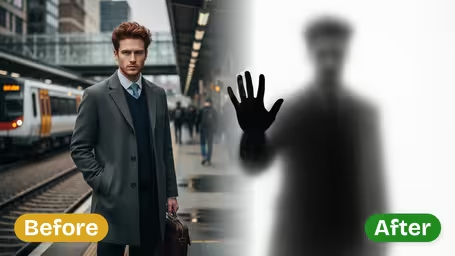
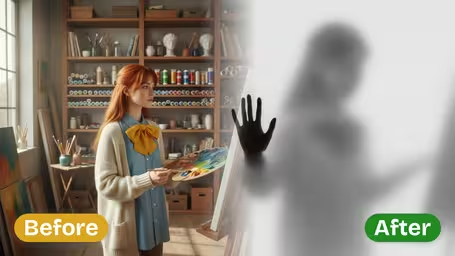
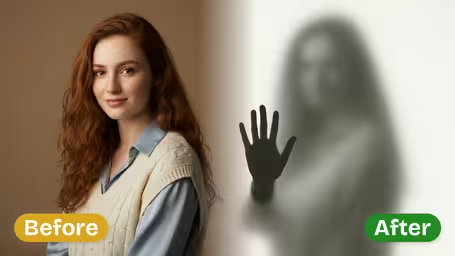
AI Frosted Glass Silhouette Effect - Transform your photos into mysterious frosted glass silhouettes with blurred figures behind opaque glass and crisp hand details pressed against the surface.
Example Gallery
Recommended Templates
AI Frosted Glass Silhouette Effect Features
Discover how Dreamega’s AI frosted glass silhouette effect transforms photos into translucent, mysterious art with fine textures and captivating contours.
- 01
Mysterious Silhouettes with Modern Depth
Turn any photo into a striking frosted glass silhouette that blends soft opacity with clear outlines, creating visually intriguing, mysterious silhouettes ideal for social media or printed art.
- 02
Realistic Frosted Glass Texture Rendering
AI-generated frosted glass textures add tactile grain and subtle gradients, enhancing the silhouette effect while preserving photo shapes and contours for a refined aesthetic.
- 03
Effortless Artistic Transformation
No design expertise required—upload your photo and let the tool convert it into captivating frosted glass silhouettes in seconds, making art creation simple and accessible.

How to Create Mysterious Frosted Glass Silhouette Photos with Dreamega
Upload a portrait and get a blurred figure behind frosted glass with one sharp hand pressed against it, on a clean white backdrop.
- 01
Upload a Portrait Photo
Add one JPG or PNG of a single person, ideally from the chest or waist up.
A plain background and a clear outline of hair and shoulders give the best silhouette.
- 02
Choose the AI Model and Generate
Keep GPT Image 2.5 (8 credits) for the strongest blur-versus-sharp contrast, or pick Nano Banana 2.1 (4 credits) to try several photos.
There is nothing else to set: the frosted glass, the pressed hand and the white backdrop are fixed.
- 03
Download Your Silhouette
Download the finished image and use it as it is, or add text and color in an editor.
If the hand looks blurred instead of crisp, generate again; the contrast varies from run to run.
When people use the Frosted Glass Silhouette effect
The effect hides who you are while still looking personal, and that drives most of its uses. People make anonymous avatars, teaser images and minimalist covers with it, and photographers use it to sketch a concept before shooting the real thing behind a sheet of frosted glass.
Anonymous profile pictures
People who keep their face off the internet use the blurred figure as an avatar that still feels like them.
Single and book covers
The white backdrop leaves clean space for a title, so musicians and writers use it for minimalist covers.
Reveal teasers
Brands and creators post the silhouette before announcing a new team member, guest or collaborator.
Photo shoot concepts
Photographers make a quick preview to show a client before setting up a real frosted-glass shot.
AI Frosted Glass Silhouette Effect FAQ
How much of you stays visible, which photos work, and what you can and cannot change.
AI Pricing Plans
Flexible AI Pricing
Pay-as-you-go credits or subscription plans. No hidden fees, cancel anytime.
One Time supports crypto payment (BTC, USDT, ETH, 350+) · Monthly billing
Free-One Time
Try before you buy
- Up to 3 videos
- Up to 32 images
- Multi-Model Support
- Text to Video
- Image to Video
- Video to Video
Show more (+11)
- Consistent Character
- AI Animation Generator
- Templates & Effects
- AI Video Enhancers
- Interactive Community
- Faster Generation Speed
- No-watermark Outputs
- More Camera Movement
- Private Video Visibility
- Copy Protection
- Priority Support
Pro-1 Month
PopularElevate your AI experience
- Up to 80 videos
- Up to 800 images
- 3 tasks(Parallel Tasks)
- Multi-Model Support
- Text to Video
- Image to Video
Show more (+12)
- Video to Video
- Consistent Character
- AI Animation Generator
- Templates & Effects
- AI Video Enhancers
- Interactive Community
- Faster Generation Speed
- No-watermark Outputs
- More Camera Movement
- Private Video Visibility
- Copy Protection
- Priority Support
Lite-1 Month
Start your AI journey
- Up to 30 videos
- Up to 300 images
- 3 tasks(Parallel Tasks)
- Multi-Model Support
- Text to Video
- Image to Video
Show more (+12)
- Video to Video
- Consistent Character
- AI Animation Generator
- Templates & Effects
- AI Video Enhancers
- Interactive Community
- Faster Generation Speed
- No-watermark Outputs
- More Camera Movement
- Private Video Visibility
- Copy Protection
- Priority Support
- Card
- Crypto accepted (BTC, USDT, ETH, 350+)