


🎨 Seedream 5.0 Pro — ByteDance's flagship image model: up to 2K, best-in-class typography & multi-reference editing!


Neon Line Art Generator: Turn Any Photo into Glowing Neon Outlines
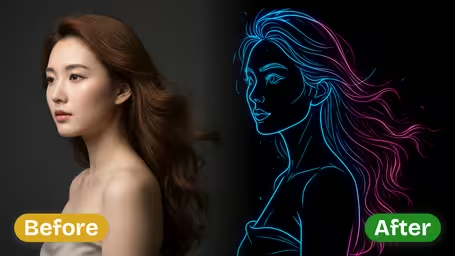
Upload a photo and the AI redraws it as luminous neon lines in electric blue, hot pink, deep purple or a rainbow mix. You set how strong the glow is, from a subtle halo to a full light bloom.
Example Gallery


Recommended Templates


What the neon line art generator does
It replaces the surfaces in your photo with glowing line work, the way a sign maker would trace a subject in bent glass tubing. You choose the color of the light and how much it glows; the AI decides which edges are worth keeping. Everything runs on GPT Image 2.5 at 8 credits per square image.
- 01
Your photo traced in light
Faces, hair and outlines become luminous neon strokes. Skin and fabric texture drop away, leaving a clean, graphic image.
- 02
Four neon palettes
Blue with cyan highlights, hot Pink with magenta, deep Purple with violet, or Multicolor mixing all of them.
- 03
Three glow strengths
Soft keeps lines crisp, Medium gives a classic neon look, and Strong adds heavy light bloom around every stroke.
- 04
Square image, fixed price
One square image per run on GPT Image 2.5 for 8 credits, ready for avatars, posts and posters.

How to turn a photo into neon line art
Three steps. The two settings that matter are the neon color and the glow intensity.
- 01
Upload a photo with a clear subject
Add one JPG or PNG. Portraits, pets, cars and skylines all work, as long as the main subject stands out.
Plain backgrounds give clean lines. If the background is busy, crop closer to the subject before uploading.
- 02
Pick Neon Color and Glow Intensity
Choose Blue, Pink, Purple or Multicolor, then Soft, Medium or Strong. Blue and Medium are the defaults.
Pink or Purple with Strong reads as a club poster; Blue with Soft looks clean and techy.
- 03
Generate and download
The template runs on GPT Image 2.5 and returns one square image for 8 credits.
Run the same photo in two colors. The color changes the mood far more than you would expect.


When people use the neon line art generator
People reach for it when they want a photo to feel like nightlife or synthwave instead of daylight. Musicians and DJs make cover art and event posters, streamers make glowing avatars, couples turn a favorite photo into a neon-sign-style keepsake, and small shops mock up what their logo or storefront could look like in neon.
Event posters and cover art
A DJ portrait in Pink or Purple with Strong glow makes an instant flyer or single cover.
Glowing avatars
Turn a headshot into a neon profile picture for Twitch, Discord or a gaming handle.
Neon sign mock-ups
Show a sign maker roughly how your logo, pet or couple photo would look in tubing.
Wallpapers and wall art
Print a skyline or car photo as a poster, or use it as a phone or desktop background.
Neon Line Art Generator FAQ
How the effect works, how the color and glow settings differ, and which photos make the best neon art.
AI Pricing Plans
Flexible AI Pricing
Pay-as-you-go credits or subscription plans. No hidden fees, cancel anytime.
One Time supports crypto payment (BTC, USDT, ETH, 350+) · Monthly billing
Free-One Time
Try before you buy
- Up to 3 videos
- Up to 32 images
- Multi-Model Support
- Text to Video
- Image to Video
- Video to Video
Show more (+11)
- Consistent Character
- AI Animation Generator
- Templates & Effects
- AI Video Enhancers
- Interactive Community
- Faster Generation Speed
- No-watermark Outputs
- More Camera Movement
- Private Video Visibility
- Copy Protection
- Priority Support
Pro-1 Month
PopularElevate your AI experience
- Up to 80 videos
- Up to 800 images
- 3 tasks(Parallel Tasks)
- Multi-Model Support
- Text to Video
- Image to Video
Show more (+12)
- Video to Video
- Consistent Character
- AI Animation Generator
- Templates & Effects
- AI Video Enhancers
- Interactive Community
- Faster Generation Speed
- No-watermark Outputs
- More Camera Movement
- Private Video Visibility
- Copy Protection
- Priority Support
Lite-1 Month
Start your AI journey
- Up to 30 videos
- Up to 300 images
- 3 tasks(Parallel Tasks)
- Multi-Model Support
- Text to Video
- Image to Video
Show more (+12)
- Video to Video
- Consistent Character
- AI Animation Generator
- Templates & Effects
- AI Video Enhancers
- Interactive Community
- Faster Generation Speed
- No-watermark Outputs
- More Camera Movement
- Private Video Visibility
- Copy Protection
- Priority Support
- Card
- Crypto accepted (BTC, USDT, ETH, 350+)