


🎨 Seedream 5.0 Pro — ByteDance's flagship image model: up to 2K, best-in-class typography & multi-reference editing!


Line Art Emoji Generator: Turn One Photo into a 9-Expression Emoji Sheet
Upload a single portrait and the AI draws the same face nine times in clean black-and-white outlines, each with a different expression, laid out in a 3x3 grid on a light paper background.
Example Gallery


Recommended Templates
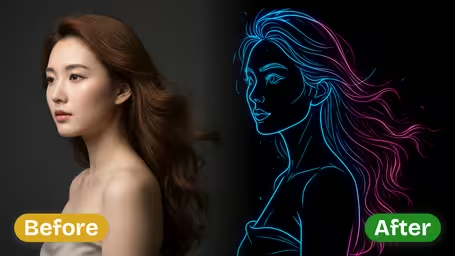


What the line art emoji template does
One upload produces a full emoji sheet rather than a single cartoon. The AI simplifies your face into bold, even outlines, keeps the features that make it recognizable, and repeats it nine times with a different expression in each cell. The result is black ink on a light paper texture, which is easy to crop, print or color in.
- 01
Nine expressions, one consistent face
Every sheet holds the same nine moods: happy, sad, surprised, thoughtful, playful, winking, angry, neutral and excited. They sit in a 3x3 grid with matching proportions, so the set reads as one character rather than nine different drawings.
- 02
Clean black-and-white outlines
Lines are bold and kept at a uniform thickness, with very little interior detail and no shading. The original background is replaced by a plain light paper texture, which keeps the faces readable at small emoji sizes and makes them simple to cut out.
- 03
Your likeness, simplified
Face shape, hairstyle, glasses, beards and other strong features carry over from the photo. Skin texture, lighting and small blemishes are dropped on purpose. Depending on the photo, the AI draws just the head or a simple full figure.
- 04
Two models, two price points
GPT Image 2.5 is the default at 8 credits per sheet and returns a square image with steadier line weight across the cells. Nano Banana 2.1 costs 4 credits and works well for testing a photo before you spend more.

How to make a line art emoji sheet from a photo
Three steps, no settings to tune beyond the model.
- 01
Upload one clear portrait
Add a single JPG or PNG photo. A head-and-shoulders shot with one person in frame works best, since every one of the nine faces is drawn from it.
Remove sunglasses and hats that hide the eyes or hairline. Eyes and eyebrows carry most of the expression in line art.
- 02
Choose GPT Image 2.5 or Nano Banana 2.1
GPT Image 2.5 (8 credits) is the default and gives more consistent lines across all nine cells. Nano Banana 2.1 (4 credits) is cheaper and fine for a first test.
Test a new photo on Nano Banana 2.1 first; if the likeness is right, run it on GPT Image 2.5 for the final sheet.
- 03
Generate, then crop the grid
Click generate and you get one square sheet with nine expressions. Download it and crop each cell to use the faces as separate emojis or stickers.
If two expressions look too alike, generate again. Each run draws a fresh set.

When people use the line art emoji generator
Most people want a personal emoji set without drawing anything. The nine faces end up as chat reactions, printed feelings charts, coloring pages and small gifts. Because the sheet is plain black lines on a pale background, it works on screens and on paper equally well.
Custom chat reactions
Crop the grid into nine squares and upload them as Discord, Slack or Telegram emojis, so friends can react with your own face.
Printable feelings chart
Teachers, coaches and parents print the sheet on an ordinary office printer to talk about moods in class or put a mood board on the fridge.
Coloring page and DIY merch
The open outlines are easy to color in by hand, or to transfer onto stickers, tote bags and rubber stamps without the lines going muddy.
Joke gift for a friend
Upload a friend's photo and print the nine faces as a card or sticker sheet. It takes a few minutes and always gets a laugh.
Line Art Emoji Generator FAQ
What you get, how to prepare your photo and how to turn the sheet into usable emojis.
AI Pricing Plans
Flexible AI Pricing
Pay-as-you-go credits or subscription plans. No hidden fees, cancel anytime.
One Time supports crypto payment (BTC, USDT, ETH, 350+) · Monthly billing
Free-One Time
Try before you buy
- Up to 3 videos
- Up to 32 images
- Multi-Model Support
- Text to Video
- Image to Video
- Video to Video
Show more (+11)
- Consistent Character
- AI Animation Generator
- Templates & Effects
- AI Video Enhancers
- Interactive Community
- Faster Generation Speed
- No-watermark Outputs
- More Camera Movement
- Private Video Visibility
- Copy Protection
- Priority Support
Pro-1 Month
PopularElevate your AI experience
- Up to 80 videos
- Up to 800 images
- 3 tasks(Parallel Tasks)
- Multi-Model Support
- Text to Video
- Image to Video
Show more (+12)
- Video to Video
- Consistent Character
- AI Animation Generator
- Templates & Effects
- AI Video Enhancers
- Interactive Community
- Faster Generation Speed
- No-watermark Outputs
- More Camera Movement
- Private Video Visibility
- Copy Protection
- Priority Support
Lite-1 Month
Start your AI journey
- Up to 30 videos
- Up to 300 images
- 3 tasks(Parallel Tasks)
- Multi-Model Support
- Text to Video
- Image to Video
Show more (+12)
- Video to Video
- Consistent Character
- AI Animation Generator
- Templates & Effects
- AI Video Enhancers
- Interactive Community
- Faster Generation Speed
- No-watermark Outputs
- More Camera Movement
- Private Video Visibility
- Copy Protection
- Priority Support
- Card
- Crypto accepted (BTC, USDT, ETH, 350+)