


🎨 Seedream 5.0 Pro — ByteDance's flagship image model: up to 2K, best-in-class typography & multi-reference editing!


AI Cyberpunk Filter
AI Cyberpunk Filter - Transform your photos into futuristic cyberpunk portraits with neon-soaked aesthetics, glowing accents, and cinematic atmosphere.
Example Gallery


Recommended Templates
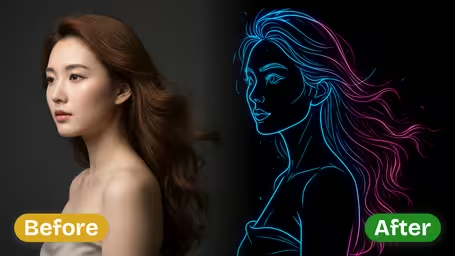


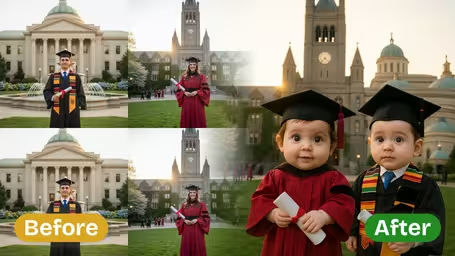

Cyberpunk Filter Features
Discover how Dreamega's AI cyberpunk filter transforms photos into vivid, futuristic cyberpunk images while keeping your subject authentic.
- 01
One-Click Cyberpunk Transformation
Convert your photos into cyberpunk images in a single click. The AI filter applies a detailed, neon-hued futuristic effect to both subject and surroundings, giving you a complete immersive look without manual editing.
- 02
Authentic Subject Preservation
Maintain the true appearance and traits of your photo’s subject while adding a bold cyberpunk effect. The AI ensures facial features, posture, and details remain intact to preserve the essence of the original image.
- 03
Dynamic Cyberpunk Backgrounds
Replace plain or dull backgrounds with richly layered cyberpunk scenes. The AI blends your subject seamlessly into vibrant sci-fi environments, creating images that feel cinematic and immersive.

How to Turn Photos into Cyberpunk Images with Dreamega's AI Cyberpunk Filter
Upload a portrait, pick one of four neon palettes, and the AI Cyberpunk Filter turns it into a glowing night-city portrait.
- 01
Upload a Portrait
Upload one JPG or PNG with a clearly visible face. A head-and-shoulders photo works best, because the neon accents are placed on the face.
Center your face and leave space around the head: the result is square.
- 02
Pick a Neon Palette and Generate
Choose Classic, Electric, Warm or Cool, or type your own colors, then generate. Each image costs 8 credits on GPT Image 2.5.
Classic and Cool feel cold and techy; Warm looks more like a film poster.
- 03
Download Your Cyberpunk Portrait
Download the finished image and use it as an avatar, a stream panel picture or a poster.
Run the same photo in two palettes and keep the one that matches your profile theme.



When people use the AI Cyberpunk Filter
Gamers, streamers and sci-fi fans use the cyberpunk filter to get a futuristic version of themselves without learning photo editing. The neon style also makes a dull indoor selfie look like a night-city poster, which is why it shows up so often in profile pictures and event promotion.
Gaming and streaming avatars
A Classic or Electric palette portrait matches the look of a Twitch, Discord or Steam profile.
Event and party flyers
DJs and club nights use a neon portrait of the performer as the main image on a flyer.
Music covers
The square format fits single and album covers, and the Warm palette suits retro electronic tracks.
Character concepts
Tabletop players turn their own photo into a reference image for a character in a sci-fi campaign.
AI Cyberpunk Filter FAQ
How the neon palettes work, what changes in your photo, what a cyberpunk conversion costs and how to get a clean result.
AI Pricing Plans
Flexible AI Pricing
Pay-as-you-go credits or subscription plans. No hidden fees, cancel anytime.
One Time supports crypto payment (BTC, USDT, ETH, 350+) · Monthly billing
Free-One Time
Try before you buy
- Up to 3 videos
- Up to 32 images
- Multi-Model Support
- Text to Video
- Image to Video
- Video to Video
Show more (+11)
- Consistent Character
- AI Animation Generator
- Templates & Effects
- AI Video Enhancers
- Interactive Community
- Faster Generation Speed
- No-watermark Outputs
- More Camera Movement
- Private Video Visibility
- Copy Protection
- Priority Support
Pro-1 Month
PopularElevate your AI experience
- Up to 80 videos
- Up to 800 images
- 3 tasks(Parallel Tasks)
- Multi-Model Support
- Text to Video
- Image to Video
Show more (+12)
- Video to Video
- Consistent Character
- AI Animation Generator
- Templates & Effects
- AI Video Enhancers
- Interactive Community
- Faster Generation Speed
- No-watermark Outputs
- More Camera Movement
- Private Video Visibility
- Copy Protection
- Priority Support
Lite-1 Month
Start your AI journey
- Up to 30 videos
- Up to 300 images
- 3 tasks(Parallel Tasks)
- Multi-Model Support
- Text to Video
- Image to Video
Show more (+12)
- Video to Video
- Consistent Character
- AI Animation Generator
- Templates & Effects
- AI Video Enhancers
- Interactive Community
- Faster Generation Speed
- No-watermark Outputs
- More Camera Movement
- Private Video Visibility
- Copy Protection
- Priority Support
- Card
- Crypto accepted (BTC, USDT, ETH, 350+)