









🎨 Seedream 5.0 Pro — ByteDance's flagship image model: up to 2K, best-in-class typography & multi-reference editing!


Pixel Dissolve Effect: Turn a Photo into a Subject Breaking Apart into Pixels
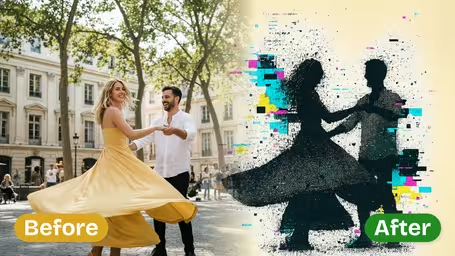
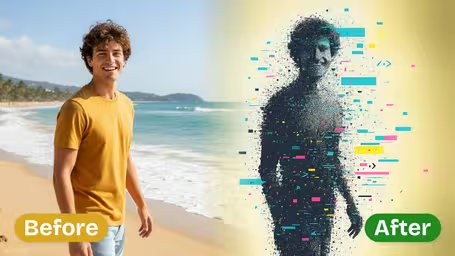
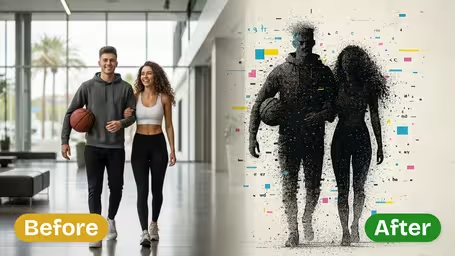
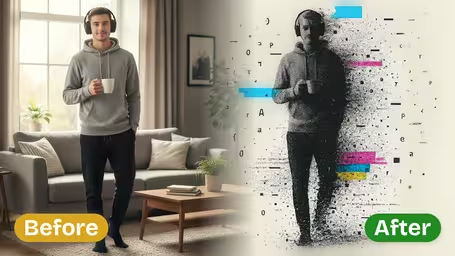
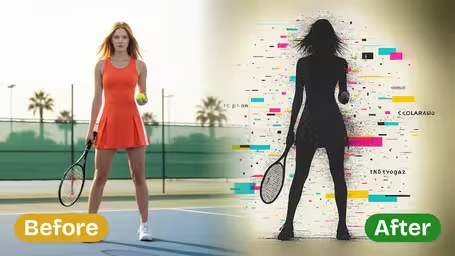
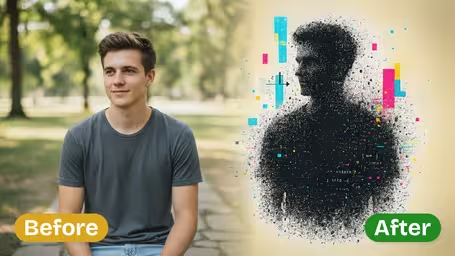
Upload a photo and the AI breaks it into drifting square fragments with a digital glitch feel. Choose how much dissolves, from a few loose pixels to dramatic disintegration, and how big the pixel blocks are.
Example Gallery
Recommended Templates
What the pixel dissolve effect does
It takes a normal photo and makes it look like it is coming apart: square fragments break off and drift, with the glitchy feel of a corrupted screen. Two settings shape the result, how much dissolves and how big the pixels are, and everything runs on GPT Image 2.5 for 8 credits per square image.
- 01
Disintegration into pixels
Parts of the photo break into square fragments that scatter, giving a digital glitch, fading-away look instead of a simple filter.
- 02
Three dissolve intensities
Light keeps the subject almost whole, Medium is balanced, Heavy breaks large areas apart for an abstract, dramatic image.
- 03
Three pixel sizes
Small for fine digital dust, Medium for visible blocks, Large for chunky retro 8-bit fragments.
- 04
Square output, fixed price
One square image per run on GPT Image 2.5 for 8 credits. Where the image breaks varies with each run.

How to make a photo dissolve into pixels
Three steps. Dissolve Intensity and Pixel Size are the only two settings to think about.
- 01
Upload a photo with a clear subject
Add one JPG or PNG. A single person, pet or object with a clean outline works best.
Plain or dark backgrounds make the flying pixels easy to read; busy backgrounds swallow them.
- 02
Set Dissolve Intensity and Pixel Size
Intensity: Light, Medium or Heavy. Pixel Size: Small, Medium or Large. Both default to Medium.
Light with Small is a subtle touch for portraits; Heavy with Large is the dramatic poster version.
- 03
Generate and download
The template runs on GPT Image 2.5 and returns one square image for 8 credits.
Where the image breaks changes every run, so generate two or three and keep the best one.


When people use the pixel dissolve effect
It shows up wherever an image needs to say digital, fading or glitch. Musicians use it for electronic and lo-fi covers, creators use it on thumbnails about AI or the internet, designers drop it into tech event posters, and plenty of people simply make a dramatic disappearing profile picture or meme.
Album and single covers
A portrait at Heavy intensity with Large pixels gives electronic or synthwave tracks an instant cover.
Thumbnails and tech posters
A dissolving face or product says "digital" or "AI" at a glance on YouTube or event flyers.
Disappearing-act memes
Make yourself or a friend fade into pixels for the classic vanishing joke.
Glitchy profile pictures
Light intensity with Small pixels keeps your face recognizable with a subtle digital edge.
Pixel Dissolve Effect FAQ
What the effect looks like, what the two settings change and how to get a result you can actually use.
AI Pricing Plans
Flexible AI Pricing
Pay-as-you-go credits or subscription plans. No hidden fees, cancel anytime.
One Time supports crypto payment (BTC, USDT, ETH, 350+) · Monthly billing
Free-One Time
Try before you buy
- Up to 3 videos
- Up to 32 images
- Multi-Model Support
- Text to Video
- Image to Video
- Video to Video
Show more (+11)
- Consistent Character
- AI Animation Generator
- Templates & Effects
- AI Video Enhancers
- Interactive Community
- Faster Generation Speed
- No-watermark Outputs
- More Camera Movement
- Private Video Visibility
- Copy Protection
- Priority Support
Pro-1 Month
PopularElevate your AI experience
- Up to 80 videos
- Up to 800 images
- 3 tasks(Parallel Tasks)
- Multi-Model Support
- Text to Video
- Image to Video
Show more (+12)
- Video to Video
- Consistent Character
- AI Animation Generator
- Templates & Effects
- AI Video Enhancers
- Interactive Community
- Faster Generation Speed
- No-watermark Outputs
- More Camera Movement
- Private Video Visibility
- Copy Protection
- Priority Support
Lite-1 Month
Start your AI journey
- Up to 30 videos
- Up to 300 images
- 3 tasks(Parallel Tasks)
- Multi-Model Support
- Text to Video
- Image to Video
Show more (+12)
- Video to Video
- Consistent Character
- AI Animation Generator
- Templates & Effects
- AI Video Enhancers
- Interactive Community
- Faster Generation Speed
- No-watermark Outputs
- More Camera Movement
- Private Video Visibility
- Copy Protection
- Priority Support
- Card
- Crypto accepted (BTC, USDT, ETH, 350+)