


🎨 Seedream 5.0 Pro — ByteDance's flagship image model: up to 2K, best-in-class typography & multi-reference editing!


AI Emoji from Photo Generator
Transform into personalized emoji with custom emoji design, digital communication symbol, simplified facial expression, modern emoji style
Example Gallery


Recommended Templates


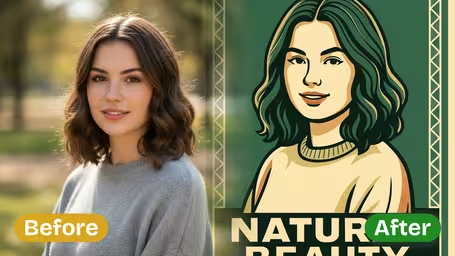

Create Emoji from Photo Features
Discover how Dreamega transforms your photos into personalized emojis for free using advanced AI technology, delivering fast, fun, and unique results.
- 01
AI-Powered Emoji Creation
Use advanced AI to create emojis from photos that capture your expressions, moods, and memories with remarkable accuracy and artistic flair.
- 02
Personalized Emoji Effects
Generate emojis from photos that reflect your unique style. Whether it’s a joyful pose or a favorite snapshot, each emoji is tailored just for you.
- 03
Quick and Easy Process
Upload a photo and create personalized emojis in seconds. Dreamega’s user-friendly interface delivers rapid results without sacrificing quality.



How to Turn Your Photo into a Personalized Emoji
Upload one selfie, pick Classic, Modern or 3D, and get a square emoji of your face for 8 credits.
- 01
Upload a Selfie
Upload one JPG or PNG photo with your face clearly visible. A head-and-shoulders selfie works better than a full-body shot, because the emoji is built from the face.
Pull the expression you want before you take the photo. The emoji keeps it.
- 02
Pick an Emoji Style and Generate
Choose Classic, Modern or 3D, or type a custom style such as “pastel kawaii”. The model is GPT-Image 2.5 Flare Edit App and each run costs 8 credits.
Take off sunglasses and keep hair out of your eyes. Glasses and hats carry over, but hidden eyes make the emoji look generic.
- 03
Download and Use It
Download the square image and add it to your chat stickers, profile picture or an invitation. Run the same photo in a second style if you want to compare.
If your sticker app needs a transparent background, cut the emoji out with a background remover before importing it.


When people use the AI Emoji from Photo Generator
Most people start with one emoji of themselves for a profile picture, then come back with more faces to build a sticker set. Friends use it to make matching emojis for a group chat, and streamers or small community admins use it to get a recognizable icon without hiring an illustrator.
Group chat sticker sets
Shoot four or five selfies with different faces and turn each one into an emoji in the same style, so your reactions in the group chat are actually you.
Profile pictures
A Classic or 3D emoji of your face works as an avatar on Discord, Slack or gaming profiles when you'd rather not post a real photo.
Streamer and community emotes
Small streamers and Discord server owners use it to draft emotes of themselves, then resize them to each platform's emote rules.
Invitations and small gifts
Put an emoji of the birthday person or the couple on party invites, place cards or a printed sticker sheet.
Create Emoji from Photo FAQ
Answers about styles, expressions, pets, credit cost and sticker use for the AI Emoji from Photo Generator.
AI Pricing Plans
Flexible AI Pricing
Pay-as-you-go credits or subscription plans. No hidden fees, cancel anytime.
One Time supports crypto payment (BTC, USDT, ETH, 350+) · Monthly billing
Free-One Time
Try before you buy
- Up to 3 videos
- Up to 32 images
- Multi-Model Support
- Text to Video
- Image to Video
- Video to Video
Show more (+11)
- Consistent Character
- AI Animation Generator
- Templates & Effects
- AI Video Enhancers
- Interactive Community
- Faster Generation Speed
- No-watermark Outputs
- More Camera Movement
- Private Video Visibility
- Copy Protection
- Priority Support
Pro-1 Month
PopularElevate your AI experience
- Up to 80 videos
- Up to 800 images
- 3 tasks(Parallel Tasks)
- Multi-Model Support
- Text to Video
- Image to Video
Show more (+12)
- Video to Video
- Consistent Character
- AI Animation Generator
- Templates & Effects
- AI Video Enhancers
- Interactive Community
- Faster Generation Speed
- No-watermark Outputs
- More Camera Movement
- Private Video Visibility
- Copy Protection
- Priority Support
Lite-1 Month
Start your AI journey
- Up to 30 videos
- Up to 300 images
- 3 tasks(Parallel Tasks)
- Multi-Model Support
- Text to Video
- Image to Video
Show more (+12)
- Video to Video
- Consistent Character
- AI Animation Generator
- Templates & Effects
- AI Video Enhancers
- Interactive Community
- Faster Generation Speed
- No-watermark Outputs
- More Camera Movement
- Private Video Visibility
- Copy Protection
- Priority Support
- Card
- Crypto accepted (BTC, USDT, ETH, 350+)