


🎨 Seedream 5.0 Pro — ByteDance's flagship image model: up to 2K, best-in-class typography & multi-reference editing!


Photo to Digital Art: Turn Any Picture into an Oil Painting, Watercolor or Concept Art
Upload one photo of a person, pet or place and pick a style. The AI repaints it with thick brushstrokes, soft watercolor washes, a polished digital finish or moody concept-art lighting, then gives you a square image to download.
Example Gallery


Recommended Templates


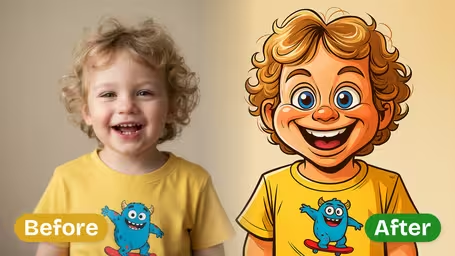

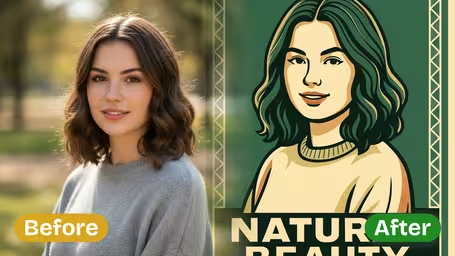
What the photo to digital art converter does
It repaints your photo rather than laying a filter on top. The subject, pose and main colors stay; texture, light and edges are rebuilt in the style you choose. There are four styles and one model, so results are consistent and every image costs the same. Each result comes out as a square image you can download right away.
- 01
Four painting styles
Oil Painting with thick brushstrokes, Watercolor with soft transparent washes, Digital Painting with a clean polished finish, or Concept Art with dramatic light and a cinematic layout.
- 02
Keeps what makes the photo yours
Face shape, hairstyle, pose and the main colors of clothes or fur carry over. Small details turn into brushwork, so the result reads as a painting of your photo.
- 03
One model, one flat price
Every style runs on GPT Image 2.5 and makes one image per click for 8 credits. New accounts get free credits plus a daily check-in bonus.
- 04
Square output ready to use
Results are square, which suits profile pictures, Instagram posts and square canvas prints. Center your subject before uploading to keep the framing you want.

How to convert a photo to digital art
Three steps, one photo, about a minute from upload to download.
- 01
Upload one photo
Add a single JPG or PNG. Portraits, pets, landscapes and buildings all work.
Use a sharp, well-lit photo with the subject near the center, because the result is square and the edges may be recomposed.
- 02
Choose an art style
Pick Oil Painting, Watercolor, Digital Painting or Concept Art. GPT Image 2.5 is the only model here, and every style costs 8 credits.
Digital Painting stays closest to your photo; Concept Art changes lighting and mood the most. Try both if you are unsure.
- 03
Generate and download
Click generate, wait a few seconds and download your painting. Run it again for a different take on the same style.
For printing, start from the highest-resolution photo you have and upscale the result before ordering large formats.


What people make with the photo to digital art converter
Most people want a favorite photo to look hand-painted. Wedding portraits become oil paintings for anniversaries, dog photos become watercolors for the hallway, and holiday snaps get printed as posters. Writers and tabletop players use Concept Art to turn reference photos into scenes for their stories.
Painted portraits as gifts
Turn a couple, parent or family photo into an oil-painting portrait for a birthday, anniversary or Mother's Day card.
Pet portraits
Dogs, cats and horses look great in Oil Painting or Watercolor. Fur becomes soft brushwork while the markings stay recognizable.
Wall art from travel photos
Repaint a beach, mountain or city shot in Watercolor and print it as a poster or small canvas for your home.
Concept art for stories and games
Use the Concept Art style to give a photo of a street, forest or costume a cinematic, illustrated look for a novel, D&D campaign or mood board.
Photo to Digital Art FAQ
Answers about the four art styles, credits, which photos work and what to do with the finished painting.
AI Pricing Plans
Flexible AI Pricing
Pay-as-you-go credits or subscription plans. No hidden fees, cancel anytime.
One Time supports crypto payment (BTC, USDT, ETH, 350+) · Monthly billing
Free-One Time
Try before you buy
- Up to 3 videos
- Up to 32 images
- Multi-Model Support
- Text to Video
- Image to Video
- Video to Video
Show more (+11)
- Consistent Character
- AI Animation Generator
- Templates & Effects
- AI Video Enhancers
- Interactive Community
- Faster Generation Speed
- No-watermark Outputs
- More Camera Movement
- Private Video Visibility
- Copy Protection
- Priority Support
Pro-1 Month
PopularElevate your AI experience
- Up to 80 videos
- Up to 800 images
- 3 tasks(Parallel Tasks)
- Multi-Model Support
- Text to Video
- Image to Video
Show more (+12)
- Video to Video
- Consistent Character
- AI Animation Generator
- Templates & Effects
- AI Video Enhancers
- Interactive Community
- Faster Generation Speed
- No-watermark Outputs
- More Camera Movement
- Private Video Visibility
- Copy Protection
- Priority Support
Lite-1 Month
Start your AI journey
- Up to 30 videos
- Up to 300 images
- 3 tasks(Parallel Tasks)
- Multi-Model Support
- Text to Video
- Image to Video
Show more (+12)
- Video to Video
- Consistent Character
- AI Animation Generator
- Templates & Effects
- AI Video Enhancers
- Interactive Community
- Faster Generation Speed
- No-watermark Outputs
- More Camera Movement
- Private Video Visibility
- Copy Protection
- Priority Support
- Card
- Crypto accepted (BTC, USDT, ETH, 350+)