


🎨 Seedream 5.0 Pro — ByteDance's flagship image model: up to 2K, best-in-class typography & multi-reference editing!


3D Pixar
3D Pixar Generator - Transform your photos into Pixar-style 3D animated characters with classic Pixar modeling, vibrant colors, and professional animation quality.
Example Gallery


Recommended Templates


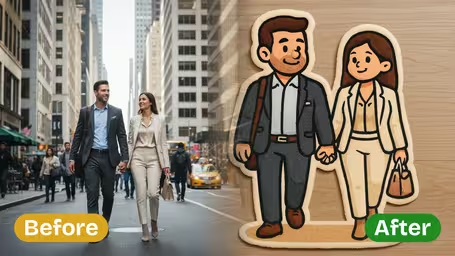
AI 3D Pixar Generator Features
Transform any uploaded image into a vivid, 3D Disney Pixar-style creation with Dreamega's AI-powered generator, preserving unique character details while adding lifelike charm.
- 01
Convert Your Photos Into 3D Disney Pixar Style
Upload any image and instantly turn your subject into a detailed 3D Pixar-style version, complete with vibrant colors and lifelike textures that mirror Disney’s signature look.
- 02
Accurate Disney-Pixar Character Rendering
Generate faithful 3D Pixar-style recreations that capture signature Disney features like expressive eyes, soft contours, and warm facial details for an authentic character transformation.
- 03
Create Engaging Pixar-Inspired Social Content
Transform your photos into playful 3D Pixar-style images perfect for profile avatars or social posts, helping you capture attention and boost engagement with a whimsical Disney touch.
How to Turn Your Photo into a 3D Pixar-Style Image
Upload one clear photo and get a square, Pixar-inspired 3D character image set in a warm family scene, with no settings to adjust.
- 01
Upload Your Photo
Upload one JPG or PNG photo of a person, a pet or a small group. The face should be sharp and fill a good part of the frame.
Crop around the subject before uploading. The output is square, so a centered subject keeps more of the body in the picture.
- 02
Generate the 3D Pixar-Style Image
Click generate. There is nothing to configure: the template runs GPT Image 2.5, rebuilds your subject as a 3D animated character and places it in a cozy, film-like family scene. Each image costs 8 credits.
If the first result drifts from your likeness, try a different photo with more even light instead of rerunning the same one.
- 03
Download and Share
Download the square image and use it as a profile picture, a birthday card cover or a print for the family.
The square format fits profile pictures as is. For a story post, place it on a taller canvas rather than stretching it.



What people make with 3D Pixar
Most people use 3D Pixar to see family members, kids and pets as animated-movie characters. Because the template adds a cozy home scene and soft lighting on its own, you get a finished picture rather than just a restyled face, which is why it gets used a lot for gifts and family keepsakes.
Family portraits
Turn a holiday photo of parents and kids into something that looks like a still from an animated film, then frame it or put it on a calendar page.
Pet characters
Dogs and cats come out with big eyes and soft 3D fur. Owners use them as profile pictures or print them on mugs.
Birthday and anniversary cards
A 3D character version of the guest of honor makes a personal card cover or one slide in a celebration video.
Profile pictures
The output is already square, so it drops into Instagram, WhatsApp or Discord without cropping.
AI 3D Pixar Generator FAQ
Practical answers about the 3D Pixar template: photo tips, pets, group shots, the credit cost and how you can use the results.
AI Pricing Plans
Flexible AI Pricing
Pay-as-you-go credits or subscription plans. No hidden fees, cancel anytime.
One Time supports crypto payment (BTC, USDT, ETH, 350+) · Monthly billing
Free-One Time
Try before you buy
- Up to 3 videos
- Up to 32 images
- Multi-Model Support
- Text to Video
- Image to Video
- Video to Video
Show more (+11)
- Consistent Character
- AI Animation Generator
- Templates & Effects
- AI Video Enhancers
- Interactive Community
- Faster Generation Speed
- No-watermark Outputs
- More Camera Movement
- Private Video Visibility
- Copy Protection
- Priority Support
Pro-1 Month
PopularElevate your AI experience
- Up to 80 videos
- Up to 800 images
- 3 tasks(Parallel Tasks)
- Multi-Model Support
- Text to Video
- Image to Video
Show more (+12)
- Video to Video
- Consistent Character
- AI Animation Generator
- Templates & Effects
- AI Video Enhancers
- Interactive Community
- Faster Generation Speed
- No-watermark Outputs
- More Camera Movement
- Private Video Visibility
- Copy Protection
- Priority Support
Lite-1 Month
Start your AI journey
- Up to 30 videos
- Up to 300 images
- 3 tasks(Parallel Tasks)
- Multi-Model Support
- Text to Video
- Image to Video
Show more (+12)
- Video to Video
- Consistent Character
- AI Animation Generator
- Templates & Effects
- AI Video Enhancers
- Interactive Community
- Faster Generation Speed
- No-watermark Outputs
- More Camera Movement
- Private Video Visibility
- Copy Protection
- Priority Support
- Card
- Crypto accepted (BTC, USDT, ETH, 350+)