


🎨 Seedream 5.5 — ByteDance's newest image model: native transparent backgrounds, up to 2K & editing with up to 10 references!


3D Face Emoji
3D Face Emoji Generator - Transform your photos into highly stylized 3D emoji characters with rounded features, oversized expressive eyes, and playful proportions.
Example Gallery


Recommended Templates

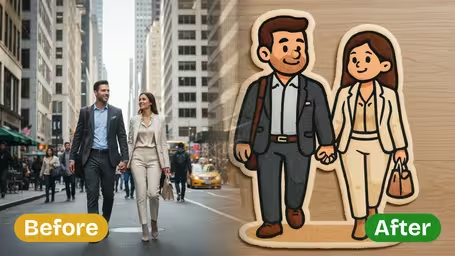
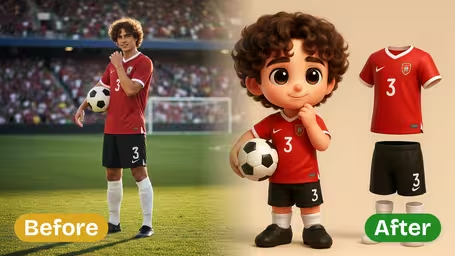


AI 3D Face Emoji Generator Features
Discover how Dreamega's AI 3D face emoji generator instantly transforms any uploaded photo into a personalized 3D Apple-style avatar emoji, preserving facial features, hairstyles, and expressions for a lifelike result.
- 01
Instant 3D Emoji Creation
Upload your photo and watch Dreamega's generator turn it into a lively 3D Apple-style emoji face within seconds, perfect for messaging or sharing on social media.
- 02
Preserve Unique Facial Traits
Your distinctive facial features, hair style, and natural expressions are accurately retained, ensuring each generated emoji avatar truly reflects the photo subject’s personality.
- 03
Authentic Apple-Style Design
Advanced AI replicates the smooth shapes, vibrant colors, and polished look of Apple emoji avatars, transforming your photo into a high-quality 3D face emoji.

How to Turn Your Photo Into a 3D Face Emoji
Upload one JPG or PNG photo, choose an Emoji Style and a model, and get a round, big-eyed 3D emoji of yourself that keeps your hair, glasses and outfit.
- 01
Upload one clear photo
Upload a JPG or PNG with a single person in it. A selfie or head-and-shoulders portrait works best, because the model needs to see your face, your hairstyle and whatever you wear on your head.
Take off sunglasses and keep hair out of your eyes. The eyes are what this style enlarges most, so they need to be visible.
- 02
Pick a style and a model, then generate
Under Emoji Style, choose Classic Yellow, Realistic Skin or Colorful, or pick Custom Style and type your own idea such as “pastel pink”. Select GPT Image 2.5 (8 credits) or Nano Banana 2.1 (4 credits) and start the generation.
Comparing several styles? Run them on Nano Banana 2.1 first, then redo your favorite on GPT Image 2.5 for the more detailed version.
- 03
Download and put it to use
Download the image when it finishes. Set it as a profile picture, send it in a chat, or turn it into a sticker for your messaging app.
If the background came back as a plain color instead of transparent, remove it with a background remover before making a sticker.
When people use the 3D Face Emoji template
Most people want a cartoon version of themselves that still looks like them, for a profile picture, a chat sticker or a reaction image. Because the template keeps your hairstyle, glasses and outfit, friends can tell it's you even at thumbnail size, which a stock emoji can't do.
Personal chat stickers
Make a few versions in different Emoji Styles, remove the background, and load them into a WhatsApp or Telegram sticker pack.
Profile pictures without a real photo
A Realistic Skin version works as an avatar on Discord, Slack or a gaming profile when you'd rather not show your actual face.
Matching set for a team or family
Run each person's photo separately with the same style, so the whole group chat or team page gets a consistent set.
Pet emoji
Turn a close-up of your cat or dog into a round, big-eyed character for posts or a one-off custom sticker.
AI 3D Face Emoji Generator FAQ
Answers about the 3D Face Emoji template: picking an Emoji Style, keeping your likeness, using the result as a sticker, and GPT Image 2.5 versus Nano Banana 2.1.
AI Pricing Plans
Flexible AI Pricing
Pay-as-you-go credits or subscription plans. No hidden fees, cancel anytime.
One Time supports crypto payment (BTC, USDT, ETH, 350+) · Monthly billing
Free-One Time
Try before you buy
- Up to 3 videos
- Up to 32 images
- Multi-Model Support
- Text to Video
- Image to Video
- Video to Video
Show more (+11)
- Consistent Character
- AI Animation Generator
- Templates & Effects
- AI Video Enhancers
- Interactive Community
- Faster Generation Speed
- No-watermark Outputs
- More Camera Movement
- Private Video Visibility
- Copy Protection
- Priority Support
Pro-1 Month
PopularElevate your AI experience
- Up to 80 videos
- Up to 800 images
- 3 tasks(Parallel Tasks)
- Multi-Model Support
- Text to Video
- Image to Video
Show more (+12)
- Video to Video
- Consistent Character
- AI Animation Generator
- Templates & Effects
- AI Video Enhancers
- Interactive Community
- Faster Generation Speed
- No-watermark Outputs
- More Camera Movement
- Private Video Visibility
- Copy Protection
- Priority Support
Lite-1 Month
Start your AI journey
- Up to 30 videos
- Up to 300 images
- 3 tasks(Parallel Tasks)
- Multi-Model Support
- Text to Video
- Image to Video
Show more (+12)
- Video to Video
- Consistent Character
- AI Animation Generator
- Templates & Effects
- AI Video Enhancers
- Interactive Community
- Faster Generation Speed
- No-watermark Outputs
- More Camera Movement
- Private Video Visibility
- Copy Protection
- Priority Support
- Card
- Crypto accepted (BTC, USDT, ETH, 350+)