


🎨 Seedream 5.0 Pro — ByteDance's flagship image model: up to 2K, best-in-class typography & multi-reference editing!


AI 3D Trompe L'Oeil Art Generator
AI 3D Trompe L'Oeil Art Generator - Transform your photos into stunning 3D trompe-l'œil artworks where subjects appear to step out of social media interfaces with realistic dimensional breakthrough effects.
Example Gallery


Recommended Templates


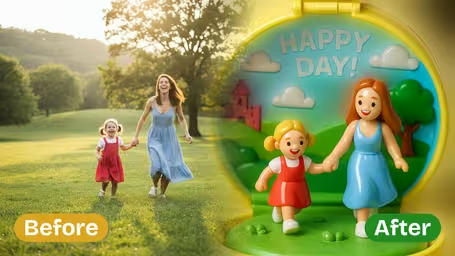


AI 3D Trompe L'Oeil Art Generator Features
Transform ordinary photos into realistic 3D trompe l’oeil illusions with Dreamega’s AI-powered art generator. Create depth-rich, eye-tricking social media images instantly with vivid optical effects.
- 01
Craft Realistic Optical Illusions
Easily convert your images into stunning 3D trompe l’oeil art that fools the eye with lifelike detail. Dreamega’s generator adds convincing depth and perspective, ideal for artistic photo effects and social media visuals.
- 02
Hyper-Realistic 3D Social Media Effects
Apply advanced trompe l’oeil techniques to create images that appear to break through the boundaries of your screen. Made for attention-grabbing social media posts, these effects produce believable, high-impact illusions.
- 03
Boost Creativity in Your Media Posts
Design playful illusionary scenes like stepping out of a social interface. Dreamega’s vibrant outcomes enhance engagement, making your photo art stand out, attract followers, and increase shareability across platforms.
How to Create 3D Trompe L'Oeil Art from Your Photo
Upload one photo, choose which app the phone screen should imitate, and get a still image of your subject climbing out of that phone.
- 01
Upload a Full-Body Photo
Upload a JPG or PNG of one person, pet or product. The subject ends up stepping out of a phone with a leg over the frame, so a shot that shows the whole body leaves the AI less to invent.
Skip photos where hands, bags or other people cover the legs.
- 02
Choose the Interface Style and Model
Pick Instagram, TikTok, Facebook or Generic Social Media, or type a platform name yourself, such as YouTube. Then choose GPT Image 2.5 (8 credits, square output) or Nano Banana 2.1 (4 credits).
Try a new photo on Nano Banana 2.1 first, then make the final version with GPT Image 2.5.
- 03
Generate and Check the Details
After generating, zoom in on the phone screen before you post. Usernames, counts and emoji icons are drawn by the AI and can come out garbled. Download it if it looks right, or run it again.
The result is a still image. If you want your real handle on it, paste it over the AI text in any photo editor.



When people use the 3D trompe l'oeil generator
Most people use it for a post where they seem to climb out of their own feed. Creators use it to mark a follower milestone, small shops use it to tease a product, and plenty of people just want one picture on their profile grid that doesn't look like all the others.
Follower milestone posts
Pick the interface of the app where you hit the milestone and post the image as a thank-you. Swap in your real follower number afterwards, since the AI's numbers are random.
Product teasers for small shops
Upload a clean product shot and the item pushes out of a phone screen with emoji hearts floating around it. A plain background gives cleaner edges.
Pet accounts
A full-body photo of your cat or dog climbing out of a TikTok-style screen gets more reactions than yet another photo on the sofa.
Invites and announcements
For a birthday invite, a club recruitment post or a new-account teaser where no specific app should appear, use Generic Social Media or type your own name.
3D Trompe L'Oeil Art Generator FAQ
Answers about interface styles, photo choice, models and credits, and why the on-screen text in the 3D trompe l'oeil generator looks the way it does.
AI Pricing Plans
Flexible AI Pricing
Pay-as-you-go credits or subscription plans. No hidden fees, cancel anytime.
One Time supports crypto payment (BTC, USDT, ETH, 350+) · Monthly billing
Free-One Time
Try before you buy
- Up to 3 videos
- Up to 32 images
- Multi-Model Support
- Text to Video
- Image to Video
- Video to Video
Show more (+11)
- Consistent Character
- AI Animation Generator
- Templates & Effects
- AI Video Enhancers
- Interactive Community
- Faster Generation Speed
- No-watermark Outputs
- More Camera Movement
- Private Video Visibility
- Copy Protection
- Priority Support
Pro-1 Month
PopularElevate your AI experience
- Up to 80 videos
- Up to 800 images
- 3 tasks(Parallel Tasks)
- Multi-Model Support
- Text to Video
- Image to Video
Show more (+12)
- Video to Video
- Consistent Character
- AI Animation Generator
- Templates & Effects
- AI Video Enhancers
- Interactive Community
- Faster Generation Speed
- No-watermark Outputs
- More Camera Movement
- Private Video Visibility
- Copy Protection
- Priority Support
Lite-1 Month
Start your AI journey
- Up to 30 videos
- Up to 300 images
- 3 tasks(Parallel Tasks)
- Multi-Model Support
- Text to Video
- Image to Video
Show more (+12)
- Video to Video
- Consistent Character
- AI Animation Generator
- Templates & Effects
- AI Video Enhancers
- Interactive Community
- Faster Generation Speed
- No-watermark Outputs
- More Camera Movement
- Private Video Visibility
- Copy Protection
- Priority Support
- Card
- Crypto accepted (BTC, USDT, ETH, 350+)