


🎨 Seedream 5.0 Pro — ByteDance's flagship image model: up to 2K, best-in-class typography & multi-reference editing!


3D Miniature ESC Keycap
3D Miniature ESC Keycap Generator - Transform subjects into highly detailed miniature 3D scenes enclosed inside a transparent ESC keycap on a computer keyboard.
Example Gallery


Recommended Templates


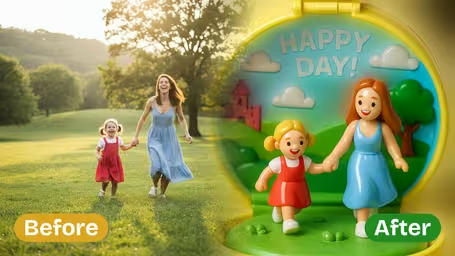

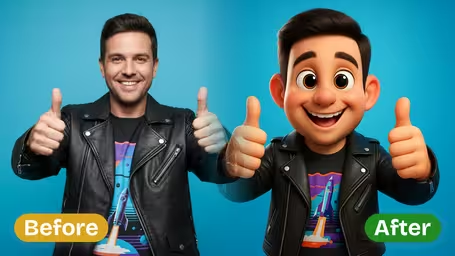

AI 3D Miniature ESC Keycap Generator Features
Explore how Dreamega’s AI 3D miniature ESC keycap generator transforms your uploaded images into lifelike, detailed miniature working scenes embedded in an ESC keycap.
- 01
Turn Image into Miniature Workspace Keycap
Upload any image of your subject and instantly generate a vivid 3D miniature ESC keycap scene of them working. The generator recreates the working environment inside the keycap, making it ideal for custom art or keyboard design projects.
- 02
Miniature Keycap with Accurate Details
Advanced AI processing ensures precise replication of your subject’s facial features, clothing, and other visual elements. Every detail in the miniature workspace keycap scene matches your original image for a true-to-life effect.
- 03
Immersive Workspace Scene in Keycap
Create a static yet visually rich 3D ESC keycap scene that shows your subject at work with realistic elements like a monitor, desk, and accessories. The generator produces professional-looking miniature displays for any setup.

How to Create a 3D Miniature ESC Keycap Working Scene from Your Image with Dreamega Generator
Upload a photo and get the subject back as a tiny figurine working at a mini desk inside a clear ESC keycap.
- 01
Upload a clear photo of one subject
Use a JPG or PNG of a person or pet where hair, glasses and clothing colors are easy to see.
Distinctive outfits and hairstyles survive the tiny scale better than facial details, so pick a photo where they stand out.
- 02
Choose a model and generate
GPT Image 2.5 (8 credits) gives the cleanest glass keycap and ESC lettering; Nano Banana 2.1 (4 credits) is cheaper for a first draft.
If the lettering on top comes out wrong, regenerate or switch to GPT Image 2.5.
- 03
Download your keycap scene
Save the image for a desk-setup post, a profile picture or a gift for a friend who lives on their keyboard.
Keep the original file if you plan to show it to an artisan keycap maker as a reference.


Who uses the 3D Miniature ESC Keycap template
This one is popular with people who spend their day at a keyboard: developers, gamers, designers and mechanical-keyboard fans. The joke of being stuck under the escape key makes it a good fit for work humor, and the warm desk lighting makes it look like a real collectible on a real board.
Keyboard community posts
Mechanical keyboard fans share it next to their real setups, as if it were a custom artisan keycap.
Gift for a coder or gamer
A photo of a friend becomes a tiny version of them at their desk, a light birthday or farewell gift.
Last day or vacation post
People use the escape-key scene to announce leaving a job or logging off for holidays on LinkedIn or in the team chat.
Artisan keycap reference
Some use the image as a mood reference when ordering a handmade resin keycap from a maker.
AI 3D Miniature ESC Keycap Generator FAQ
Answers about the 3D Miniature ESC Keycap template: what the scene contains, likeness at tiny scale, model choice and credits, and real keycaps.
AI Pricing Plans
Flexible AI Pricing
Pay-as-you-go credits or subscription plans. No hidden fees, cancel anytime.
One Time supports crypto payment (BTC, USDT, ETH, 350+) · Monthly billing
Free-One Time
Try before you buy
- Up to 3 videos
- Up to 32 images
- Multi-Model Support
- Text to Video
- Image to Video
- Video to Video
Show more (+11)
- Consistent Character
- AI Animation Generator
- Templates & Effects
- AI Video Enhancers
- Interactive Community
- Faster Generation Speed
- No-watermark Outputs
- More Camera Movement
- Private Video Visibility
- Copy Protection
- Priority Support
Pro-1 Month
PopularElevate your AI experience
- Up to 80 videos
- Up to 800 images
- 3 tasks(Parallel Tasks)
- Multi-Model Support
- Text to Video
- Image to Video
Show more (+12)
- Video to Video
- Consistent Character
- AI Animation Generator
- Templates & Effects
- AI Video Enhancers
- Interactive Community
- Faster Generation Speed
- No-watermark Outputs
- More Camera Movement
- Private Video Visibility
- Copy Protection
- Priority Support
Lite-1 Month
Start your AI journey
- Up to 30 videos
- Up to 300 images
- 3 tasks(Parallel Tasks)
- Multi-Model Support
- Text to Video
- Image to Video
Show more (+12)
- Video to Video
- Consistent Character
- AI Animation Generator
- Templates & Effects
- AI Video Enhancers
- Interactive Community
- Faster Generation Speed
- No-watermark Outputs
- More Camera Movement
- Private Video Visibility
- Copy Protection
- Priority Support
- Card
- Crypto accepted (BTC, USDT, ETH, 350+)