


🎨 Seedream 5.0 Pro — ByteDance's flagship image model: up to 2K, best-in-class typography & multi-reference editing!


Crayon AI Drawing Effect
Crayon AI Drawing Effect - Transform your photos into vibrant crayon drawings with bright saturated colors and childhood art aesthetic.
Example Gallery


Recommended Templates
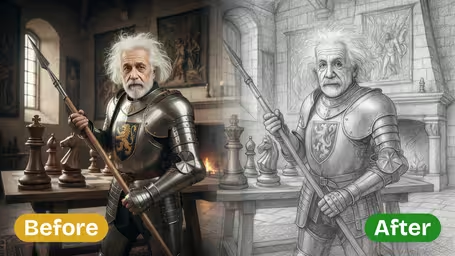

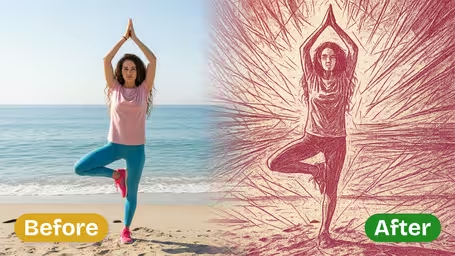

Crayon AI Drawing Effect Features
Discover how the Crayon AI Drawing Effect from Dreamega turns your uploaded photo into playful, vibrant crayon art with simplified lines and cheerful tones.
- 01
Convert Photo into Playful Crayon Drawing
Transform any uploaded image into a lively crayon drawing through our AI generator. The effect captures bold colors and a simplified subject, preserving a playful, childlike charm.
- 02
Vibrant Crayon Color Transformation
Reimagine your images with cheerful hues and bold strokes. The AI applies a vivid palette that mimics the fun, energetic look of real crayon artwork.
- 03
Simplified Subject with Clean Lines
The generator reduces complex details into clear outlines, giving your photo an illustrated, picture-book style complemented by a colorful background.

How to Turn Your Photo into Playful Crayon Drawing Effect with Dreamega AI Generator
Upload one JPG or PNG and the template redraws it as a square crayon picture with waxy strokes and bright primary colors.
- 01
Upload One Photo
Pick a single JPG or PNG: a portrait, a pet, a favorite toy or your house. WebP and other formats aren't accepted, so convert them first.
The result is square, so crop to roughly 1:1 with your subject centered before you upload.
- 02
Generate the Crayon Drawing
There are no styles to choose. The template runs on GPT-Image 2.5 Flare Edit App and costs 8 credits per drawing, shown before you start.
Clear outlines and a plain background give bold, readable shapes, which is what makes it look like real crayon.
- 03
Download and Share
Download the drawing, post it, print it on a card or send it to family. For a different take, run the same photo again.
Colorful clothes in the photo carry into the drawing; photos with dull colors give flatter results.


When people use the Crayon AI Drawing Effect
Most people use it for something personal: a parent turning a family photo into a picture that looks like their kid drew it, a teacher making class materials, or someone who wants a playful avatar instead of a selfie. The crayon look is forgiving, so an ordinary phone photo works fine.
Fridge-art family portraits
Turn a family photo into a picture that looks like it came home from kindergarten. Framed, it tends to be a hit with grandparents.
Birthday and greeting cards
Put a crayon version of the birthday kid, or the whole family, on the front of a card or party invite. The square format fits most card templates.
Pet portraits
Dogs and cats with distinct markings become cheerful scribbled portraits for a phone wallpaper or a printed gift.
Classroom and kids' content
Teachers and people who make kids' content use it to give worksheets, slides and story illustrations a hand-drawn look without drawing anything.
Crayon AI Drawing Effect FAQ
Straight answers about the Crayon AI Drawing Effect: which photos work, why the result is square, what a drawing costs and how you can use it.
AI Pricing Plans
Flexible AI Pricing
Pay-as-you-go credits or subscription plans. No hidden fees, cancel anytime.
One Time supports crypto payment (BTC, USDT, ETH, 350+) · Monthly billing
Free-One Time
Try before you buy
- Up to 3 videos
- Up to 32 images
- Multi-Model Support
- Text to Video
- Image to Video
- Video to Video
Show more (+11)
- Consistent Character
- AI Animation Generator
- Templates & Effects
- AI Video Enhancers
- Interactive Community
- Faster Generation Speed
- No-watermark Outputs
- More Camera Movement
- Private Video Visibility
- Copy Protection
- Priority Support
Pro-1 Month
PopularElevate your AI experience
- Up to 80 videos
- Up to 800 images
- 3 tasks(Parallel Tasks)
- Multi-Model Support
- Text to Video
- Image to Video
Show more (+12)
- Video to Video
- Consistent Character
- AI Animation Generator
- Templates & Effects
- AI Video Enhancers
- Interactive Community
- Faster Generation Speed
- No-watermark Outputs
- More Camera Movement
- Private Video Visibility
- Copy Protection
- Priority Support
Lite-1 Month
Start your AI journey
- Up to 30 videos
- Up to 300 images
- 3 tasks(Parallel Tasks)
- Multi-Model Support
- Text to Video
- Image to Video
Show more (+12)
- Video to Video
- Consistent Character
- AI Animation Generator
- Templates & Effects
- AI Video Enhancers
- Interactive Community
- Faster Generation Speed
- No-watermark Outputs
- More Camera Movement
- Private Video Visibility
- Copy Protection
- Priority Support
- Card
- Crypto accepted (BTC, USDT, ETH, 350+)