


🎨 Seedream 5.0 Pro — ByteDance's flagship image model: up to 2K, best-in-class typography & multi-reference editing!


AI Cartoon Generator
AI Cartoon Generator - Transform your photos into clean, colorful cartoon style illustrations with bold outlines, simplified details, and vibrant tones.
Example Gallery


Recommended Templates


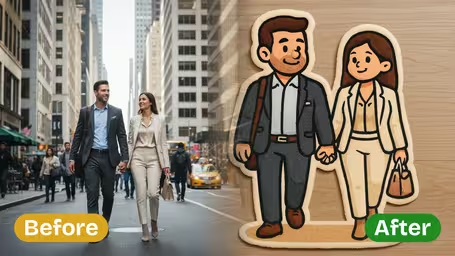

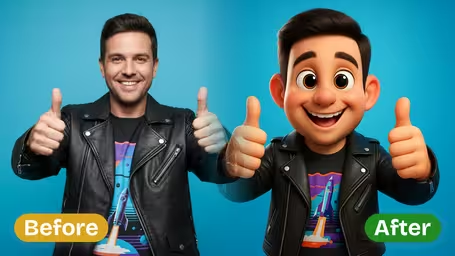
Photo to Cartoon Generator Features
Transform your photos into captivating cartoon images instantly with Dreamega’s AI-powered photo to cartoon generator. Enjoy diverse artistic styles, quick conversions, and creative applications for portraits, landscapes, and more—all for free.
- 01
Convert Photo to Cartoon With Artistic Flair
Easily turn any real-life photo into an artistic cartoon image in seconds. Give your photos a distinctive stylized appearance that grabs attention for social media, presentations, or creative projects.
- 02
Instant Free Cartoon Conversions
Quickly cartoonize photos without spending a cent. Simply upload any image, from selfies to pet pictures, and receive a unique cartoon version almost instantly.
- 03
Diverse Artistic Cartoon Styles
Choose from a wide array of cartoon styles including pixel art, watercolor, comic, manga, Pixar-inspired looks, or 3D renderings. Match your cartoonized images to any creative theme or personal preference.
- 04
Create Unique Cartoon Portraits
Transform portrait photos into playful and eye-catching cartoon profiles. Perfect for avatars, gaming accounts, or art projects, these customized cartoon portraits reflect your personality in a fun way.
- 05
Reimagine Landscapes as Cartoons
Cartoonize landscape images to make ordinary scenery look extraordinary. Convert pictures of lakes, mountains, buildings, and cityscapes into vibrant cartoon art that’s ready to share.
- 06
Cartoonize Any Picture in Any Style
Upload any photo and select from a variety of cartoon effects to create your desired look, whether whimsical, realistic, or stylized. Enjoy complete creative freedom with Dreamega’s generator.



How to Turn a Photo into a Cartoon with AI
Upload one clear photo, choose how cartoonish and how colorful you want it, and download a square cartoon with bold outlines and flat colors.
- 01
Upload one clear photo
Upload a JPG or PNG of a person, a couple, a pet or a scene. One image per generation.
Crop roughly square around the subject first. The result is square, and a face that fills the frame keeps the likeness best.
- 02
Pick style intensity and colors, then generate
Choose Light, Medium or Strong cartoon style, and Natural, Vibrant or Cheerful colors. Then click generate; it costs 8 credits.
Start with Light if you want people to recognize you, Strong if you want a playful, exaggerated avatar.
- 03
Download your cartoon
Save the finished image and use it as an avatar, a print or a post.
If the colors feel too loud, rerun with Natural Colors instead of changing the style.


When people use the AI Cartoon Generator
Most people come here with one photo they like and want a friendlier, drawn version of it: a profile picture that doesn't show every pore, a gift for someone, or a picture of their kid or dog that looks like a page from a picture book. The two settings let you go from barely cartoonish to fully stylized.
Profile pictures
A Light or Medium cartoon of your face works well on WhatsApp, Discord, Slack or a forum where you don't want a raw selfie.
Personalized gifts
Couples and family photos turned into cartoons get printed on mugs, cards and canvas for birthdays and anniversaries.
Kids and pets
Cheerful Colors with Medium style gives children and pet photos a storybook feel that parents like to frame or share.
Small business and creators
A cartoon headshot gives a team page, YouTube channel or newsletter a consistent, approachable look without hiring an illustrator.
Photo to Cartoon Generator FAQ
Practical answers about the AI Cartoon Generator: the style and color settings, pets and group photos, getting a good likeness, credit cost and using your cartoon.
AI Pricing Plans
Flexible AI Pricing
Pay-as-you-go credits or subscription plans. No hidden fees, cancel anytime.
One Time supports crypto payment (BTC, USDT, ETH, 350+) · Monthly billing
Free-One Time
Try before you buy
- Up to 3 videos
- Up to 32 images
- Multi-Model Support
- Text to Video
- Image to Video
- Video to Video
Show more (+11)
- Consistent Character
- AI Animation Generator
- Templates & Effects
- AI Video Enhancers
- Interactive Community
- Faster Generation Speed
- No-watermark Outputs
- More Camera Movement
- Private Video Visibility
- Copy Protection
- Priority Support
Pro-1 Month
PopularElevate your AI experience
- Up to 80 videos
- Up to 800 images
- 3 tasks(Parallel Tasks)
- Multi-Model Support
- Text to Video
- Image to Video
Show more (+12)
- Video to Video
- Consistent Character
- AI Animation Generator
- Templates & Effects
- AI Video Enhancers
- Interactive Community
- Faster Generation Speed
- No-watermark Outputs
- More Camera Movement
- Private Video Visibility
- Copy Protection
- Priority Support
Lite-1 Month
Start your AI journey
- Up to 30 videos
- Up to 300 images
- 3 tasks(Parallel Tasks)
- Multi-Model Support
- Text to Video
- Image to Video
Show more (+12)
- Video to Video
- Consistent Character
- AI Animation Generator
- Templates & Effects
- AI Video Enhancers
- Interactive Community
- Faster Generation Speed
- No-watermark Outputs
- More Camera Movement
- Private Video Visibility
- Copy Protection
- Priority Support
- Card
- Crypto accepted (BTC, USDT, ETH, 350+)