


🎨 Seedream 5.0 Pro — ByteDance's flagship image model: up to 2K, best-in-class typography & multi-reference editing!


Prussian Blue Portrait Generator: Turn a Photo into a Bold One-Color Ink Sketch
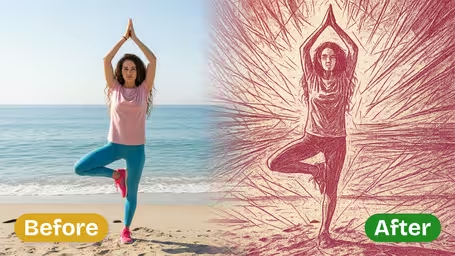
Upload one photo and the AI redraws it as a single-color portrait with raw brushstrokes, sharp angular marks and energy lines, a lot like a linocut print. Pick Prussian blue, crimson red or emerald green.
Example Gallery


Recommended Templates


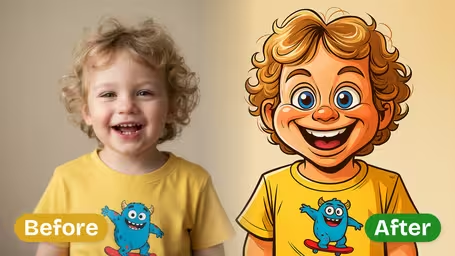
What the Prussian blue portrait template does
The template redraws your photo as a linocut-style illustration in a single ink. It keeps the pose, the face shape and the main shadows, then replaces color and fine texture with rough brushstrokes, angular accents and energy lines radiating from the subject. You only choose the ink and the model. The template writes the prompt for you.
- 01
Woodcut-style brushwork
Raw, angular strokes and high-contrast silhouettes, closer to a carved print than to a pencil sketch.
- 02
Three ink colors
Prussian Blue (default), Crimson Red or Emerald Green. Only the ink changes; the drawing style stays the same.
- 03
Likeness kept, details simplified
Face shape, hairstyle and pose carry over from the photo, while small details turn into bold shapes.
- 04
Two models, one image per run
GPT Image 2.5 returns a square image for 8 credits. Nano Banana 2.1 costs 4 credits and suits quick tests.

How to make a Prussian blue portrait from a photo
Three steps, about a minute. All you need is one photo.
- 01
Upload one photo
Upload a JPG or PNG of a person, a pet or an action shot. The template takes one image per run.
Pick a photo with visible shadows. Side light gives the brushstrokes more shape than flat front light.
- 02
Choose the ink color and model
Pick Prussian Blue, Crimson Red or Emerald Green. Then choose GPT Image 2.5 (8 credits, square output) or Nano Banana 2.1 (4 credits).
Test a new photo on Nano Banana 2.1 first, then rerun your favorite color on GPT Image 2.5.
- 03
Generate and download
Click generate, wait a few seconds and download the portrait. Each run is drawn fresh, so a second try gives a different stroke pattern.
For printing, crop tight around the subject before uploading so the face fills more of the final image.


What people make with the Prussian blue portrait
Most people use it to get a hand-printed look without carving a block. Runners and climbers turn race photos into posters for their wall. Bands and DJs make one-color flyers and cover art. Designers use one of the three inks to give a whole team matching profile pictures, and pet owners print a blue sketch of their dog as a gift.
Sports and action posters
Photos with movement get the most out of the radiating energy lines. A sprint finish or a skate trick turns into a poster that looks hand-printed.
Matching team avatars
Run every teammate's headshot in the same ink color and you get a set of profile pictures that look like one series.
One-color print and merch art
A single ink is easy to screen print or stamp, so the result is a practical starting point for tees, totes and zines.
Pet and gift portraits
A deep blue sketch of a dog or cat, framed, makes a personal gift that doesn't look like just another phone photo.
Prussian Blue Portrait FAQ
Colors, photos, credits and printing for the one-color ink portrait template.
AI Pricing Plans
Flexible AI Pricing
Pay-as-you-go credits or subscription plans. No hidden fees, cancel anytime.
One Time supports crypto payment (BTC, USDT, ETH, 350+) · Monthly billing
Free-One Time
Try before you buy
- Up to 3 videos
- Up to 32 images
- Multi-Model Support
- Text to Video
- Image to Video
- Video to Video
Show more (+11)
- Consistent Character
- AI Animation Generator
- Templates & Effects
- AI Video Enhancers
- Interactive Community
- Faster Generation Speed
- No-watermark Outputs
- More Camera Movement
- Private Video Visibility
- Copy Protection
- Priority Support
Pro-1 Month
PopularElevate your AI experience
- Up to 80 videos
- Up to 800 images
- 3 tasks(Parallel Tasks)
- Multi-Model Support
- Text to Video
- Image to Video
Show more (+12)
- Video to Video
- Consistent Character
- AI Animation Generator
- Templates & Effects
- AI Video Enhancers
- Interactive Community
- Faster Generation Speed
- No-watermark Outputs
- More Camera Movement
- Private Video Visibility
- Copy Protection
- Priority Support
Lite-1 Month
Start your AI journey
- Up to 30 videos
- Up to 300 images
- 3 tasks(Parallel Tasks)
- Multi-Model Support
- Text to Video
- Image to Video
Show more (+12)
- Video to Video
- Consistent Character
- AI Animation Generator
- Templates & Effects
- AI Video Enhancers
- Interactive Community
- Faster Generation Speed
- No-watermark Outputs
- More Camera Movement
- Private Video Visibility
- Copy Protection
- Priority Support
- Card
- Crypto accepted (BTC, USDT, ETH, 350+)