


🎨 Seedream 5.0 Pro — ByteDance's flagship image model: up to 2K, best-in-class typography & multi-reference editing!


AI Hair Color Changer: See Yourself in a New Shade Before You Dye
Upload a selfie and choose from 18 colors, from natural brunette, chestnut and honey blonde to pink, blue and silver. The AI recolors only your hair and keeps your cut, texture, face and background.
Example Gallery


Recommended Templates

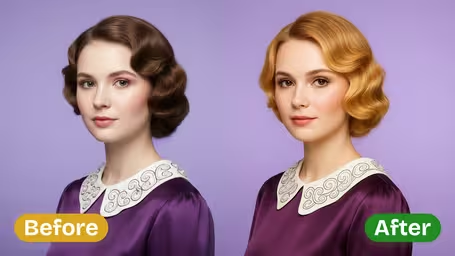


What the AI hair color changer does
It recolors your hair and nothing else. The prompt asks for a salon-dye look with natural tonal variation, while your haircut, the photo's composition, your face, clothes and background stay as they were.
- 01
18 shades, natural to vivid
Natural tones (Blonde, Brunette, Black, Chestnut, Auburn, Red), blonde variations (Platinum, Honey, Strawberry), warm and deep tones (Copper, Burgundy), fashion colors (Pink, Purple, Blue, Green) and Silver, Gray and White.
- 02
Cut, texture and volume kept
Your hairstyle is not changed. Strand texture, volume and styling stay, so curls stay curly and a bob stays a bob, just in the new color.
- 03
Face and skin untouched
Facial features, skin, clothing and background are kept, which makes it easy to judge how a shade works with your own complexion.
- 04
Two models, 4 or 8 credits
GPT Image 2.5 is the default at 8 credits and returns a square image. Nano Banana 2.1 costs 4 credits and keeps the shape of your original photo.

How to Change Your Hair Color in a Photo
Three steps. Try several shades on the same selfie and compare.
- 01
Upload a selfie in daylight
Upload one JPG or PNG where your hair is in focus and clearly visible.
Skip beauty and color filters. They shift skin and hair tones and make it harder to judge the new shade.
- 02
Pick a shade
Choose one of 18 colors, from Brunette, Chestnut and Honey Blonde to Copper, Burgundy, Pink, Blue and Silver.
Compare close neighbors, such as Honey Blonde, Strawberry Blonde and Platinum Blonde. The differences are what decide whether a color suits you.
- 03
Choose a model and generate
GPT Image 2.5 (8 credits, square image) or Nano Banana 2.1 (4 credits, keeps your photo's shape). Download the result.
Use Nano Banana 2.1 to shortlist shades cheaply, then render the final pick with GPT Image 2.5.


When people use the hair color changer
Most people use it right before a color appointment or a box-dye night, to settle between two shades. Others test a bold color for a festival or holiday, preview going gray, or plan a cosplay where the character's hair color matters.
Before a salon color appointment
Bring two or three previews so you and your colorist can agree on a shade, and how many sessions it might take, before any bleach comes out.
Trying a bold color first
Pink, Purple, Blue and Green are fun to imagine and hard to undo. A preview shows whether it works with your skin and wardrobe.
Going gray or covering gray
People deciding whether to stop dyeing use Gray, Silver and White, while others preview an even Brunette or Chestnut over their grays.
Cosplay and character looks
Copper, Silver or Blue previews help cosplayers decide between dyeing their own hair and buying a wig for a character.
AI Hair Color Changer FAQ
Answers about the 18 shades, how realistic the result is, and what to keep in mind before you actually dye.
AI Pricing Plans
Flexible AI Pricing
Pay-as-you-go credits or subscription plans. No hidden fees, cancel anytime.
One Time supports crypto payment (BTC, USDT, ETH, 350+) · Monthly billing
Free-One Time
Try before you buy
- Up to 3 videos
- Up to 32 images
- Multi-Model Support
- Text to Video
- Image to Video
- Video to Video
Show more (+11)
- Consistent Character
- AI Animation Generator
- Templates & Effects
- AI Video Enhancers
- Interactive Community
- Faster Generation Speed
- No-watermark Outputs
- More Camera Movement
- Private Video Visibility
- Copy Protection
- Priority Support
Pro-1 Month
PopularElevate your AI experience
- Up to 80 videos
- Up to 800 images
- 3 tasks(Parallel Tasks)
- Multi-Model Support
- Text to Video
- Image to Video
Show more (+12)
- Video to Video
- Consistent Character
- AI Animation Generator
- Templates & Effects
- AI Video Enhancers
- Interactive Community
- Faster Generation Speed
- No-watermark Outputs
- More Camera Movement
- Private Video Visibility
- Copy Protection
- Priority Support
Lite-1 Month
Start your AI journey
- Up to 30 videos
- Up to 300 images
- 3 tasks(Parallel Tasks)
- Multi-Model Support
- Text to Video
- Image to Video
Show more (+12)
- Video to Video
- Consistent Character
- AI Animation Generator
- Templates & Effects
- AI Video Enhancers
- Interactive Community
- Faster Generation Speed
- No-watermark Outputs
- More Camera Movement
- Private Video Visibility
- Copy Protection
- Priority Support
- Card
- Crypto accepted (BTC, USDT, ETH, 350+)