


🎨 Seedream 5.0 Pro — ByteDance's flagship image model: up to 2K, best-in-class typography & multi-reference editing!


AI Caricature Maker
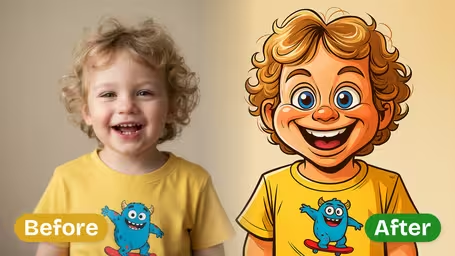
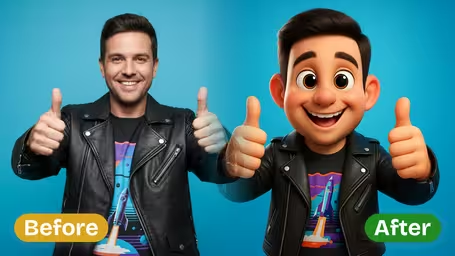
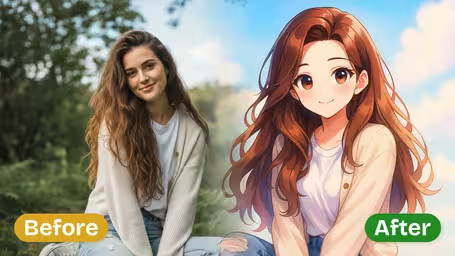
AI Caricature Maker - Transform your photos into highly detailed digital caricature illustrations with exaggerated facial proportions and cartoonish expressiveness.
Example Gallery


Recommended Templates


AI Caricature Maker Features
Discover how Dreamega’s free AI caricature maker transforms your uploaded photos into high-quality, fun, and uniquely detailed caricatures while keeping your original features recognizable.
- 01
Transform Photos into Playful Caricatures
Easily turn any uploaded photo into a vibrant caricature with Dreamega’s AI maker, perfect for social media profiles, gifts, or adding a touch of humor to your images.
- 02
High-Quality Output Every Time
Generate caricatures with crisp lines, rich colors, and preserved clarity so you can confidently share online or print for lasting enjoyment.
- 03
Facial Features Maintained
Dreamega’s AI analyzes your photo to retain important expressions, skin tones, and unique attributes, ensuring caricatures remain recognizable and personal.

How to Turn Your Photo into a Caricature with AI
Upload one portrait, set how far the features get pushed and in which style, then download the finished caricature.
- 01
Upload a Clear Portrait
Upload one JPG or PNG photo of yourself, a friend or a small group. Head-and-shoulders shots where the face is large and sharp give the most recognizable caricatures.
Remove sunglasses and skip heavy beauty filters; the AI needs to see real eye and mouth shapes to exaggerate them.
- 02
Pick Exaggeration, Style and Model
Choose Mild, Moderate or Strong exaggeration and an art style: Digital Art, Watercolor, Cartoon, or your own short style description. GPT Image 2.5 (8 credits) is the default; Nano Banana 2.1 costs 4 credits.
Try a new photo on Nano Banana 2.1 first, then rerun your favorite settings on GPT Image 2.5.
- 03
Generate and Download
Click generate. The face gets the caricature treatment while the background and outfit colors stay as they were. Download the image when you are happy with it.
If the result looks too extreme, run it again at Mild instead of changing the photo.



When people use the AI Caricature Maker
Most people come here for a funny but recognizable portrait without booking a street artist. Typical uploads are a selfie for a new avatar, a coworker's photo for a farewell card, or a couple shot for a wedding sign. Because the background and clothes stay the same, the caricature still feels like the original moment.
Profile pictures
A Moderate digital caricature reads well as a small round avatar on Discord, Slack or a gaming profile.
Farewell and birthday cards
Teams caricature a colleague for a leaving card or a retirement slideshow. Mild keeps it friendly.
Wedding and couple keepsakes
Couples turn an engagement photo into a watercolor caricature for a guest-book sign or thank-you cards.
Party and event invites
A Strong cartoon caricature of the birthday person on the invite gets a laugh before the party starts.
AI Caricature Maker FAQ
Answers about credits, exaggeration levels, art styles and getting a caricature that still looks like the person in the photo.
AI Pricing Plans
Flexible AI Pricing
Pay-as-you-go credits or subscription plans. No hidden fees, cancel anytime.
One Time supports crypto payment (BTC, USDT, ETH, 350+) · Monthly billing
Free-One Time
Try before you buy
- Up to 3 videos
- Up to 32 images
- Multi-Model Support
- Text to Video
- Image to Video
- Video to Video
Show more (+11)
- Consistent Character
- AI Animation Generator
- Templates & Effects
- AI Video Enhancers
- Interactive Community
- Faster Generation Speed
- No-watermark Outputs
- More Camera Movement
- Private Video Visibility
- Copy Protection
- Priority Support
Pro-1 Month
PopularElevate your AI experience
- Up to 80 videos
- Up to 800 images
- 3 tasks(Parallel Tasks)
- Multi-Model Support
- Text to Video
- Image to Video
Show more (+12)
- Video to Video
- Consistent Character
- AI Animation Generator
- Templates & Effects
- AI Video Enhancers
- Interactive Community
- Faster Generation Speed
- No-watermark Outputs
- More Camera Movement
- Private Video Visibility
- Copy Protection
- Priority Support
Lite-1 Month
Start your AI journey
- Up to 30 videos
- Up to 300 images
- 3 tasks(Parallel Tasks)
- Multi-Model Support
- Text to Video
- Image to Video
Show more (+12)
- Video to Video
- Consistent Character
- AI Animation Generator
- Templates & Effects
- AI Video Enhancers
- Interactive Community
- Faster Generation Speed
- No-watermark Outputs
- More Camera Movement
- Private Video Visibility
- Copy Protection
- Priority Support
- Card
- Crypto accepted (BTC, USDT, ETH, 350+)