


🎨 Seedream 5.5 — ByteDance's newest image model: native transparent backgrounds, up to 2K & editing with up to 10 references!


1980s Yearbook Photo AI
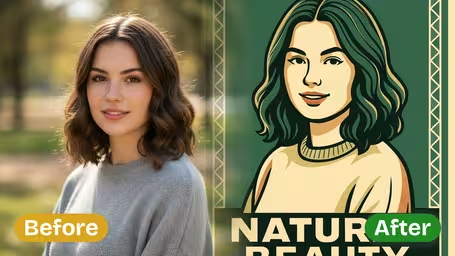
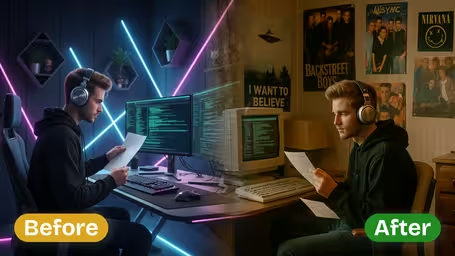
Upload a selfie and get a 1980s yearbook portrait with teased hair, bold colors and film grain. Prefer another era? The 50s, 60s, 70s, 90s and Y2K are one tap away.
Recommended Templates


AI Vintage Yearbook Generator Features
Discover how the Dreamega AI Vintage Yearbook Generator transports any portrait back to the golden age of American high school yearbooks. From feathered 70s hair to neon 80s shoulder pads and grunge 90s flannel, every detail is recreated with authentic film grain, washed-out colors, and the iconic laser-grid backdrops that defined a generation.
- 01
Authentic Decade-by-Decade Yearbook Looks
Switch between 1950s slicked-back classics, 1970s feathered disco hair, 1980s big-perm-and-pastels glamour, or 1990s grunge flannel with a single click. Each era brings its own period-correct hairstyles, wardrobe, and lighting so your portrait feels like it was actually pulled out of a real high school yearbook.
- 02
Iconic Retro Backdrops & Studio Lighting
Pick from the legendary backdrops that defined yearbook photography — classic blue gradients, soft grey studio paper, neon laser grids, library shelves, or fluorescent-lit school hallways. Combined with vintage soft-focus glow and warm portrait lighting, every shot looks freshly developed by the school photographer.
- 03
Built-in Film Grain & Faded Color Effects
Nail the look of analog photography with sepia tones, faded Kodak film color grading, black-and-white monochrome, and authentic film grain texture. The AI replicates the slight blur, color shift, and tonal warmth of old yearbook prints — the kind of imperfections that make a photo feel genuinely vintage.
- 04
Multiple Outfits, Poses & Yearbook Superlatives
Generate variations as the formal class portrait, the prom photo with corsage, the team uniform shot, or playful superlatives like Class Clown and Most Likely to Succeed. Mix and match eras, styles, and props to build an entire fake yearbook page that your friends will swear is real.
- 05
Made for Viral Sharing & Nostalgia Gifts
The vintage yearbook trend dominated TikTok and Instagram for a reason — these photos are pure conversation starters. Download high-resolution results perfect for Reels, reunion invitations, throwback Thursday posts, or printed gifts that will make your parents do a double-take.

How to Use AI Vintage Yearbook Generator
Transform modern photos into vintage yearbook portraits in four steps
- 01
Upload Modern Photo
Select and upload a modern photo of yourself. Clear, front-facing portraits work best. The AI will transform your appearance to match the vintage era you select. Supported formats include JPEG and PNG.
- 02
Choose Decade & Style
Select the decade you want your yearbook photo to represent: 1950s, 1960s, 1970s, 1980s, 1990s, or 2000s. Each decade features authentic hairstyles, fashion, and photographic characteristics of that era.
- 03
Select Effects & Filters
Choose vintage photo effects such as sepia tone, film grain, faded colors, soft focus, or era-specific color palettes. These effects enhance the authenticity of the vintage yearbook look.
- 04
Generate Yearbook Photo
Click generate to create your vintage yearbook portrait. The AI transforms your hairstyle, clothing, and photo quality to authentically match the selected decade while preserving your facial features.

AI Vintage Yearbook Generator FAQ
AI Pricing Plans
Flexible AI Pricing
Pay-as-you-go credits or subscription plans. No hidden fees, cancel anytime.
One Time supports crypto payment (BTC, USDT, ETH, 350+) · Monthly billing
Free-One Time
Try before you buy
- Up to 3 videos
- Up to 32 images
- Multi-Model Support
- Text to Video
- Image to Video
- Video to Video
Show more (+11)
- Consistent Character
- AI Animation Generator
- Templates & Effects
- AI Video Enhancers
- Interactive Community
- Faster Generation Speed
- No-watermark Outputs
- More Camera Movement
- Private Video Visibility
- Copy Protection
- Priority Support
Pro-1 Month
PopularElevate your AI experience
- Up to 80 videos
- Up to 800 images
- 3 tasks(Parallel Tasks)
- Multi-Model Support
- Text to Video
- Image to Video
Show more (+12)
- Video to Video
- Consistent Character
- AI Animation Generator
- Templates & Effects
- AI Video Enhancers
- Interactive Community
- Faster Generation Speed
- No-watermark Outputs
- More Camera Movement
- Private Video Visibility
- Copy Protection
- Priority Support
Lite-1 Month
Start your AI journey
- Up to 30 videos
- Up to 300 images
- 3 tasks(Parallel Tasks)
- Multi-Model Support
- Text to Video
- Image to Video
Show more (+12)
- Video to Video
- Consistent Character
- AI Animation Generator
- Templates & Effects
- AI Video Enhancers
- Interactive Community
- Faster Generation Speed
- No-watermark Outputs
- More Camera Movement
- Private Video Visibility
- Copy Protection
- Priority Support
- Card
- Crypto accepted (BTC, USDT, ETH, 350+)