


🎨 Seedream 5.0 Pro — ByteDance's flagship image model: up to 2K, best-in-class typography & multi-reference editing!


3D Miniature Scene
3D Miniature Scene Generator - Transform your photos into adorable 3D miniature diorama scenes with chibi-style figurines in dollhouse-like environments.
Example Gallery


Recommended Templates

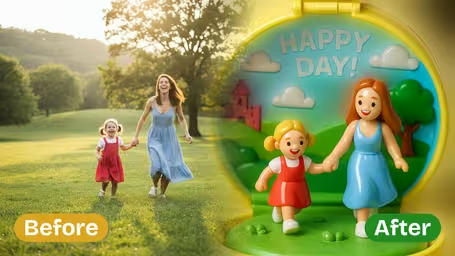


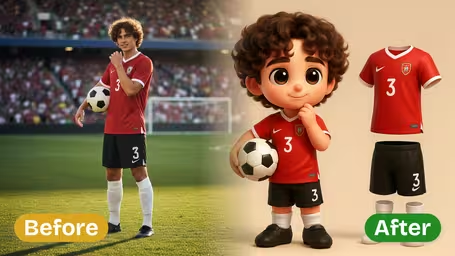
AI 3D Miniature Scene Generator Features
Explore Dreamega's AI 3D miniature scene generator to instantly transform any photo into a charming 3D miniature house, preview creative designs, and create themed scenes for social sharing.
- 01
Turn Your Photos Into Cute 3D Miniature Houses
Upload any image and let Dreamega's AI combine playful character elements with intricate architecture to recreate it as an enchanting 3D miniature house, complete with dollhouse-style details in just a few clicks.
- 02
Preview Unique 3D Miniature House Designs
Convert all your images into 3D miniature scene previews to explore innovative house concepts instantly—ideal for product visualization or creative inspiration before manufacturing miniature home models.
- 03
Create Engaging 3D Miniature Scene Avatars
Transform any photo into an adorable 3D miniature house avatar that captivates viewers and boosts engagement on social profiles with visually appealing, share-worthy posts.


How to Use Dreamega’s AI 3D Miniature Scene Generator to Transform Any Photo into a Cute Miniature House Image
Upload one photo of a person or pet in their own space and get it back as a chibi figurine inside a miniature room.
- 01
Upload a photo that shows the room
Pick a JPG or PNG where the subject and some of the surroundings are both visible, such as a desk, a sofa corner or a shop counter.
Shoot from a little further back than a selfie so the AI has furniture and props to shrink into the diorama.
- 02
Choose a model and generate
GPT Image 2.5 (8 credits) gives the most polished miniature; Nano Banana 2.1 (4 credits) is cheaper and good for a first test.
If the face matters most, try Nano Banana 2.1 too and compare the two results side by side.
- 03
Download your miniature scene
Save the finished diorama image and use it as an avatar, a post or a printed gift.
If the room looks empty, retake the photo with more of the space in frame instead of regenerating the same picture.


What people make with the 3D Miniature Scene template
Most people use this to turn a photo of themselves in a place they care about, like a home office, a studio or a small shop, into a tiny collectible-looking box. It works best when the photo already tells a story about the space, because the template copies that space in miniature.
Work-from-home desk
A photo at your desk becomes a tiny figure with a mini monitor, mug and chair, which makes a fun profile picture for work chats.
Studio or hobby corner
Musicians, painters and streamers use it to shrink their gear and setup into a dollhouse room they can share with followers.
Small business storefront
Café, bakery and shop owners turn a photo behind the counter into a cute miniature for social posts or a menu board.
Pet in its favourite spot
A cat on the windowsill or a dog on its bed comes back as a chibi figurine in a little box room, a popular gift idea for pet owners.
AI 3D Miniature Scene Generator FAQ
Practical answers about the 3D Miniature Scene template: what it rebuilds from your photo, group shots and pets, model choice and credits.
AI Pricing Plans
Flexible AI Pricing
Pay-as-you-go credits or subscription plans. No hidden fees, cancel anytime.
One Time supports crypto payment (BTC, USDT, ETH, 350+) · Monthly billing
Free-One Time
Try before you buy
- Up to 3 videos
- Up to 32 images
- Multi-Model Support
- Text to Video
- Image to Video
- Video to Video
Show more (+11)
- Consistent Character
- AI Animation Generator
- Templates & Effects
- AI Video Enhancers
- Interactive Community
- Faster Generation Speed
- No-watermark Outputs
- More Camera Movement
- Private Video Visibility
- Copy Protection
- Priority Support
Pro-1 Month
PopularElevate your AI experience
- Up to 80 videos
- Up to 800 images
- 3 tasks(Parallel Tasks)
- Multi-Model Support
- Text to Video
- Image to Video
Show more (+12)
- Video to Video
- Consistent Character
- AI Animation Generator
- Templates & Effects
- AI Video Enhancers
- Interactive Community
- Faster Generation Speed
- No-watermark Outputs
- More Camera Movement
- Private Video Visibility
- Copy Protection
- Priority Support
Lite-1 Month
Start your AI journey
- Up to 30 videos
- Up to 300 images
- 3 tasks(Parallel Tasks)
- Multi-Model Support
- Text to Video
- Image to Video
Show more (+12)
- Video to Video
- Consistent Character
- AI Animation Generator
- Templates & Effects
- AI Video Enhancers
- Interactive Community
- Faster Generation Speed
- No-watermark Outputs
- More Camera Movement
- Private Video Visibility
- Copy Protection
- Priority Support
- Card
- Crypto accepted (BTC, USDT, ETH, 350+)