


🎨 Seedream 5.0 Pro — ByteDance's flagship image model: up to 2K, best-in-class typography & multi-reference editing!


AI Bangs Filter
AI Bangs Filter - Transform your hairstyle with professional bangs, featuring clean edges and salon-quality styling effects.
Example Gallery


Recommended Templates


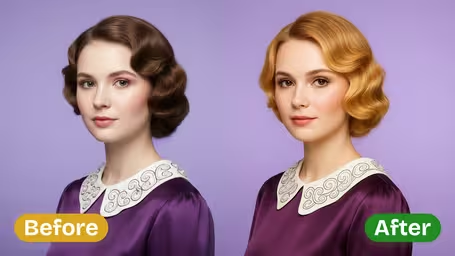

AI Bangs Filter Features
Discover how you would look with different bangs styles using Dreamega's AI Bangs Filter. Try on bangs online for free, see instant previews, and explore new looks without cutting your hair.
- 01
Instant Bangs Preview
Upload your photo and instantly see how you would look with various bangs styles. The AI bangs filter provides an accurate visual so you can make styling decisions confidently.
- 02
Fun Style Randomizer
Try bangs for fun with randomly generated styles, from Korean wispy bangs to curtain bangs. Each preview is different, letting you see new options every time without committing to a haircut.
- 03
Easy Social Sharing
Share your new bangs look directly to social media from the preview page. Let friends see your latest style experiments and get their opinions on what suits you best.

How to Use the AI Bangs Filter on Your Photo
Upload a face photo, describe the fringe and overall hairstyle you want, and get one preview image per run.
- 01
Upload a photo with your forehead showing
Use a JPG or PNG where you face the camera and your eyebrows are visible. If you already have a fringe, pin it back so the AI can see your hairline.
Daylight from a window gives more natural hair color than flash.
- 02
Describe the bangs and pick a model
Type the bangs you want (curtain, blunt, wispy, side-swept) and the overall hairstyle, then choose GPT Image 2.5 (8 credits) or Nano Banana 2.1 (4 credits) and generate.
Set Hairstyle Type to your current length if you only want to test the fringe.
- 03
Compare it with your original photo
Check where the fringe ends relative to your eyebrows and how much forehead it hides. Download the versions you like and show them to your stylist.
Run two or three styles on the same photo so the comparison is fair.



When people use the AI Bangs Filter
Bangs are the haircut people most often regret, mostly because they take months to grow out. Most people here want to see a fringe on their own face before they sit in the salon chair, or to settle a choice between two styles. Stylists and content creators use it too, to show options without cutting anything.
Before a salon appointment
Generate the cut you are considering and keep it on your phone, so the stylist sees the exact length and shape you mean instead of a celebrity photo.
Curtain or blunt?
Run the same photo with two or three bang styles and compare them side by side. How much forehead each one shows is easy to judge this way.
Deciding whether to grow them out
If you already have bangs, try a longer side-swept version to see whether a grown-out fringe still works on you.
Showing clients options
Hairdressers can run a client's photo with a couple of fringe ideas during a consultation, which makes the talk about length and density concrete.
AI Bangs Filter FAQ
Practical answers about the AI Bangs Filter: what to type in the style fields, which photos work, and what each run costs.
AI Pricing Plans
Flexible AI Pricing
Pay-as-you-go credits or subscription plans. No hidden fees, cancel anytime.
One Time supports crypto payment (BTC, USDT, ETH, 350+) · Monthly billing
Free-One Time
Try before you buy
- Up to 3 videos
- Up to 32 images
- Multi-Model Support
- Text to Video
- Image to Video
- Video to Video
Show more (+11)
- Consistent Character
- AI Animation Generator
- Templates & Effects
- AI Video Enhancers
- Interactive Community
- Faster Generation Speed
- No-watermark Outputs
- More Camera Movement
- Private Video Visibility
- Copy Protection
- Priority Support
Pro-1 Month
PopularElevate your AI experience
- Up to 80 videos
- Up to 800 images
- 3 tasks(Parallel Tasks)
- Multi-Model Support
- Text to Video
- Image to Video
Show more (+12)
- Video to Video
- Consistent Character
- AI Animation Generator
- Templates & Effects
- AI Video Enhancers
- Interactive Community
- Faster Generation Speed
- No-watermark Outputs
- More Camera Movement
- Private Video Visibility
- Copy Protection
- Priority Support
Lite-1 Month
Start your AI journey
- Up to 30 videos
- Up to 300 images
- 3 tasks(Parallel Tasks)
- Multi-Model Support
- Text to Video
- Image to Video
Show more (+12)
- Video to Video
- Consistent Character
- AI Animation Generator
- Templates & Effects
- AI Video Enhancers
- Interactive Community
- Faster Generation Speed
- No-watermark Outputs
- More Camera Movement
- Private Video Visibility
- Copy Protection
- Priority Support
- Card
- Crypto accepted (BTC, USDT, ETH, 350+)