


🎨 Seedream 5.0 Pro — ByteDance's flagship image model: up to 2K, best-in-class typography & multi-reference editing!


AI Braids Filter
AI Braids Filter - Transform your hair into beautiful braided hairstyles with intricate braiding craftsmanship and diverse styling options.
Example Gallery


Recommended Templates


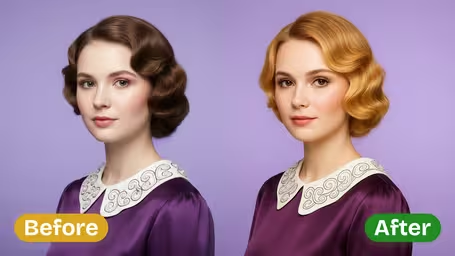
AI Braids Filter Features
Discover how Dreamega’s AI Braids Filter can transform your photo into a stunning braided hairstyle with vibrant, cultural flair in just a few clicks.
- 01
Vibrant Braided Style Instantly
Transform your hair in any photo into vibrant braids that celebrate cultural beauty. The AI filter adds realistic textures and natural flow for a stunning look ready to share.
- 02
Effortless Style Transformation
Simply upload your photo and let the AI create a beautiful braided style—no hairstyling skills needed. Ideal for quick, shareable images or keepsakes that stand out.
- 03
Authentic Braid Craftsmanship
Dreamega’s AI preserves your facial features while weaving intricate, lifelike braid patterns into your photo, blending seamlessly for a polished, cultural style.


How to Use the AI Braids Filter on Your Photo
Upload a photo, choose a braid style and how detailed it should be, and see braids on your own hair with your face and outfit unchanged.
- 01
Upload a photo that shows your hair
Use a clear JPG or PNG with your hair loose and your head turned slightly, so the AI has room to show the braid. A straight-on selfie hides most braids behind your head.
Pull your hair forward over your shoulders so its length is visible.
- 02
Pick a braid style, complexity and model
Choose Classic, French, Dutch, Fishtail or Multiple Braids, or type a style like box braids or cornrows. Set complexity to Simple, Intermediate or Intricate, then pick GPT Image 2.5 (8 credits) or Nano Banana 2.1 (4 credits).
Start with Intermediate; save Intricate for long hair or event looks.
- 03
Save and show your braider
Download the version you like and use it as a reference at the salon, or as a guide when braiding at home.
Run the same style at two complexity levels to see how much detail you want.


When people use the AI Braids Filter
Braided styles can take hours in the chair and cost real money, so people like to see the style on their own head first. Others use it to plan a wedding or festival look, to pick between French and Dutch braids before practicing, or to bring a clear reference to their braider.
Before a protective style appointment
Check box braids, cornrows or knotless braids at the length you want before booking several hours at the salon.
Wedding, prom and festival looks
Try an intricate crown or fishtail braid with your real outfit in the photo to see the whole look.
French or Dutch?
Run both on the same photo before you practice. Dutch braids stand out more, while French braids lie flatter and look softer.
A reference for your braider
Bring a picture of the exact style on your own hair so the stylist knows the size, length and placement you want.
AI Braids Photo Filter FAQ
Answers about the AI Braids Filter: braid styles, box braids and cornrows, complexity levels, short hair and credits.
AI Pricing Plans
Flexible AI Pricing
Pay-as-you-go credits or subscription plans. No hidden fees, cancel anytime.
One Time supports crypto payment (BTC, USDT, ETH, 350+) · Monthly billing
Free-One Time
Try before you buy
- Up to 3 videos
- Up to 32 images
- Multi-Model Support
- Text to Video
- Image to Video
- Video to Video
Show more (+11)
- Consistent Character
- AI Animation Generator
- Templates & Effects
- AI Video Enhancers
- Interactive Community
- Faster Generation Speed
- No-watermark Outputs
- More Camera Movement
- Private Video Visibility
- Copy Protection
- Priority Support
Pro-1 Month
PopularElevate your AI experience
- Up to 80 videos
- Up to 800 images
- 3 tasks(Parallel Tasks)
- Multi-Model Support
- Text to Video
- Image to Video
Show more (+12)
- Video to Video
- Consistent Character
- AI Animation Generator
- Templates & Effects
- AI Video Enhancers
- Interactive Community
- Faster Generation Speed
- No-watermark Outputs
- More Camera Movement
- Private Video Visibility
- Copy Protection
- Priority Support
Lite-1 Month
Start your AI journey
- Up to 30 videos
- Up to 300 images
- 3 tasks(Parallel Tasks)
- Multi-Model Support
- Text to Video
- Image to Video
Show more (+12)
- Video to Video
- Consistent Character
- AI Animation Generator
- Templates & Effects
- AI Video Enhancers
- Interactive Community
- Faster Generation Speed
- No-watermark Outputs
- More Camera Movement
- Private Video Visibility
- Copy Protection
- Priority Support
- Card
- Crypto accepted (BTC, USDT, ETH, 350+)