


🎨 Seedream 5.0 Pro — ByteDance's flagship image model: up to 2K, best-in-class typography & multi-reference editing!


AI Manga Filter: Turn Your Photo into a Full-Color Manga Illustration
Upload a photo and the AI redraws it as a vivid manga illustration with clean ink lines, cel-shaded color, large expressive eyes and dramatic lighting, like a manga cover. The original composition and background stay in place.
Example Gallery


Recommended Templates


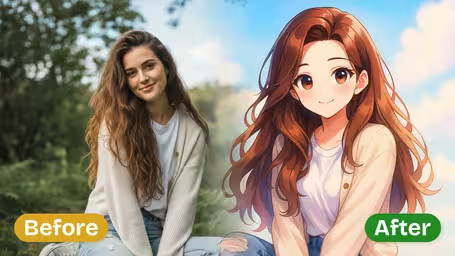

What the AI manga filter does
The filter redraws your whole photo in a full-color Japanese manga style aimed at the look of a manga cover. The drawing style changes completely, while the layout of the scene, the people in it and the background stay where they were.
- 01
Ink linework and cel shading
Clean ink-style lines, sharp black contours and high-contrast cel-shaded color, with dramatic lighting and boosted color vibrancy.
- 02
Manga faces
Large expressive anime eyes, slightly exaggerated facial proportions and smooth skin rendering give faces the classic manga look.
- 03
Composition and background kept
The filter keeps the original composition and background context, so a café, a beach or a city street is redrawn rather than replaced.
- 04
Two models, 4 or 8 credits
GPT Image 2.5 is the default at 8 credits and returns a square image. Nano Banana 2.1 costs 4 credits and keeps the shape of your original photo.
How to Turn a Photo into Manga Art
Three steps from photo to full-color manga illustration.
- 01
Upload your photo
Upload one JPG or PNG: a portrait, a couple shot, a pet or a street scene.
For portraits, use a clear, well-lit photo where the face takes up a good part of the frame. Small faces get less manga detail.
- 02
Pick the model that fits your use
GPT Image 2.5 (8 credits) returns a square image, good for avatars. Nano Banana 2.1 (4 credits) keeps your photo's shape, good for covers and wallpapers.
Planning a mock manga cover? Start from a vertical photo and use Nano Banana 2.1 so the portrait format is kept.
- 03
Generate and download
Your manga illustration is ready in a few moments. Download it to use as an avatar, a print or the base of a cover design.
Want a black-and-white printed look instead? Run the same photo through the Black & White Manga template.


When people use the AI manga filter
Most people use it on their own selfies for a manga-style profile picture. Couples turn date photos into a single manga panel, friends make mock manga covers as birthday jokes, and travelers redraw trip photos as manga scenes for their feed.
Manga profile pictures
A selfie redrawn with big manga eyes and cel shading makes a recognizable avatar for Instagram, LINE, Discord or a gaming profile.
Couple and friend photos
Because the composition is kept, a photo of two or three people becomes one manga scene, a popular anniversary or friendship post.
Mock manga covers as gifts
Add a title and volume number to the result to make a fake manga cover starring a friend, printed as a card or small poster.
Travel photos as manga scenes
Street corners, cafés and beaches keep their layout but get the manga treatment, which makes a fun series for a travel post.
AI Manga Filter FAQ
What the filter changes, how it differs from black-and-white manga, and how to get a result that still looks like you.
AI Pricing Plans
Flexible AI Pricing
Pay-as-you-go credits or subscription plans. No hidden fees, cancel anytime.
One Time supports crypto payment (BTC, USDT, ETH, 350+) · Monthly billing
Free-One Time
Try before you buy
- Up to 3 videos
- Up to 32 images
- Multi-Model Support
- Text to Video
- Image to Video
- Video to Video
Show more (+11)
- Consistent Character
- AI Animation Generator
- Templates & Effects
- AI Video Enhancers
- Interactive Community
- Faster Generation Speed
- No-watermark Outputs
- More Camera Movement
- Private Video Visibility
- Copy Protection
- Priority Support
Pro-1 Month
PopularElevate your AI experience
- Up to 80 videos
- Up to 800 images
- 3 tasks(Parallel Tasks)
- Multi-Model Support
- Text to Video
- Image to Video
Show more (+12)
- Video to Video
- Consistent Character
- AI Animation Generator
- Templates & Effects
- AI Video Enhancers
- Interactive Community
- Faster Generation Speed
- No-watermark Outputs
- More Camera Movement
- Private Video Visibility
- Copy Protection
- Priority Support
Lite-1 Month
Start your AI journey
- Up to 30 videos
- Up to 300 images
- 3 tasks(Parallel Tasks)
- Multi-Model Support
- Text to Video
- Image to Video
Show more (+12)
- Video to Video
- Consistent Character
- AI Animation Generator
- Templates & Effects
- AI Video Enhancers
- Interactive Community
- Faster Generation Speed
- No-watermark Outputs
- More Camera Movement
- Private Video Visibility
- Copy Protection
- Priority Support
- Card
- Crypto accepted (BTC, USDT, ETH, 350+)