


🎨 Seedream 5.0 Pro — ByteDance's flagship image model: up to 2K, best-in-class typography & multi-reference editing!


Comic Book Filter
Comic Book Filter - Transform your photos into vibrant comic book style illustrations with bold outlines, halftone textures, and dramatic lighting.
Example Gallery


Recommended Templates


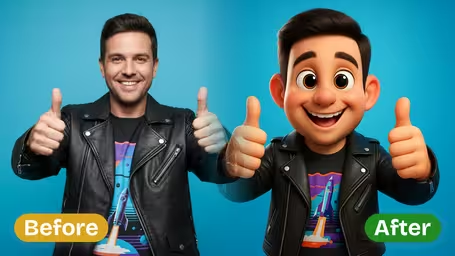


AI Comic Book Filter Features
Enhance your photos with Dreamega’s AI comic book filter, adding vibrant colors, bold outlines, and dynamic shading for an authentic graphic novel effect in just one click.
- 01
Transform Photos into Comic Art
Use the AI comic book filter to instantly turn your uploaded photo into a vivid comic-style illustration with bold outlines, dramatic shading, and energetic colors for a striking visual impact.
- 02
Lifelike Comic Book Effects
Achieve immersive comic book visuals that capture the hand-drawn essence of classic graphic novels, with precise detailing and dynamic tones applied to your original photos.
- 03
One-Click Comic Filter Application
Upload your photo, click once, and let Dreamega’s AI apply the full comic book effect automatically—no manual settings or artistic skills required.


How to Use the AI Comic Book Filter on Your Photo
Upload one photo, pick a comic style and an AI model, and download a comic-panel version with ink outlines and halftone shading.
- 01
Upload a JPG or PNG photo
Choose one photo from your phone or computer. The uploader accepts JPG and PNG, so convert HEIC or WebP files first.
A sharp photo with even light and a clear subject gives cleaner ink lines than a dim or blurry one.
- 02
Choose a comic style and model
Pick Classic, Modern, Superhero or Noir, or type your own style. GPT Image 2.5 costs 8 credits and returns a square image; Nano Banana 2.1 costs 4 credits.
Noir looks best on photos with strong side light and a simple background.
- 03
Generate and download
Click generate, wait for the comic version to appear, then download it or post it as your new profile picture.
If the outlines look muddy or the face drifts, try the other model before re-cropping the photo.



When people use the Comic Book Filter
Most people use it to get a hand-drawn comic look without commissioning an artist: a new profile picture, a birthday card for a comics fan, or art for a small project. It handles portraits, pets and everyday scenes, so travel and party photos get the treatment too.
Profile pictures
A Classic or Modern portrait makes an avatar for Discord, X or a gaming profile that is still easy to recognise at thumbnail size.
Gifts and cards
Turn a friend's photo into a Superhero-style panel and print it as a birthday card or a mock comic cover.
Pet portraits
Dogs and cats come out with thick outlines and dotted shading, which works well on mugs, stickers and small prints.
Zines and posters
Small creators run several photos through Noir or Classic to get a consistent comic look for zine pages, event posters and thumbnails.
AI Comic Book Filter FAQ
Questions about the Comic Book Filter's four styles, model credits, which photos work, and how you can use the results.
AI Pricing Plans
Flexible AI Pricing
Pay-as-you-go credits or subscription plans. No hidden fees, cancel anytime.
One Time supports crypto payment (BTC, USDT, ETH, 350+) · Monthly billing
Free-One Time
Try before you buy
- Up to 3 videos
- Up to 32 images
- Multi-Model Support
- Text to Video
- Image to Video
- Video to Video
Show more (+11)
- Consistent Character
- AI Animation Generator
- Templates & Effects
- AI Video Enhancers
- Interactive Community
- Faster Generation Speed
- No-watermark Outputs
- More Camera Movement
- Private Video Visibility
- Copy Protection
- Priority Support
Pro-1 Month
PopularElevate your AI experience
- Up to 80 videos
- Up to 800 images
- 3 tasks(Parallel Tasks)
- Multi-Model Support
- Text to Video
- Image to Video
Show more (+12)
- Video to Video
- Consistent Character
- AI Animation Generator
- Templates & Effects
- AI Video Enhancers
- Interactive Community
- Faster Generation Speed
- No-watermark Outputs
- More Camera Movement
- Private Video Visibility
- Copy Protection
- Priority Support
Lite-1 Month
Start your AI journey
- Up to 30 videos
- Up to 300 images
- 3 tasks(Parallel Tasks)
- Multi-Model Support
- Text to Video
- Image to Video
Show more (+12)
- Video to Video
- Consistent Character
- AI Animation Generator
- Templates & Effects
- AI Video Enhancers
- Interactive Community
- Faster Generation Speed
- No-watermark Outputs
- More Camera Movement
- Private Video Visibility
- Copy Protection
- Priority Support
- Card
- Crypto accepted (BTC, USDT, ETH, 350+)