


🎨 Seedream 5.0 Pro — ByteDance's flagship image model: up to 2K, best-in-class typography & multi-reference editing!


AI Cartoon Sticker
AI Cartoon Sticker Generator - Transform your photos into adorable cartoon sticker style with chibi-like proportions, flat vibrant colors, and cute simplified features.
Example Gallery


Recommended Templates



AI Cartoon Sticker Generator Features
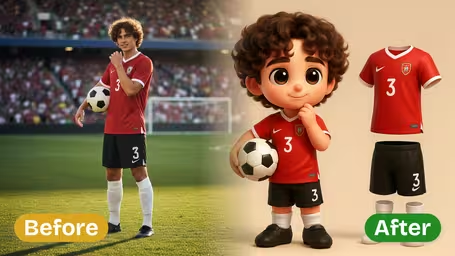
Discover how Dreamega’s AI Cartoon Sticker Generator transforms your photo into a playful chibi cartoon sticker over realistic scenes, capturing unique details with vibrant, hand-drawn effects.
- 01
Chibi Sticker Pop on Real Scenes
Dreamega’s AI Cartoon Sticker Generator replaces the main subject in your photo with a lively Q-version cartoon sticker. The playful design stands out against the real background, creating a striking image effect that blends fantasy and reality.
- 02
Cute Chibi Matches Your Unique Look
The generator captures your natural pose, clothing style, and body shape in an adorable big-headed chibi image. With dot eyes, a smiling arc, and blush accents, this sticker filter makes your cartoon effect personal and endearing.
- 03
Bold Sticker with Playful Hand-Drawn Flair
Enjoy a vibrant cartoon photo effect with flat colors, rough black outlines, and a thick white die-cut border. This playful sticker style ensures your image stands out with artistic charm while keeping the authentic scene intact.

How to Create a Playful Chibi Cartoon Sticker Photo Effect with Dreamega AI Generator
Turn one JPG or PNG photo into a chibi cartoon sticker by choosing an AI model, a chibi intensity and a border style.
- 01
Upload One Clear Photo
Upload a JPG or PNG with one person or one pet. Waist-up or full-body shots give the model a pose and an outfit to work with; a tight face crop often ends up as a floating head.
Even light and a clearly visible hairstyle and outfit matter more than resolution, because the face itself gets simplified to dot eyes.
- 02
Pick the Model, Chibi Intensity and Border
GPT Image 2.5 (8 credits) is selected by default; Nano Banana 2.1 (4 credits) is the cheaper option. Set Chibi Style Intensity to Light, Medium or Strong, then choose Thick White, Thin White, Colorful or No Border.
For printing or chat stickers, Thick White Border is the safest pick because it separates the character from whatever it is placed on.
- 03
Generate and Download
Click generate and download the sticker when it is done. The original background is not kept: you get the character on its own against a plain background.
No Border is not a true transparent PNG. Put it through a background remover if you need a clean cut-out.



What people make with the AI Cartoon Sticker
Most people use it to get a sticker of themselves, a partner or a pet without drawing anything. The result is a single character with a clean outline, which is the shape chat apps, sticker printers and cutting machines expect. Running the same photo at Light, Medium and Strong gives you a small matching set.
Personal chat stickers
Make three or four versions of yourself, then use a sticker-maker app to add them to WhatsApp or Telegram as your own pack.
Laptop and water-bottle stickers
Print the Thick White Border version on vinyl and cut along the white edge, and it looks like a die-cut sticker from a shop.
Pet stickers
A close-up of a cat or dog becomes a chibi sticker for a phone case, a treat jar or a thank-you card for the pet sitter.
Party favors and gift labels
Chibi stickers of the birthday kid or the couple go on goodie bags, wedding favor boxes and gift tags.
AI Cartoon Sticker Generator FAQ
What people ask before turning a photo into a chibi cartoon sticker: models and credits, border options, transparency, pets and printing.
AI Pricing Plans
Flexible AI Pricing
Pay-as-you-go credits or subscription plans. No hidden fees, cancel anytime.
One Time supports crypto payment (BTC, USDT, ETH, 350+) · Monthly billing
Free-One Time
Try before you buy
- Up to 3 videos
- Up to 32 images
- Multi-Model Support
- Text to Video
- Image to Video
- Video to Video
Show more (+11)
- Consistent Character
- AI Animation Generator
- Templates & Effects
- AI Video Enhancers
- Interactive Community
- Faster Generation Speed
- No-watermark Outputs
- More Camera Movement
- Private Video Visibility
- Copy Protection
- Priority Support
Pro-1 Month
PopularElevate your AI experience
- Up to 80 videos
- Up to 800 images
- 3 tasks(Parallel Tasks)
- Multi-Model Support
- Text to Video
- Image to Video
Show more (+12)
- Video to Video
- Consistent Character
- AI Animation Generator
- Templates & Effects
- AI Video Enhancers
- Interactive Community
- Faster Generation Speed
- No-watermark Outputs
- More Camera Movement
- Private Video Visibility
- Copy Protection
- Priority Support
Lite-1 Month
Start your AI journey
- Up to 30 videos
- Up to 300 images
- 3 tasks(Parallel Tasks)
- Multi-Model Support
- Text to Video
- Image to Video
Show more (+12)
- Video to Video
- Consistent Character
- AI Animation Generator
- Templates & Effects
- AI Video Enhancers
- Interactive Community
- Faster Generation Speed
- No-watermark Outputs
- More Camera Movement
- Private Video Visibility
- Copy Protection
- Priority Support
- Card
- Crypto accepted (BTC, USDT, ETH, 350+)