


🎨 Seedream 5.0 Pro — ByteDance's flagship image model: up to 2K, best-in-class typography & multi-reference editing!


JoJo Filter: Turn Your Photo into a JoJo-Style Character with an Iconic Pose
Upload a photo and the AI redraws you with bold inked lines, sharp features, heavy cel shading and dramatic colored lighting. Choose one of four art styles and decide whether to keep your pose or strike an iconic one.
Example Gallery


Recommended Templates


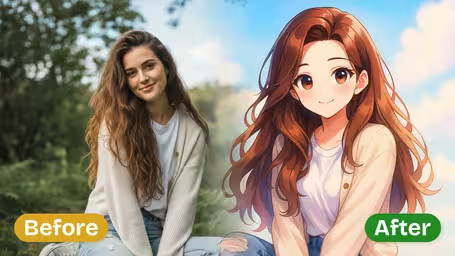


What the JoJo filter does to your photo
Every result starts from the same look: bold inked line art, exaggerated anime proportions, sharp facial features, heavy cel shading and dramatic colored lighting. On top of that you choose an art style and how far the pose should go, then pick one of two models.
- 01
The bold, inked look
Strong outlines, stylized shading patterns, vivid contrasting colors and colored light across the face give the comic-page intensity the style is known for.
- 02
Four art styles
Classic JoJo Style, Dramatic Bizarre, High Fashion JoJo and Muscular Intense shift the result from traditional cel shading to fashion-shoot elegance or exaggerated muscle.
- 03
Three pose levels
Subtle Pose keeps how you stood in the photo. Dynamic Action adds movement, and Iconic JoJo Pose adds the distinctive hand gestures and dramatic stance.
- 04
Two models, 4 or 8 credits
GPT Image 2.5 is the default at 8 credits and returns a square image. Nano Banana 2.1 costs 4 credits and keeps the shape of your original photo.


How to Use the JoJo Filter
Three steps from an ordinary photo to a JoJo-style character.
- 01
Upload a photo of one person
Upload one JPG or PNG. A waist-up or full-body shot works better than a close-up selfie.
Keep your hands in the frame. The pose options use arms and hands, and they look stiff when those are cut off.
- 02
Choose an art style and pose level
Pick Classic JoJo Style, Dramatic Bizarre, High Fashion JoJo or Muscular Intense, then Subtle Pose, Dynamic Action or Iconic JoJo Pose.
For a profile picture that still looks like you, try Classic JoJo Style with Subtle Pose. For a meme, go Iconic JoJo Pose.
- 03
Pick a model and generate
GPT Image 2.5 (8 credits, square image) or Nano Banana 2.1 (4 credits, keeps your photo's shape). Download your character.
Explore style and pose combinations with Nano Banana 2.1, then make the final version with GPT Image 2.5.


When people use the JoJo filter
Most users are fans who want to see themselves drawn in the style: a new profile picture, a Discord avatar, an over-the-top pose to post in a group chat. Cosplayers use it to preview a look, and friends often run a whole group's photos for a matching set.
Profile pictures and avatars
A Classic JoJo Style portrait with Subtle Pose makes a recognizable, dramatic avatar for Discord, X or a gaming profile.
Pose memes
Iconic JoJo Pose turns an everyday photo, like standing at a bus stop, into an overdramatic stance that works well as a reaction image.
Cosplay planning
Cosplayers run a costume test photo through High Fashion JoJo or Muscular Intense to see how a pose and color scheme might read before a convention.
Matching sets for friend groups
Run each friend's photo with the same art style to get a consistent set of characters for a group chat banner or a personal birthday card.
JoJo Filter FAQ
How the art styles and pose levels work, which photos give the best result, and what this fan-made tool is and is not.
AI Pricing Plans
Flexible AI Pricing
Pay-as-you-go credits or subscription plans. No hidden fees, cancel anytime.
One Time supports crypto payment (BTC, USDT, ETH, 350+) · Monthly billing
Free-One Time
Try before you buy
- Up to 3 videos
- Up to 32 images
- Multi-Model Support
- Text to Video
- Image to Video
- Video to Video
Show more (+11)
- Consistent Character
- AI Animation Generator
- Templates & Effects
- AI Video Enhancers
- Interactive Community
- Faster Generation Speed
- No-watermark Outputs
- More Camera Movement
- Private Video Visibility
- Copy Protection
- Priority Support
Pro-1 Month
PopularElevate your AI experience
- Up to 80 videos
- Up to 800 images
- 3 tasks(Parallel Tasks)
- Multi-Model Support
- Text to Video
- Image to Video
Show more (+12)
- Video to Video
- Consistent Character
- AI Animation Generator
- Templates & Effects
- AI Video Enhancers
- Interactive Community
- Faster Generation Speed
- No-watermark Outputs
- More Camera Movement
- Private Video Visibility
- Copy Protection
- Priority Support
Lite-1 Month
Start your AI journey
- Up to 30 videos
- Up to 300 images
- 3 tasks(Parallel Tasks)
- Multi-Model Support
- Text to Video
- Image to Video
Show more (+12)
- Video to Video
- Consistent Character
- AI Animation Generator
- Templates & Effects
- AI Video Enhancers
- Interactive Community
- Faster Generation Speed
- No-watermark Outputs
- More Camera Movement
- Private Video Visibility
- Copy Protection
- Priority Support
- Card
- Crypto accepted (BTC, USDT, ETH, 350+)