


🎨 Seedream 5.0 Pro — ByteDance's flagship image model: up to 2K, best-in-class typography & multi-reference editing!


AI Baby Filter
AI Baby Filter - Transform the subject into a hyper-realistic baby version while preserving recognizable adult features such as hairstyle, clothing, and setting. The baby should have large round eyes, smooth porcelain skin, plump cheeks, and a gentle innocent expression.
Example Gallery
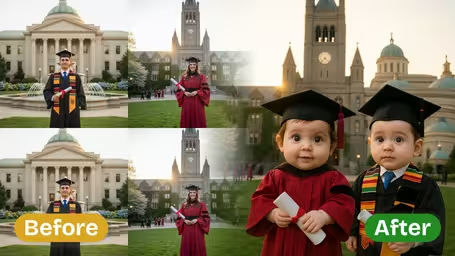


Recommended Templates

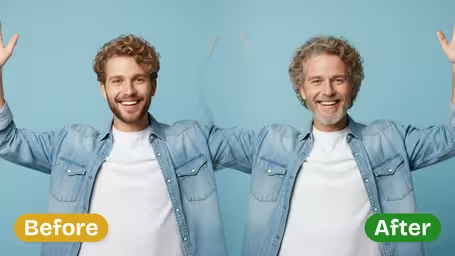


AI Baby Filter Features
Discover how Dreamega’s AI Baby Filter can instantly turn any photo of yourself or others into an adorable, realistic baby face version with just one click.
- 01
Turn Yourself into an Adorable Baby Face
Curious to see yourself as a baby? Dreamega’s AI Baby Filter lets you transform any photo into a charming baby face version in seconds, capturing your unique features in the cutest way possible.
- 02
Realistic Baby Face Transformation
Experience lifelike results with advanced AI that recreates your facial structure and expressions into a realistic baby face, maintaining recognizable traits for a true-to-you adorable version.
- 03
Share Across Social Media
Easily share your transformed baby face photo on social media to surprise friends, add a playful touch to your feed, and boost engagement with irresistible, share-worthy content.

How to Transform Your Photo into an Adorable Baby Face Version with Dreamega's Realistic Filter
Upload one adult photo, choose a baby age and an expression, and get a baby version of the same person in the same outfit and setting.
- 01
Upload a clear photo of one person
Use a JPG or PNG where the face looks toward the camera and is well lit. Selfies, ID-style portraits and wedding photos all work, and the outfit and background will carry over into the baby version.
Crop group photos down to one person first. The filter is built for a single face.
- 02
Choose the age, expression and model
Pick Newborn, Infant or Toddler, then Innocent & Sweet, Playful & Curious or Sleepy & Peaceful. Choose GPT Image 2.5 (8 credits) or Nano Banana 2.1 (4 credits) and generate.
Sleepy & Peaceful suits Newborn best; Playful & Curious looks most natural on Toddler.
- 03
Download and compare
Save the result and put it next to the original photo or a real baby picture of the same person. Running the same photo at a different age is the easiest way to make a small series.
Ask before you upload or post someone else's photo, even for a surprise birthday post.



When people use the AI Baby Filter
Most people try it on themselves first, then on a partner, a parent or a coworker. The fun part is seeing an adult's real hair, outfit and surroundings on a baby, which feels more personal than a generic baby face. It also makes an easy, lighthearted post for birthdays and anniversaries.
Then-and-now guessing games
Post the AI baby version next to a real childhood photo and let friends guess which one is real.
Birthday and anniversary cards
Turn the birthday person into a baby in their usual outfit and use it as a card cover or the first slide of a slideshow.
Team chats and farewell cards
Baby versions of coworkers in their work clothes make a quick icebreaker. Get everyone's OK before you share them.
Profile pictures and stickers
A Toddler result with the Playful & Curious expression is still recognizable enough to use as an avatar or chat sticker.
AI Baby Face Filter FAQ
Questions people ask before turning an adult photo into a baby version: the three ages, expressions, models, group photos and pets.
AI Pricing Plans
Flexible AI Pricing
Pay-as-you-go credits or subscription plans. No hidden fees, cancel anytime.
One Time supports crypto payment (BTC, USDT, ETH, 350+) · Monthly billing
Free-One Time
Try before you buy
- Up to 3 videos
- Up to 32 images
- Multi-Model Support
- Text to Video
- Image to Video
- Video to Video
Show more (+11)
- Consistent Character
- AI Animation Generator
- Templates & Effects
- AI Video Enhancers
- Interactive Community
- Faster Generation Speed
- No-watermark Outputs
- More Camera Movement
- Private Video Visibility
- Copy Protection
- Priority Support
Pro-1 Month
PopularElevate your AI experience
- Up to 80 videos
- Up to 800 images
- 3 tasks(Parallel Tasks)
- Multi-Model Support
- Text to Video
- Image to Video
Show more (+12)
- Video to Video
- Consistent Character
- AI Animation Generator
- Templates & Effects
- AI Video Enhancers
- Interactive Community
- Faster Generation Speed
- No-watermark Outputs
- More Camera Movement
- Private Video Visibility
- Copy Protection
- Priority Support
Lite-1 Month
Start your AI journey
- Up to 30 videos
- Up to 300 images
- 3 tasks(Parallel Tasks)
- Multi-Model Support
- Text to Video
- Image to Video
Show more (+12)
- Video to Video
- Consistent Character
- AI Animation Generator
- Templates & Effects
- AI Video Enhancers
- Interactive Community
- Faster Generation Speed
- No-watermark Outputs
- More Camera Movement
- Private Video Visibility
- Copy Protection
- Priority Support
- Card
- Crypto accepted (BTC, USDT, ETH, 350+)