


🎨 Seedream 5.0 Pro — ByteDance's flagship image model: up to 2K, best-in-class typography & multi-reference editing!


AI Skinny Filter: See What You Might Look Like Slimmer
Upload a photo of yourself and the AI redraws your body a little slimmer and more toned, keeping your face, pose and outfit. It is a playful simulation for curiosity and fun, not a weight-loss prediction.
Example Gallery


Recommended Templates

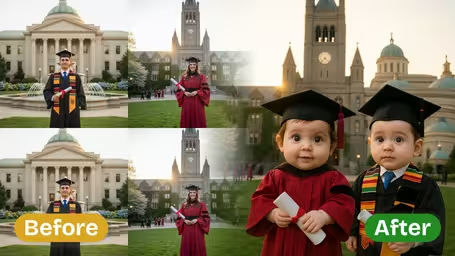
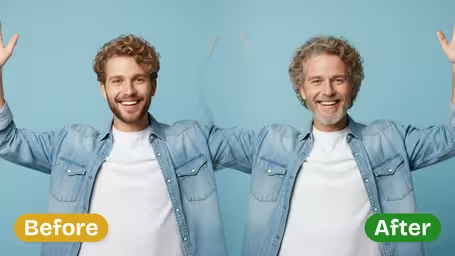


How the AI skinny filter works
The filter reshapes the body in your photo rather than pasting on a new one. It trims the waist, arms and legs slightly, adds a bit of muscle tone and keeps your proportions believable, so the result reads as a photo of you on a different day, not a cartoon. Everything else in the picture stays as close to the original as possible.
- 01
Subtle, natural slimming
The AI is instructed to aim for natural proportions and gentle contouring. Instead of stretching or shrinking the whole image, it slims the body outline and adds a little tone, so clothes still hang realistically and you don't get the warped walls and bent door frames of old liquify filters.
- 02
Your face, pose and outfit stay
Facial features are kept so the person remains recognizable. Pose, hairstyle, clothing and the general background are carried over from your photo. Small differences in lighting or background detail can appear, because the image is redrawn rather than warped pixel by pixel.
- 03
One model, one fixed price
Every image runs on GPT Image 2.5 and costs 8 credits. There are no settings to adjust: upload a photo and generate. That keeps the effect consistent, and if you want a different take, simply run the same photo again.
- 04
Square output for social posts
The result comes back as a square image, which fits Instagram, Facebook and most chat apps without further cropping. Tall full-body photos are reframed to fit the square, so leave space above your head and below your feet when you take the picture.


How to use the AI skinny filter
There is only one setting to worry about: the photo you upload.
- 01
Upload a full-body or half-body photo
Add one JPG or PNG photo with a single person standing, ideally in fitted clothes and even light.
Stand straight and face the camera. Side angles and sitting poses make the body outline harder to read and the result less natural.
- 02
Generate the slimmer version
Click generate. The template uses GPT Image 2.5 and costs 8 credits per image; there is no model or strength to choose.
Leave space around yourself in the frame. The output is square, and a tightly cropped photo can lose your feet or the top of your head.
- 03
Compare, download and share responsibly
Put the result next to your original, download the version you like, and share it as an edit rather than a real photo.
If the change looks too strong or too weak, run the same photo again. Each generation comes out a little different.


When people use the skinny filter
Most people try it out of curiosity: what would I look like a bit slimmer? Others use the picture as a light-hearted motivation image, a joke between friends who agreed to it, or a quick visual for a character or costume idea. It works best when everyone involved knows it is an edit.
Satisfying a what-if
Upload a recent photo and see a slimmer take on yourself in seconds, without touching a photo editor.
A motivation picture
Some people keep the result on a vision board as a fun nudge, knowing their real result will look different.
Laughs with friends
Friends run each other's photos through the filter for a group-chat comparison, with everyone in on the joke.
Character and costume ideas
Writers and cosplayers use it to sketch how a slimmer version of a look or character might come across.
AI Skinny Filter FAQ
Straight answers on what the filter does, how to get a natural result and how to use it responsibly.
AI Pricing Plans
Flexible AI Pricing
Pay-as-you-go credits or subscription plans. No hidden fees, cancel anytime.
One Time supports crypto payment (BTC, USDT, ETH, 350+) · Monthly billing
Free-One Time
Try before you buy
- Up to 3 videos
- Up to 32 images
- Multi-Model Support
- Text to Video
- Image to Video
- Video to Video
Show more (+11)
- Consistent Character
- AI Animation Generator
- Templates & Effects
- AI Video Enhancers
- Interactive Community
- Faster Generation Speed
- No-watermark Outputs
- More Camera Movement
- Private Video Visibility
- Copy Protection
- Priority Support
Pro-1 Month
PopularElevate your AI experience
- Up to 80 videos
- Up to 800 images
- 3 tasks(Parallel Tasks)
- Multi-Model Support
- Text to Video
- Image to Video
Show more (+12)
- Video to Video
- Consistent Character
- AI Animation Generator
- Templates & Effects
- AI Video Enhancers
- Interactive Community
- Faster Generation Speed
- No-watermark Outputs
- More Camera Movement
- Private Video Visibility
- Copy Protection
- Priority Support
Lite-1 Month
Start your AI journey
- Up to 30 videos
- Up to 300 images
- 3 tasks(Parallel Tasks)
- Multi-Model Support
- Text to Video
- Image to Video
Show more (+12)
- Video to Video
- Consistent Character
- AI Animation Generator
- Templates & Effects
- AI Video Enhancers
- Interactive Community
- Faster Generation Speed
- No-watermark Outputs
- More Camera Movement
- Private Video Visibility
- Copy Protection
- Priority Support
- Card
- Crypto accepted (BTC, USDT, ETH, 350+)