


🎨 Seedream 5.0 Pro — ByteDance's flagship image model: up to 2K, best-in-class typography & multi-reference editing!


AI Beard Filter
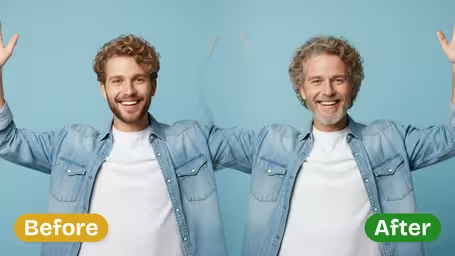
AI Beard Filter - Add a natural, well-groomed full beard to male subjects, making them appear more mature and confident while preserving original pose, expression, and clothing.
Example Gallery


Recommended Templates




AI Beard Filter Features
Discover how Dreamega’s AI beard filter can quickly transform any photo subject with a natural, realistic beard effect while preserving facial details and style.
- 01
Add a Realistic Beard in Minutes
Instantly give your photo subject a stunning new look by adding a lifelike beard. Our AI filter uses advanced facial recognition to blend the beard seamlessly for a natural finish.
- 02
Natural Texture and Skin Tone Match
The AI matches beard textures, shading, and colors with your skin tone and lighting for the most natural and realistic appearance possible.
- 03
Preserve Facial Expressions and Features
Smart mapping ensures your original facial expressions, contours, and skin details remain intact while perfectly aligning the beard with your jawline.


How to Add a Realistic Beard to Your Photo with Dreamega's AI Beard Filter
Upload one clear JPG or PNG portrait, pick GPT Image 2.5 or Nano Banana 2.1, and get the same photo back with a groomed full beard added while your face, pose, clothes and background stay as they were.
- 01
Upload a clear face photo
Upload one JPG or PNG where the face is easy to see, ideally looking at the camera or turned slightly to one side.
Crop out extra background so the face and jaw take up a good part of the frame. Hands, scarves or high collars over the chin get in the way.
- 02
Pick a model and generate
Choose GPT Image 2.5 (8 credits, square output) or Nano Banana 2.1 (4 credits, keeps your framing), then start the generation.
For a vertical selfie or a half-body shot, Nano Banana 2.1 avoids the square crop.
- 03
Compare and download
Check the jawline, the beard edges and the color against your original photo, then download the image.
If the beard looks off, try a cleaner photo or the other model instead of re-running the same one. Every run costs credits again.



When people use the AI Beard Filter
Most people use it to settle one question before committing to weeks of growth: would a full beard suit me? Others try it on a profile photo, show a partner or a dad what he'd look like bearded, or preview a character look for a costume or a role. It works from a single existing photo, so there is nothing to set up.
Deciding whether to grow one
See how a full beard changes your jawline and face shape before you stop shaving. Use a recent, well-lit photo so the comparison is fair.
A reference for the barber
Show the result to your barber as a rough target for the overall shape, then let them work out length and lines in person.
Profile photo comparison
Put the bearded and clean-shaven versions side by side to see which one looks more like the image you want on LinkedIn or a dating app.
Costumes, roles and group chats
Actors and cosplayers preview a bearded character, and friends trade bearded versions of each other's selfies. Ask before you use someone else's photo.
AI Beard Filter FAQ
Answers about beard style, beard color, which model to pick and how to get a natural-looking result from the AI Beard Filter.
AI Pricing Plans
Flexible AI Pricing
Pay-as-you-go credits or subscription plans. No hidden fees, cancel anytime.
One Time supports crypto payment (BTC, USDT, ETH, 350+) · Monthly billing
Free-One Time
Try before you buy
- Up to 3 videos
- Up to 32 images
- Multi-Model Support
- Text to Video
- Image to Video
- Video to Video
Show more (+11)
- Consistent Character
- AI Animation Generator
- Templates & Effects
- AI Video Enhancers
- Interactive Community
- Faster Generation Speed
- No-watermark Outputs
- More Camera Movement
- Private Video Visibility
- Copy Protection
- Priority Support
Pro-1 Month
PopularElevate your AI experience
- Up to 80 videos
- Up to 800 images
- 3 tasks(Parallel Tasks)
- Multi-Model Support
- Text to Video
- Image to Video
Show more (+12)
- Video to Video
- Consistent Character
- AI Animation Generator
- Templates & Effects
- AI Video Enhancers
- Interactive Community
- Faster Generation Speed
- No-watermark Outputs
- More Camera Movement
- Private Video Visibility
- Copy Protection
- Priority Support
Lite-1 Month
Start your AI journey
- Up to 30 videos
- Up to 300 images
- 3 tasks(Parallel Tasks)
- Multi-Model Support
- Text to Video
- Image to Video
Show more (+12)
- Video to Video
- Consistent Character
- AI Animation Generator
- Templates & Effects
- AI Video Enhancers
- Interactive Community
- Faster Generation Speed
- No-watermark Outputs
- More Camera Movement
- Private Video Visibility
- Copy Protection
- Priority Support
- Card
- Crypto accepted (BTC, USDT, ETH, 350+)